ePlugin Framework
ePlugin Framework adds declarative dependency and resource management to Godot editor plugins written in C#. A plugin describes what it needs once: NuGet packages, C# projects, autoloads, managed directories and other plugins. The framework installs all of it when the plugin is enabled and removes it again when the plugin is disabled.
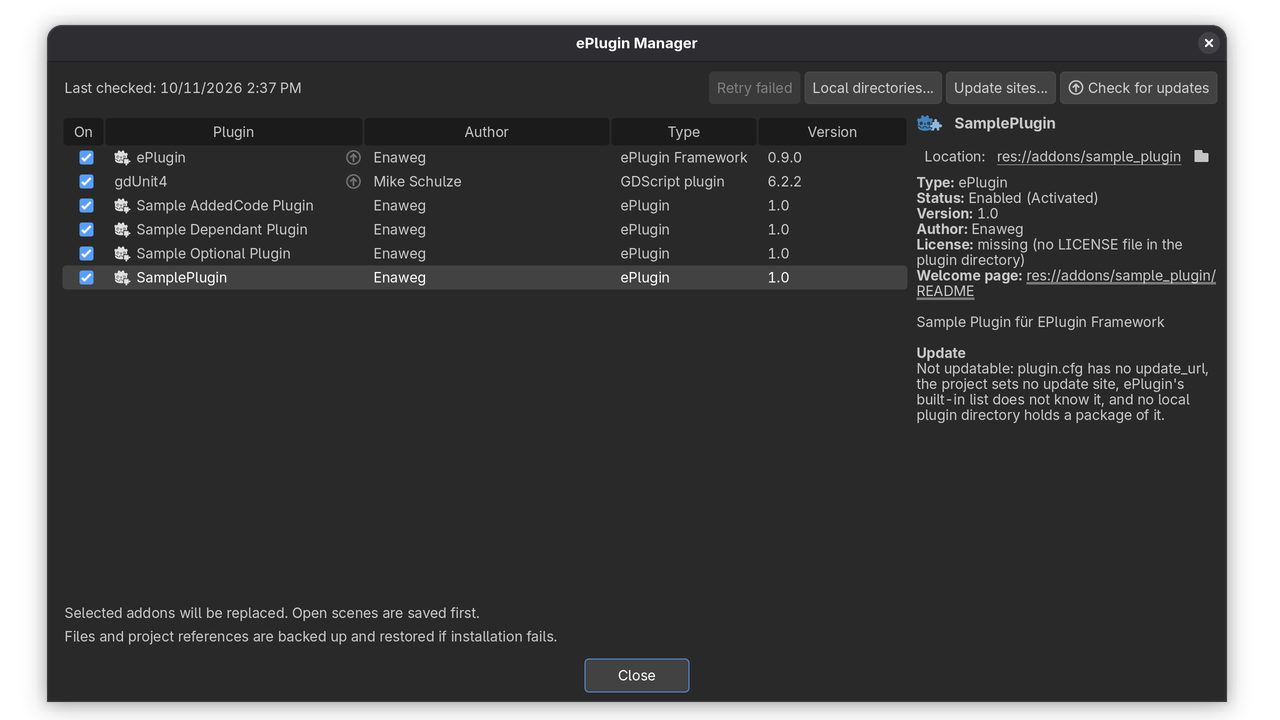
It also ships the ePlugin Manager, one editor window for every plugin in res://addons (ePlugins, plain C# and GDScript plugins). From there you can enable and disable plugins, check for updates, install, downgrade or reinstall versions, and retry failed work.
For plugin authors
- Declarative recipes: NuGet packages (including local and external sources, recorded in
nuget.configfor reproducible restores), C# projects and project references, autoloads, and managed directories. Recipes are checked when the plugin is enabled, with clear error messages. - Managed directories: code that needs those packages stays hidden until the plugin is enabled, so the project always compiles.
- Plugin dependencies: required C# or GDScript plugins are enabled first and checked against version constraints (exact or
>=). Plugins that depend on a disabled plugin are disabled too. - Optional dependencies: a nested recipe is applied only while another plugin is enabled, whichever of the two is enabled first.
- Licenses and welcome pages: declared in the recipe or
plugin.cfg. By default the plugin'sLICENSEand README are used. - Startup initializers: run code from managed directories once the framework is ready.
- Progress reporting: show your own long-running editor work in ePlugin's progress window with
EPlugin.Progress. - Updatable releases: an
update_urlinplugin.cfgpointing at GitHub or GitLab releases or a Git repository is all it takes.
For everyone on the project
- Updates for any add-on: from GitHub and GitLab releases (including self-hosted GitLab), Git tags and branches, or ZIP packages in local directories, including prerelease versions. A built-in list of popular Godot add-ons and per-project update sites let you update add-ons that have no
update_urlof their own. - Safe installation: updates are downloaded, validated and backed up as a batch, built, and rolled back on failure. Plugins that depend on each other are installed together and independent ones separately, so one failing update does not undo the others. Packages with warnings or a new update host are shown for review first.
- License acceptance: plugins can require their license to be accepted before they are enabled or updated, also when a GDScript plugin is enabled in Project Settings.
- Welcome pages: shown once per project after a plugin is installed.
- Progress window: an animated native window (Windows, macOS, and Linux with GTK 3) stays responsive while the editor is busy enabling, disabling, building, checking for updates, downloading or installing. Operations running at the same time and all open Godot editors share one window, and it stays open while an update restarts the editor.
- Recovery: failed work can be retried. An update interrupted by a crash resumes or rolls back on the next start, and a framework self-update that breaks the editor is restored automatically.
- Team-shared state: acknowledged versions, accepted licenses and shown welcome pages live in a project file you commit, so the whole team shares them. Turning plugins on or off doesn't change it, so it causes no merge conflicts.
Requirements
Godot 4.4 to 4.7 (.NET edition) and the .NET 8 SDK or later. CI-tested with Godot 4.7.2 and the .NET 8 and .NET 10 SDKs. Also tested with Godot 4.6.2, 4.5.1 and 4.4.1.
Getting started
- Install the asset and open the project in the Godot .NET editor.
- Enable ePlugin under Project > Project Settings > Plugins.
- Open the ePlugin Manager from the Tools menu or the toolbar button.
The repository includes sample plugins for required and optional dependencies, managed directories, startup initializers and welcome pages.
Limitations
- Enabling or disabling an ePlugin can freeze the editor while the project builds. The progress window shows what is happening.
- Scenes, models and other non-code assets cannot be managed from outside the project, only whole directories.
- Updates replace whole add-on folders. They don't install missing plugins or fetch dependencies remotely, and plugins containing GDExtensions are not updated.
Changelog for version v0.9.0
2026-10-11 19:11:46
No changelog provided for this version.