Swift Inventory
A small, data-driven inventory system for Godot 4
Build inventories with unmatched speed.





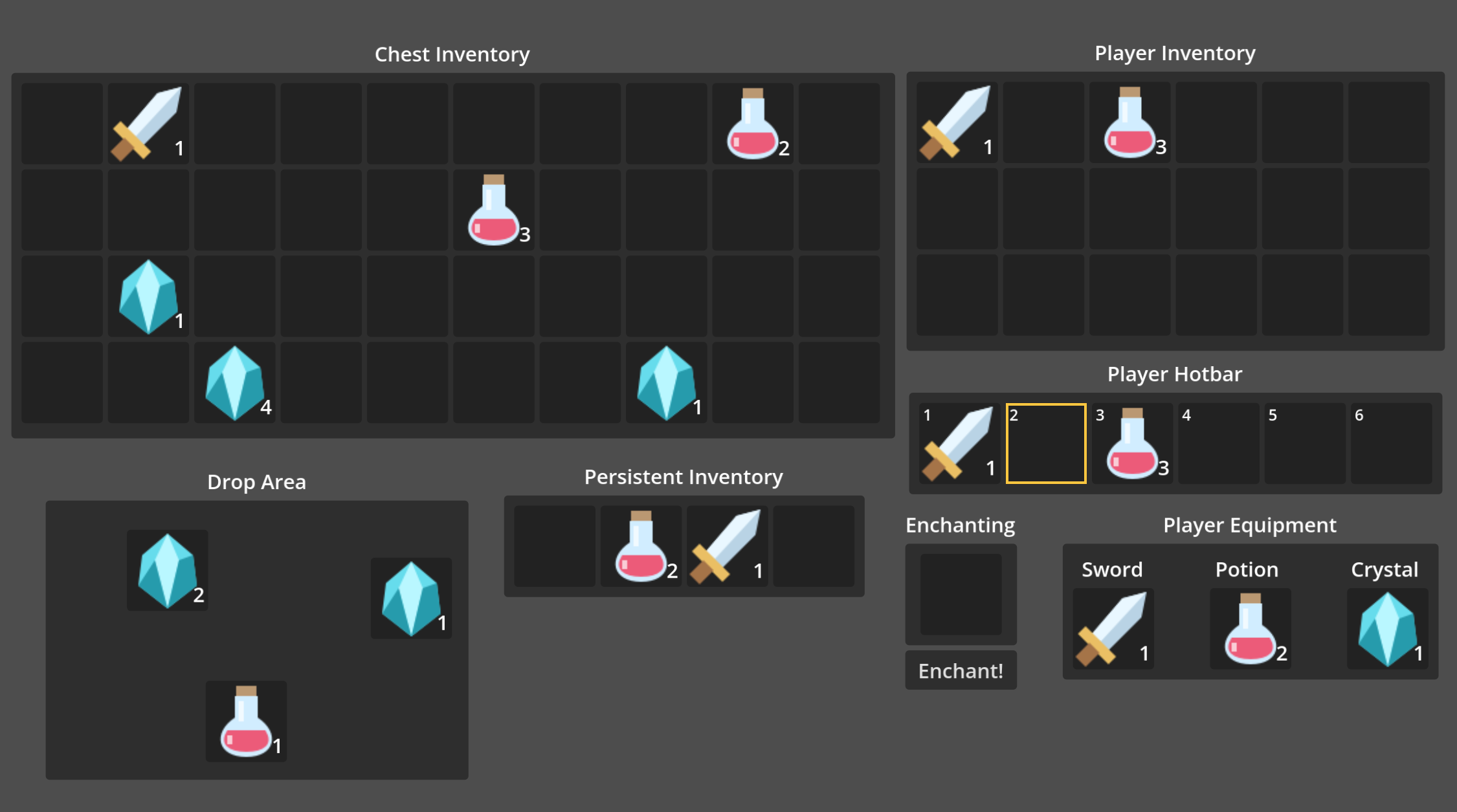
A small, data-driven inventory system for Godot 4. Build inventories with resource-based data, flexible UI, stacking, rules, persistence, and drag and drop.
Requires Godot 4.4 or newer. Swift Inventory is actively developed and written in GDScript. No autoload is required.
Godot Asset Store · GitHub · Report an issue
Features
- Inventory data and item definitions work independently of the UI.
- Automatic stacking, per-item stack limits, and stack-specific metadata.
- Add, remove, move, split, swap, and transfer items between inventories.
- Insertion rules for item IDs, tags, custom predicates, and slot quantity caps.
- Explicit or automatic native inventory persistence, plus separate UI state.
- Grids, selectable hotbars, and free-form drop areas.
- Runtime drag and drop with partial stacks and target feedback.
- Editor slot selection and item-resource drops with Undo/Redo.
- Inventory change signals and an extensible item information panel.
Installation
- Download Swift Inventory from the Godot Asset Store or GitHub.
- Copy
addons/Swift_Inventoryinto your project'saddonsfolder. - Open Project > Project Settings > Plugins and enable Swift Inventory for editor enhancements.
After Godot imports the add-on, its class_name types are available directly in GDScript.
Quick Start
1. Create an item
Create a SwiftItemData resource in the FileSystem dock, save it as .tres, and configure it in the Inspector:
| Property | Example |
|---|---|
id |
health_potion |
display_name |
Health Potion |
description |
Restores a little health. |
icon |
Your item texture |
max_stack_size |
10 |
tags |
consumable, potion |
Reuse the same item definition for all stacks of that item.
2. Create an inventory
Create and save a SwiftInventory resource. Assign it and your item resource to a script:
@export var inventory: SwiftInventory
@export var health_potion: SwiftItemData

func _ready() -> void:
    inventory.size = 24
    var remaining := inventory.try_add(health_potion, 5)
    if remaining > 0:
        print("%d potions did not fit." % remaining)
try_add() returns the quantity that could not be inserted.
3. Display the inventory
- Add a
SwiftGridto aControl-based scene. - Assign the inventory to
swift_inventory. - Configure
inventory_size,slot_size, andseparation. - Give the grid enough width for your desired columns; slots wrap automatically.
The grid generates and binds a SwiftSlot for each inventory address, updating when inventory size changes.
For a working scene with grids, free-form inventories, and an information panel, open the included example and press F6.
Main Types
| Type | Purpose |
|---|---|
SwiftItemData |
Shared item definition: ID, name, description, icon, tags, stack limit |
SwiftItemStack |
Item definition, amount, and stack-specific instance_data |
SwiftInventory |
Inventory contents, rules, operations, persistence, and signals |
SwiftRule |
Reusable insertion filters and quantity caps |
SwiftUIState |
Persistent hotbar selections and drop-area positions |
SwiftContainer |
Shared inventory binding, reconciliation, and persistence settings |
SwiftGrid |
Grid view over inventory addresses |
SwiftHotbar |
Selectable single-row view over an inventory address range |
SwiftDropArea |
Free-form view of positioned, occupied slots |
SwiftSlot |
Displays one address and handles drag and drop |
SwiftInfo |
Base control for custom item hover panels |
SwiftInventory owns the data. Containers and slots display and interact with it, allowing multiple views to share one inventory resource.
Inventory Operations
# Add items; returns the quantity that did not fit.
var remaining := inventory.try_add(item_data, 20)

# Remove exactly two items from address 3; returns an Error.
var result := inventory.try_remove(3, 2)

# Move or merge three items from address 0 to address 5.
remaining = inventory.try_move(0, 5, 3)

# Swap two occupied addresses in the same inventory.
result = inventory.try_swap(0, 4)

# Swap occupied addresses between inventories.
result = inventory.try_swap(0, 2, other_inventory)

# Transfer five items into address 3 of another inventory.
remaining = inventory.try_transfer(0, other_inventory, 3, 5)

# Transfer as much of the entire inventory as possible.
result = inventory.transfer_to(other_inventory)

# Replace or clear an address.
result = inventory.set_stack_from_data(4, item_data, 3)
result = inventory.set_stack(4, SwiftItemStack.new(item_data, 3))
result = inventory.set_stack(4, null)

# Read an address safely.
var occupied := inventory.has_stack(4)
var stack := inventory.get_stack(4)
- Add operations and bulk transfers fill compatible stacks before eligible empty addresses.
try_move()andtry_transfer()return the quantity that remains unmoved.try_remove()requires a valid occupied address with the full requested quantity.try_swap()requires both addresses to be occupied and both replacements to satisfy their rules.transfer_to()returnsOKonly when the source becomes empty; otherwise it returnsFAILED.set_stack_from_data()clamps quantity to the item limit. Passingnullor a non-positive quantity clears the address.- A stack belongs to only one inventory address. Use
stack.copy()for independent contents, or transfer the existing stack.
Use inventory methods for mutations. Editing the inventory dictionary directly bypasses validation and change notifications.
Stack-specific metadata
var sword_stack := SwiftItemStack.new(
    sword_data,
    1,
    {&"durability": 75, &"enchantment": &"fire"}
)
inventory.set_stack(4, sword_stack)
instance_data belongs to the whole stack. Set max_stack_size = 1 for independently changing items. Stable item-instance IDs are not generated automatically; store your own in metadata when needed.
Stacks merge only when item IDs, stack scripts, metadata, and stored stack extension fields match. Splitting preserves subclass fields and deeply copies mutable metadata, including nested Resources.
try_add(data, quantity) creates stacks with empty metadata. Use try_add_stack(stack, quantity = -1) to insert copies that preserve metadata and subclass fields.
To update metadata while notifying views and autosave, copy the stack, edit the copy, then apply it with set_stack().
Slot Rules
Assign inventory-wide rules through inventory.rules and an optional additional rule per address with set_rule(). Every applicable rule must pass.
var weapons_only := SwiftRule.new()
weapons_only.allowed_tags = [&"weapon"]
weapons_only.max_quantity = 1
inventory.set_rule(0, weapons_only)

var no_quest_items := SwiftRule.new()
no_quest_items.blocked_tags = [&"quest"]
inventory.rules = [no_quest_items]
| Property | Behavior |
|---|---|
allowed_ids, blocked_ids |
Filter item IDs; blocked IDs win |
allowed_tags, blocked_tags |
Filter item tags; any blocked tag rejects insertion |
require_all_tags |
Require all allowed tags instead of any one |
max_quantity |
Cap total quantity at one address; zero uses the item limit |
Empty allow lists impose no restriction. When both ID and tag allow lists are set, both must pass. The effective capacity is the smallest positive rule cap and the item's stack limit.
For custom checks, extend SwiftRule:
@tool
extends SwiftRule

func _accepts(stack: SwiftItemStack, _inventory: SwiftInventory, _address: int) -> bool:
    return int(stack.instance_data.get(&"quality", 0)) >= 3
Predicates receive the proposed final stack, including quantity and copied metadata, and must not mutate inventory state. They test the capped candidate without searching smaller quantities if it fails.
Rules apply to additions, moves, transfers, replacements, editor drops, and both sides of swaps. Changing a rule does not evict existing contents or prevent removal and movement out.
Use get_insertable_quantity(address, stack, quantity) to preview capacity and can_set_stack(address, stack) to check a complete replacement.
Persistence
Automatic saving and loading
On a SwiftGrid, SwiftHotbar, or SwiftDropArea, open Persistence, set a unique Save Path such as user://saves/player.tres, and enable Auto Persist.
- An existing file loads into the assigned inventory on ready, preserving shared views and signal connections. A missing file creates an initial save from current contents.
- Inventory change notifications queue a save; multiple pending notifications are batched. Leaving the scene tree performs a final save.
- Enable automatic persistence on one container per shared inventory. Independent inventories need separate paths.
- Paths must remain under
user://and end in.tresor.res. Automatic persistence defaults to off and never runs in editor previews. - A failed startup load preserves live contents and the file, and suspends automatic writes. Fix the file or choose another path, then toggle off/on to retry.
- Save failures preserve the previous file and retry on the next inventory notification or scene exit.
Successful operations emit inventory_loaded(path) or inventory_saved(path). Failures emit persistence_failed(operation, path, error).
Autosave follows SwiftInventory.on_change; direct edits inside dictionaries, stacks, or rule Resources may not trigger it. Hotbar selection and drop-area positions use separate UI state.
Explicit saving and loading
var error := inventory.save_to_file("user://saves/player.tres")
if error != OK:
    push_error("Save failed: " + error_string(error))

# Updates the same Resource, preserving bindings and signal connections.
error = inventory.load_from_file("user://saves/player.tres")
if error != OK:
    push_error("Load failed: " + error_string(error))
Saves include capacity, addresses, quantities, nested metadata, and inventory/slot rules. Mutable stacks and rules become detached snapshots; authored item definitions, scripts, and textures retain shared asset references. Keep changing item state on stacks.
Invalid state is rejected before saving or replacing live contents. The previous save is replaced only after a successful temporary-file write. Loading requires the same inventory script/subclass and emits one CHANGES.inventory event after restoring the complete state.
Use create_snapshot() for an independent inventory copy, or null if state is invalid. This also lets scene instances start from one template without sharing mutable inventory.
Metadata must be serializable. Runtime handles, cyclic graphs, unsupported format versions, and custom Resources with required constructor arguments are rejected. Give custom Resource constructors default arguments. Native files can reference scripts, so load saves only from trusted sources.
Separate UI state
SwiftUIState stores named hotbar selections and drop-area positions. Use stable keys for each view, and restore inventory contents before UI state.
var ui := SwiftUIState.new()
$Hotbar.capture_ui_state(ui, &"player_hotbar")
$DropArea.capture_ui_state(ui, &"ground")
var error := ui.save_to_file("user://saves/inventory_ui.tres")

error = ui.load_from_file("user://saves/inventory_ui.tres")
if error == OK:
    $Hotbar.restore_ui_state(ui, &"player_hotbar")
    $DropArea.restore_ui_state(ui, &"ground")
Hotbars store the selected local index. Drop areas store slot top-left positions in local coordinates; positions for empty addresses are discarded. File saves are independent, so coordinate transactions across inventories in your game's save system.
Hotbar
SwiftHotbar displays an address range from an existing inventory without duplicating items or resizing the inventory.
$Hotbar.swift_inventory = inventory
$Hotbar.start_address = 0
$Hotbar.slot_count = 10
$Hotbar.selection_actions.assign([&"hotbar_1", &"hotbar_2", &"hotbar_3"])
$Hotbar.item_activated.connect(_on_item_activated)

func _on_item_activated(address: int, stack: SwiftItemStack) -> void:
    print("Use requested: ", stack.item_data.display_name, " at ", address)
Configure actions in Project Settings > Input Map. Each selection_actions entry selects its corresponding visible slot, regardless of start_address. Entries are action names, not key codes; an empty array disables direct selection.
Default cycling/activation action names are swift_hotbar_next, swift_hotbar_previous, and swift_hotbar_activate. The add-on does not modify your input map.
Selection emits selection_changed(index, address). Gameplay can call select_slot(index), select_next(direction), get_selected_address(), and activate_selected(). Activation emits a request; your game decides whether to use, consume, or equip the item. Empty slots do not activate.
activate_on_select defaults to false. Input is ignored when hidden, when input_enabled is off, while a text field has focus, or during an item drag.
Drag and Drop
| Gesture | Result |
|---|---|
| Drag | Move the whole stack |
| Shift + drag | Move half, rounded up |
| Ctrl + drag | Move one; takes priority over Shift |
| Wheel while dragging | Adjust quantity by one within the source amount |
| Escape or invalid drop | Cancel without changing contents |
The preview shows the chosen amount, and target outlines indicate whether a drop is allowed. Items remain in the source until a valid drop. If only part fits, the remainder stays in the source.
Drops can move, merge, swap, or transfer across inventories. Full-stack swaps require both sides to accept the replacement; partial drags onto different items are rejected. Contents, capacity, and rules are revalidated when dropping.
For custom UI, use SwiftDrag.create_payload(inventory, address, quantity) to include protection against changed or replaced source stacks.
Free-form drop areas
Add a SwiftDropArea, assign swift_inventory, and configure slot_size. Drops find an eligible empty address and position the slot at the drop point. The inventory may expand by one address if needed and permitted by its rules.
Only explicitly positioned stacks appear. For programmatic additions, call set_slot_position(address, top_left) or restore saved UI state. Repositioning a whole stack within the same area keeps its address and capacity.
Editor Workflow
With the plugin enabled:
- Select a configured
SwiftGridin the 2D editor. - Click a generated slot. The first click selects the grid; a second click with the grid selected inspects the slot.
- Drag a
.trescontainingSwiftItemDataonto a visible slot. - Select the slot to adjust its item or amount in the Inspector.
Edits update the assigned inventory and honor its rules. Resource drops support Undo/Redo, and amount changes preserve stack metadata. The editor drop workflow accepts only .tres resources containing SwiftItemData.
Signals and Custom UI
React to inventory changes through:
signal on_change(type: CHANGES, from_address: int, to_address: int)
Change types include add, remove, move, swap, transfer, set, size, and inventory. Containers reconcile their views automatically; gameplay can connect to the same signal.
Subclass SwiftInfo for a pointer-following tooltip or hover panel and handle on_info_changed. The signal can receive null when hovered contents are cleared. position_offest remains supported, with position_offset as its correctly spelled runtime alias.
Additional API
| API | Purpose |
|---|---|
SwiftInventory.size |
Number of valid inventory addresses |
SwiftInventory.is_full() |
Whether every address is occupied |
SwiftInventory.get_slot_limit(address, item_data) |
Effective item/rule quantity limit |
SwiftInventory.validate() |
Check structural inventory invariants |
SwiftItemStack.can_stack_with(other) |
Check stack compatibility |
SwiftItemStack.get_reserve() |
Remaining capacity under the item stack limit |
SwiftSlot.refreshed |
Signal emitted after presentation refresh |
See the test guide for regression, rendered input, and editor Undo/Redo checks.
Support
Support Swift Inventory on Ko-fi. Reviews on the Godot Asset Store and stars on GitHub also help the project.
License and Credits
Swift Inventory uses the MIT License.
Some icons are based on @icons — Custom node icons by Voxybuns, also under MIT. See THIRD_PARTY_NOTICES.md.
Changelog for version v2.2.0
2026-09-06 16:43:53
No changelog provided for this version.
