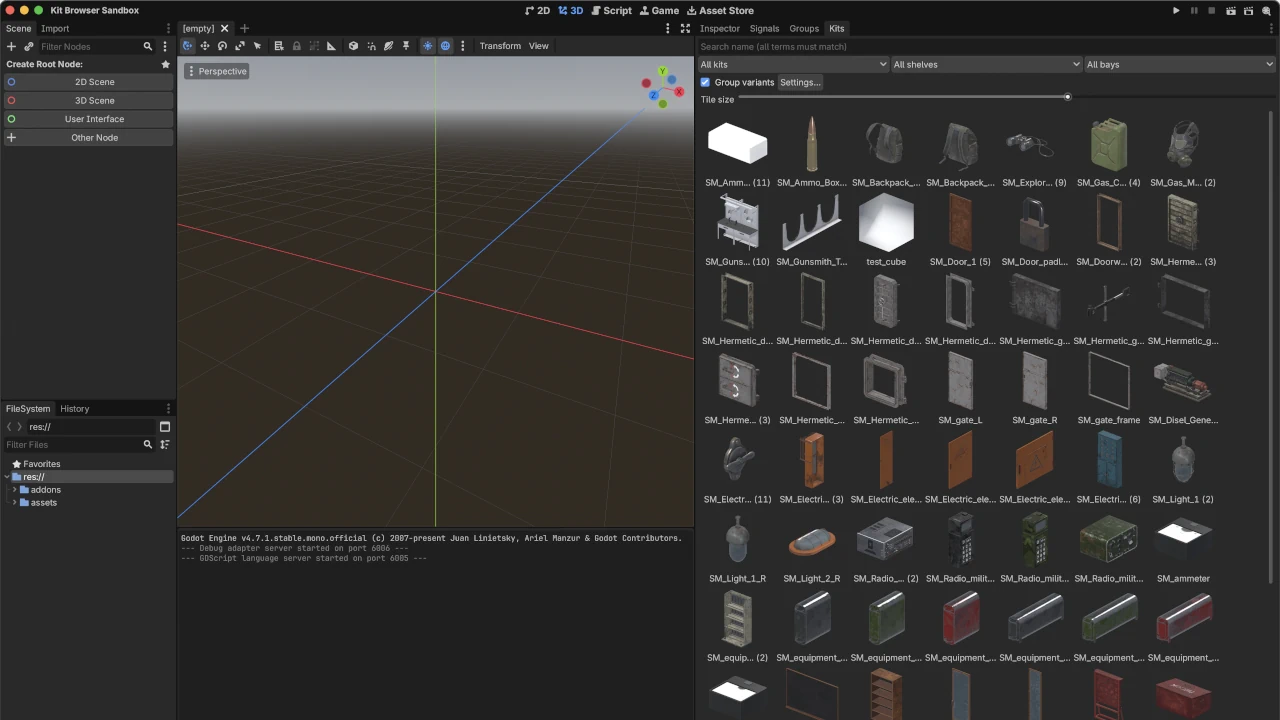
What it does
ProtoForge Kit Browser is an editor dock for projects that contain large 3D asset libraries — purchased asset packs, exported kits, scan collections. Godot's built-in FileSystem previews are too small and inconsistently framed to browse a library of several hundred meshes. This addon replaces that workflow with a searchable grid of real thumbnails.
You designate one or more asset root folders. Clicking Index scans them, writes a
catalog (index.json) per kit, and renders a WebP thumbnail per asset. Both are plain
files stored beside your assets, so they persist across sessions and can be committed
to version control — index once, and everyone on the project gets the same browser.
Thumbnails
Thumbnails are rendered by the editor itself on an offscreen viewport:
- Orthographic 3/4 view with a key/fill/rim light rig, identical for every asset. A 10 cm prop and a 20 m bridge are framed the same way, so silhouettes stay comparable across the grid.
- Rendered from the asset as Godot imported it — the thumbnail shows the materials you will actually get in a scene, not a DCC-side approximation.
- Resolution is configurable (128–1024 px, default 512). Display size in the dock is a separate per-user slider (48–256 px), useful if you want larger tiles for readability.
No Blender, no Python, no external tools. The only requirement is the editor you are already running.
Indexing model
- Roots and kits. Each subfolder of a root is treated as a kit. If a root folder contains meshes directly, the root itself becomes a single kit — both layouts work.
- Incremental. Each asset's modification time is stored in the index. Re-indexing skips unchanged assets and their thumbnails, so a re-run after adding a few meshes takes seconds. Force re-index rebuilds everything from scratch (useful after changing thumbnail resolution or import settings).
- Non-destructive. The indexer refuses to overwrite an index it did not generate, and a failed mesh is recorded and skipped — one broken file never aborts a run.
- Formats:
.glb,.gltf,.fbx,.obj,.dae,.blend, plus.tscnscenes that contain 3D geometry. (.blendrequires Blender import to be configured in the editor, as with any Godot project.)
Browsing
- Search matches on asset name; every whitespace-separated term must match, so
"wall door" finds
Wall_doorway_2regardless of word order. - Categories derive from your directory structure — your folder organization is the taxonomy. Assets without one are shelved by name tokens.
- Variant grouping. Vendors commonly ship the same piece many times over
(
Chair_01…Chair_24,Rifle_02a…Rifle_02h). The browser collapses these families to one tile with a count; right-click opens a menu of the variants. Dimension suffixes (2m,3m) are recognized as different modules, not variants, and are never merged. - Placement. Double-click (or Enter) instantiates the selected asset as a child of
the edited scene root, selected and undoable in a single step. If a
.tscnwrapper scene exists beside a mesh, the wrapper is placed instead — so collision shapes or scripts you add to an asset are used automatically.
Setup
- Install and enable the plugin.
- Open the Kits dock, click Settings…, add your asset folder(s) as roots.
- Click Index and let the progress dialog finish.
There is no step 4. Settings live in ProjectSettings (shared with your team via
project.godot); only the tile-size slider is a personal editor setting.
Requirements and license
- Godot 4.7+.
- MIT license, © ProtoForge Systems. Source: https://github.com/ProtoForgeSystems/protoforge-godot-addon-kit-browser
Issues and pull requests are welcome on the repository.
Changelog for version v1.1.0
2026-09-05 20:44:34
No changelog provided for this version.