🧩 Write your own tools
Write MCP tools in GDScript with the extension API. Extension tools hot-reload and appear to the agent exactly like built-ins, with the same schemas, hints, and error contract. C#/.NET projects extend the same way. The dock has an extension catalog browser that fetches a public listing when you open it; it is empty until community extensions are published.
An agent can also run one-off logic without a custom tool: execute_code runs a snippet in the editor or in the running game.
💬 What a session looks like
Ask your assistant things like:
- "Build a main menu scene with Play and Quit buttons and wire them to signals."
- "Create a TileSet from this spritesheet, then paint a small test level."
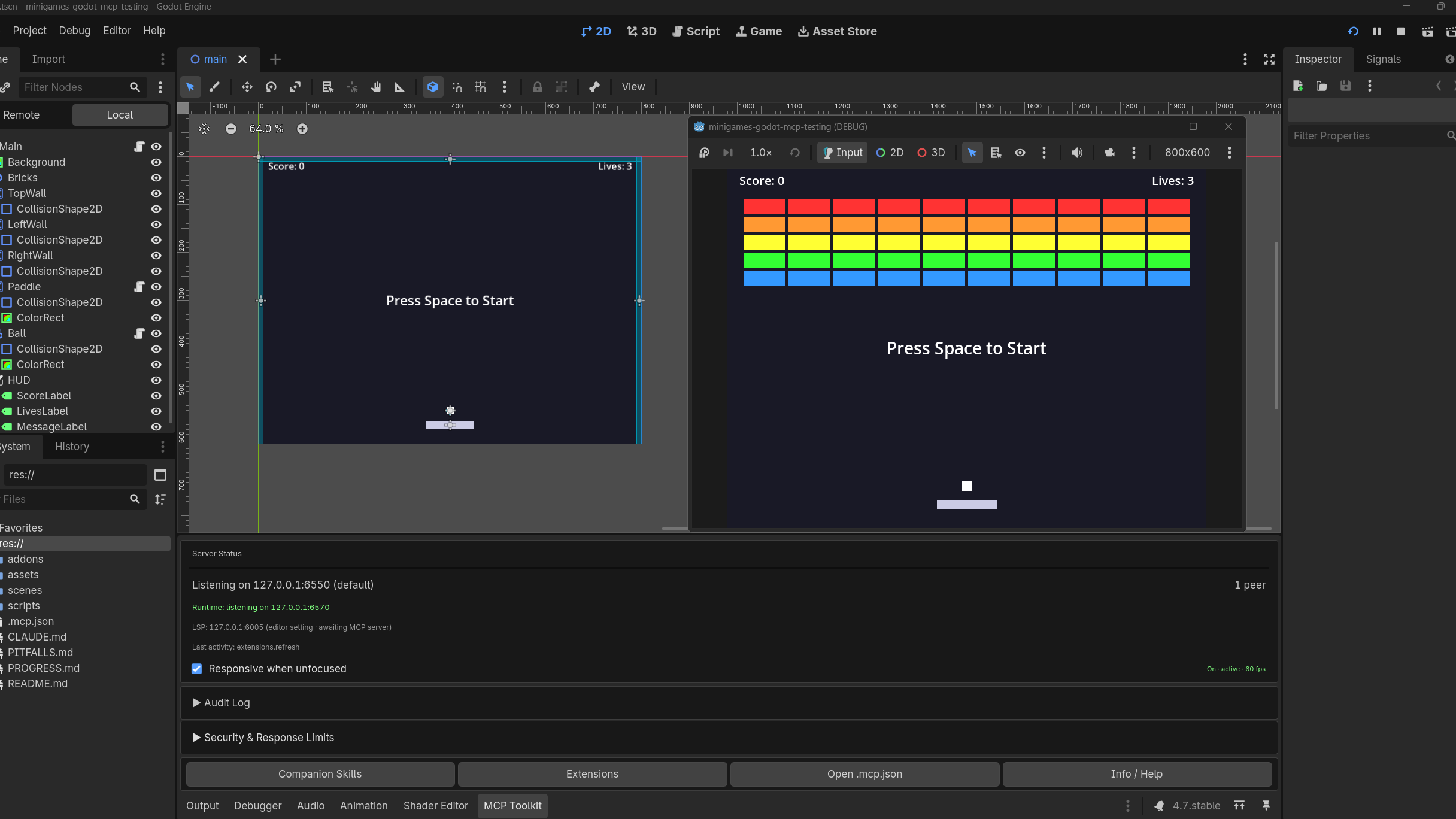
- "Run the game, hold right for two seconds, and screenshot the result."
- "Why is the score not updating? Set a breakpoint in player.gd and step through."
- "Which nodes reference this script, and what inherits Area2D?"
The agent picks the tools on its own. Scene and node edits go through the editor's undo history, so you can revert them like your own changes.
🧰 The tool surface
112 built-in tools cover 150+ operations. A 36-tool core loads at connect; the rest sit in 28 on-demand groups that the agent activates through discover_tools when the work calls for them, so the tool list stays inside every client's budget.
- Scenes, nodes, scripts, resources, and files, with structured errors and pagination on the read paths.
- 2D authoring: TileSet creation from a spritesheet plus per-tile collision, terrain, navigation, occlusion, and animation editing; TileMap painting; SpriteFrames; Path2D curves; navigation polygons; theme edits.
- 3D helpers: primitives, environment, lights, and cameras.
- Animation: AnimationPlayer authoring, AnimationTree state machines and blend trees.
- GDScript language services backed by the project's language server: diagnostics, document symbols, go to definition, find references, hover, completion, and a project-wide error scan.
- Debugging: breakpoints, stepping, debug state, and crash diagnostics from a captured error buffer.
- Playtests: start and stop the game, read live node state, capture screenshots, simulate input including typed text, and read logs while it runs.
- Placeholder content: generated textures, sounds, gradients, curves, and noise resources for blocking out a scene.
- Project management: settings, input map, layer names, and audio buses.
The full list, with every operation and parameter, is in the generated tool reference.
📦 Setup
- Install the addon and enable "Godot MCP Toolkit" in Project Settings → Plugins.
- Follow the setup wizard. It writes your project's .mcp.json; npx fetches the companion bridge, @npgamedev/godot-mcp-server, on first connect.
- Open your MCP client in the project folder and start prompting.
The client setup guide covers Claude Code, Claude Desktop, Cursor, Windsurf, VS Code, Cline, Codex CLI, Gemini CLI, and any other stdio MCP client.
🖥️ Multiple editors, multiple agents
Every project keeps its own session token and state in a per-project folder, and each editor publishes itself to a machine-wide registry that the bridge reads. Two setups work out of the box:
- One agent per game. Open several projects, or several worktrees and checkouts of the same game, in parallel editors; each agent connects to its own instance and never collides with the others.
- Several agents on one game. Multiple clients can connect to the same editor. Mutations queue and run one at a time in arrival order while reads run alongside, so agents build on each other's changes instead of trampling them.
The same discipline covers you: editing by hand while an agent works in the same project is a validated, supported workflow. Two overlap cases need turn-taking, such as agent writes to a script you have open with unsaved edits; the known limitations section covers both.
📋 Requirements
Godot 4.2 through 4.7 on desktop (Windows, macOS, Linux); Node.js 22+ for the bridge.
🔒 Security
The editor server binds 127.0.0.1 only, and every client presents a session token as its first message. Filesystem tools are boundary-checked: res:// for project files, user:// for the save tools; path traversal and absolute OS paths are rejected. An optional read-only mode (GODOT_MCP_READ_ONLY=1) hides every mutating tool. Exports automatically strip the plugin's scripts and the project's .mcp.json from shipped builds, so neither the plugin's code nor its tokens travel with a release.
🔕 No telemetry
Neither the plugin nor the bridge collects or uploads anything. The only outbound request is the extension catalog fetch, and it happens only when you open that dialog.
✅ Tested
Every push runs the unit suite on all six supported Godot versions (4.2 through 4.7), plus static GDScript validation and a ClassDB API-drift check. Every release gates on the full smoke and flow suites against a real headless editor on those six versions, in both the GDScript and C# (mono) editors. The same behavioral suites also run on Windows and macOS runners as an opt-in tier.
📚 Docs and links
👤 Author
NPGameDev · npgamedev.com · [email protected]
Contributions are welcome; start with the contributing guide.
⚖️ Copyright disclaimer
Godot is a trademark of the Godot Foundation. This is an independent community add-on, not affiliated with or endorsed by the Foundation.
Changelog for version 1.0.3
2026-10-05 06:43:25
No changelog provided for this version.
Reviews
 Recommended
by Eva Jegier - 30 July 2026
Recommended
by Eva Jegier - 30 July 2026
👍🏻
Recommended
by Fernando Micotis - 04 August 2026
Very useful.
Recommended
by Emanuel Lopez - 27 July 2026
Very useful and effective
Recommended
by Rafael Ayala - 03 August 2026
Useful, I like it
Recommended
by Iris Potruch - 27 July 2026
This toolkit is impressive! 112 tools that cover everything from scene editing and TileSet authoring to animation trees and live debugging... I also really liked the undo-history integration for scene edits, since it's great safety net. Thanks for adding the custom tool API, it can really grow with the community. Really solid work!
Recommended
by Delia Sanchez - 30 July 2026
This is truly a useful tool that helps me and saves time!
Recommended
by Katsiaryna Kavalkova - 27 July 2026
I've been using this toolkit and it's been a great addition to my Godot workflow. The setup was straightforward, the documentation is clear, and the MCP integration works smoothly. It saves time on repetitive tasks and makes development much more efficient.
Recommended
by Jorge Neri - 20 August 2026
I was able to get my hands on this early, and as someone who hadn't used Godot before, it helped me get more comfy in the engine and get a nice jumpstart.
Recommended
by Jessica - 27 July 2026
I feel like this toolkit will really help me improve my skills and will be really useful for shortening the time spent on small tasks.
Recommended
by Jack Hadjicosti - 04 August 2026
Great toolkit! It really improves the effectiveness and efficiency of using AI agents with Godot. Definitely one of the main tools I use for every project now.
Recommended
by Andreas Paschos - 27 July 2026
Great tool. Does what it says with no bs. Saves me the time from trying to reinvent the wheel since I'm a beginner with Godot. It's about time someone did this!
Recommended
by Eran Geva - 18 August 2026
Great tool!
Recommended
by Andrés Siekiera - 27 July 2026
A new ally has definitely entered my professional life!
Recommended
by Kangh Zet - 02 October 2026
Recommended
by Regner Blok-Andersen - 30 September 2026
Recommended
by Tyler Febonio - 29 August 2026
Recommended
by tanialato - 08 August 2026
Recommended
by jasze - 03 August 2026
Recommended
by Hannah Desmond - 27 July 2026
Recommended
by Samantha - 27 July 2026
Login to write a review.