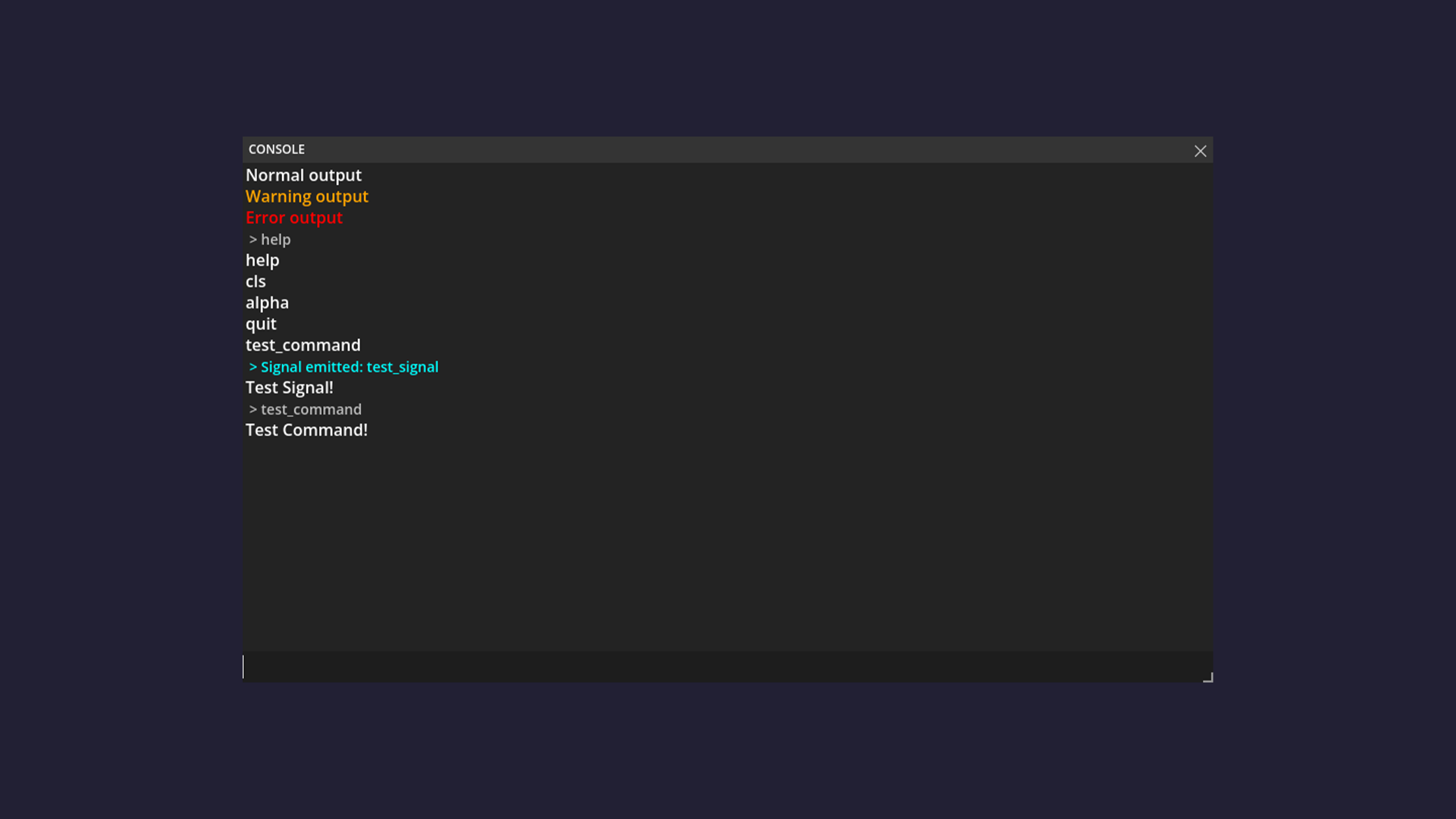
Godot Developer Console
An in-game developer console addon for Godot.
Note: All of the documentation below is written based on the newest Release
Installation
- Download the latest release from the repository.
- Extract the
addons/dev-consolefolder into your Godot project'saddonsdirectory. - Enable the plugin in your Project Settings and restart the Godot Engine.
Configuration
After installation turn OFF and ON the plugin, this ensures the configuration settings load properly.
Note: Before updating or deleting the asset, turn it
OFFin the ProjectSettings > Plugins
By openning the ProjectSettings (Project > Project Settings > General) and scrolling down you can find the DevConsole/Configuration tab.
There will be the following parameters:
| Parameter | Value Type |
|---|---|
Window Title |
String |
Default Commands |
Boolean |
View Default Commands |
Boolean |
Use History |
Boolean |
Keep Size After Closing |
Boolean |
Keep Position After Closing |
Boolean |
Keep Topmost |
Boolean |
Debug Only |
Boolean |
Toggle Keybind |
Integer |
Close On Escape |
Boolean |
Command Autocomplete |
Boolean |
| - | - |
Console Transparency |
Float (0.5 to 1.0) |
Header Background |
Color |
Output Background |
Color |
Selection Highlight |
Color |
Input Background |
Color |
Note: To reset the settings just turn
OFFandONthe plugin
By default the keybind for openning/closing the console is KEY_QUOTELEFT.
Usage (GDScript)
Do not use the DevConsoleInternal class, intead use the DevConsole singleton as shown below
Adding commands
IMPORTANT: All the parameters passed into a command must be strings.
If you need other types, you must parse them manually inside your function (e.g. int(amount))
In order to use, add commands with reference to a coresponding function in _ready function like this:
func _ready() -> void:
  # Register the command "print" to call the _print function
  DevConsole.add_command("print", _print);

# Print function that takes any amount of String and returns them
func _print(first_word: String, ...others) -> String:
  var output: String = first_word;
  for word in others:
    output += " " + word;
  return output;
Note: By returning a string you pass an output to the console, which will be displayed in it.
(Anything other than String will be converted to String)
Adding signals
Add a signal for console to listen to like this:
# Declare signal that emits a String
signal test(text: String);

func _ready() -> void:
  # Register the signal named "test" that passes the signal 'test' as the second parameter
  DevConsole.add_signal("test", test);

# Let's emit the signal on 'ESC" clicked
func _input(event: InputEvent) -> void:
  if event.is_action_pressed("ui_cancel"):
    emit_signal("test", "Hello World!");
Note: If a signal has parameters (like in the example), they are shown as a regular output in the OutputBox once the signal is emitted.
Using lambdas
Here is my personal example of how to use lambdas with DevConsole
- Documentation regarding Godot/GDScript Lambdas
DevConsole.add_command("sync_stats", func() -> String:
  return "RPCs sent: %d, Last size: %d bytes" % [
    network_manager.sync_manager.rpc_count,
    network_manager.sync_manager.last_rpc_size
  ];
);
Note: While passing parameters to a lambda function, you must pass everything as a String (e.g.
str(id = 5))
Other functions
DevConsole.get_commands(); # returns Dictionary[String, Callable]
DevConsole.get_signals(); # returns Dictionary[String, Dictionary[String, Variant]]

DevConsole.delete_command("print");
DevConsole.delete_signal("test");

DevConsole.has_command("print"); # returns bool
DevConsole.has_signal_connected("test"); # returs bool

DevConsole.print_line("Hello World!"); # Outputs to console white text
DevConsole.print_warning("Hello, World?"); # Outputs to console orange text
DevConsole.print_error("Goodbye World!"); # Outputs to console red text

DevConsole.clear_output(); # Clears the console
Properties
DevConsole.visible # bool

DevConsole.title_label # String (default: "CONSOLE")
DevConsole.use_default_commands # bool (default: true)
DevConsole.use_command_history # bool (default: true)
DevConsole.view_default_commands # bool (default: true)
DevConsole.keep_size_after_closing # bool (default: false)
DevConsole.keep_position_after_closing # bool (default: false)
DevConsole.keep_topmost # bool (default: true)
DevConsole.toggle_keybind # String (default: "QuoteLeft") ... available: QuoteLeft, F1 to F5
DevConsole.close_on_escape # bool (default: true)
DevConsole.command_autocomplete # bool (default: true)

DevConsole.alpha # float (default: 0.9)
DevConsole.header_background # Color (default: Color(0.204, 0.204, 0.204, 1.0))
DevConsole.output_background # Color (default: Color(0.137, 0.137, 0.137, 1.0))
DevConsole.selection_highlight # Color (default: Color(0.204, 0.204, 0.204, 0.878))
DevConsole.input_background # Color (default: Color(0.114, 0.114, 0.114, 1.0))
Usage (C#)
Read the GDscript usage first, as this section of README.md doesn't go deep into the logic of DevConsole methods
Adding commands
- Documentation regarding Godot/C# Callables
public partial class Main : Node
{
  public override void _Ready()
  {
    DevConsole.AddCommand("heal", Callable.From<string, string>(Heal));
  }

  // It is recommended to make all parameters a 'string' to avoid unexpected behavior
  private string Heal(string amount)
  {
    int parsedAmount = (int)amount;
    return $"Healed player for {parsedAmount} HP!";
  }
}
Note: DevConsole doesn't support "...args" (params) in C#
Adding signals
- Documentation regarding Godot/C# Signals
public partial class Main : Node
{
  [Signal]
  public delegate void TestSignalEventHandler(string message);

  public override void _Ready()
  {
    DevConsole.AddSignal("test_signal", new Signal(this, SignalName.TestSignal));
  }

  public override void _Input(InputEvent @event)
  {
    if (@event.IsActionPressed("ui_accept")
    {
      EmitSignal(SignalName.TestSignal, "Hello World!");
    }
  }
}
Other functions
Almost identical to GDScript functions, but use CamelCase instead of snake_case
Default Commands
| Command | Functionality |
|---|---|
help |
Outputs all registered commands. Ignores default commands based on Console setup |
cls |
Clears the Console output |
alpha {float} |
If no float provided it acts as a getter. If a float value is provided it acts as a setter |
quit |
Exits the game |
Requirements
Language: GDScript/C#
Minimum version: Godot 4.5.0
Maximum version: Godot 4.x.x
Font: Cascadia Mono
Note: Font is included in the
addons/dev_console/font/directory
AI Usage
AI was used to refactor the code, improve overall code structure and test edge cases.
License
Distributed under the MIT License. See LICENSE for more information.
Example output

Open to suggestions for improvement. For suggestions, issues, or bugs, please use the Issues tab
Changelog for version v1.1.1
2026-09-18 20:04:47
No changelog provided for this version.
