Advanced Model Import
A Godot 4.6+ plugin adding some bulk model import options.
Key Features
- Extract all meshes from multiple models.
- Extract all materials from multiple models.
- Set external materials for multiple models.
- See the affected model's paths depending on your selection in the FileSystem Dock.
How To Use
Extract Meshes
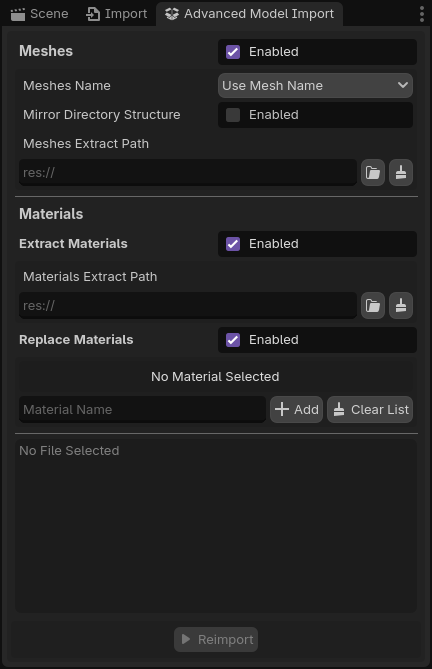
When selecting the option to extract meshes from models, you'll have access to additional options:
| Option | Description |
|---|---|
Meshes Name |
Decide on whether to use the name of the original mesh or the name of the MeshInstance3D node for the extracted meshes. |
Mirror Directory Structure |
If you have subfolders in your selection, the extraction paths will try to mirror the directory structure in the destination folder. |
Meshes Extract Path |
The path to the destination folder for the extracted meshes. |
The path to the destination folder is mandatory when this option is selected.
Extract Materials
When selecting the option to extract materials from models, you just need to provide the path to the destination folder in Materials Extract Path field.
The path to the destination folder is mandatory when this option is selected.
Replace Materials
When selecting the option to extract materials from models, you'll need to provide two informations per material:
- The material name in the meshes.
- The path to the replacing material Resource.
Some asset packs may have models with similar materials with different names, you can add the same material path for multiple material names.
The material Resource path is mandatory for each material name entry.
Install
Import the content of the downloaded .zip in your Godot project.
Make sure that the path to the plugin is res://addons/advanced_model_import/plugin.cfg.
Credits
- Code: Syvies (me)
- Icon: Game-icons.net
- 3D model in the background: Kay Lousberg
Inspired by dragon1freak's Bulk Model Manager.
Changelog for version v0.2.1
2026-02-05 12:36:49
No changelog provided for this version.