Gitot - Godot Git Tool


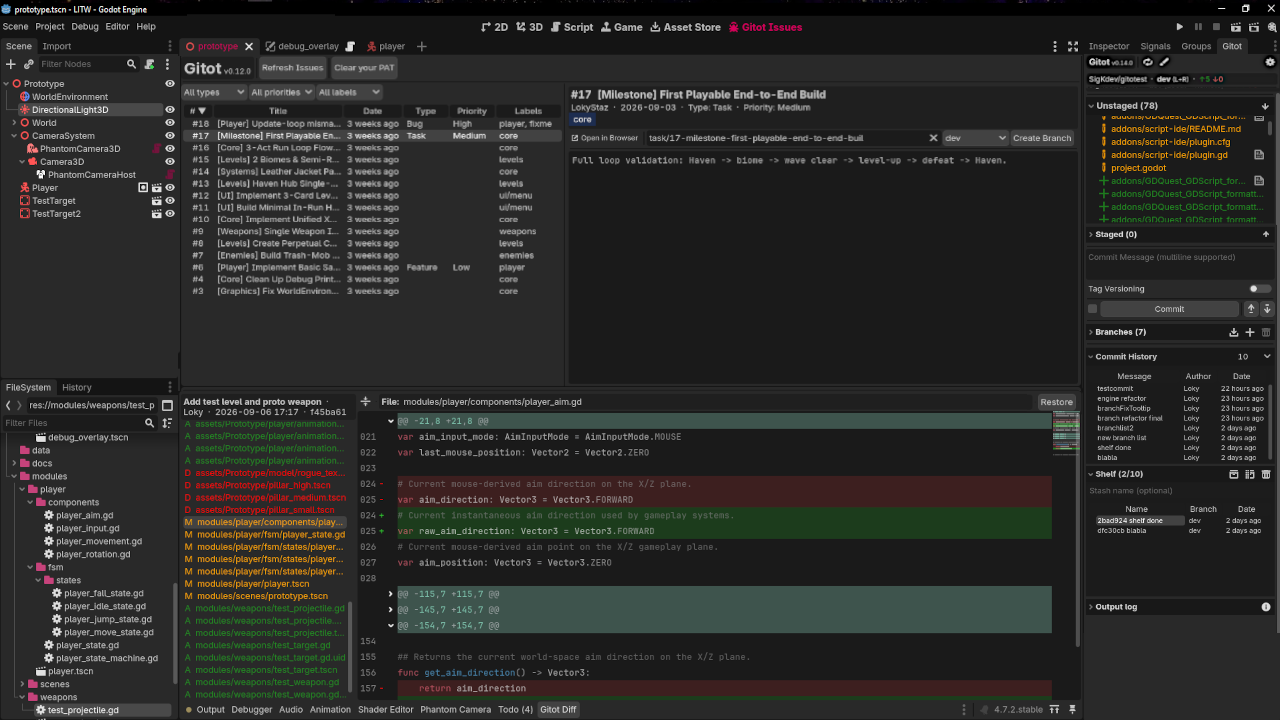
Gitot is a lightweight Git workflow plugin for the Godot 4 editor intended for solo developers who want fast, reliable Git operations (stage/unstage, commit, stash/pop, fetch/push/pull), inline diff gutter, full diff viewer, and issue tracker without leaving the editor.
Why Gitot
Git integrations for Godot either wrap libgit2 via GDExtension or require a separate installed application. Gitot does neither:
- Pure GDScript. No GDExtension, no bundled
libgit2, no compiled binaries to trust or keep updated across platforms. - Wraps the system
gitbinary directly. If yourgitworks in a terminal, it works in Gitot — same config, same credentials, same behavior you already rely on. - Built for solo developers. No team-workflow ceremony — status, commit, and push are one click away, tuned for a single-developer loop rather than large-team review tooling.
Features
- Commit & Sync: Stage or unstage files individually or in bulk, write multiline commit messages, and Commit, Amend, Push, or Pull. Amend is guarded and automatically forces the next push when required.
- Stash Manager (Shelf): Stash all changes (staged + unstaged + untracked) under an optional name, then pop or drop any entry from a capped, foldable list (limit is a setting, default 10). Pop refreshes only the files it touched in the editor.
- Local Branch Management: Foldable branch list (name, ahead/behind, last update). Double-click to switch,
+to create a branch inline, trash button to delete a merged local branch. Open scenes refresh automatically on switch without a full project rescan. A toast warns if an open script changed on disk, or if changed files couldn't be reliably detected (see Limitations). - Remote Branch Management: Fetch remote updates from the branch fold's title bar, list remote-only branches, and double-click one to check it out with automatic tracking.
- Tag Versioning: Push with or without an annotated tag. Auto-tagging settings - see _Details_ below.
- Commit History: Browse recent commits (message, author, date) with a count filter (10/20/30). Click a commit to inspect its changes file-by-file in the bottom-dock diff viewer.
- Color Diff Gutter: Modified and added lines are marked directly in the script editor's gutter. Click to open the matching hunk in the diff viewer.
- Diff Viewer Panel: Bottom-dock full-context unified diff for the current script. Basic syntax highlighting, foldable hunk with headers, per-line +/- gutter with real source line numbers and color-coded additions/deletions. Also browses any past commit file-by-file: pick a file from the changed-files list to view its diff. (Click the commit header to copy its hash).
- Restore File: In the diff viewer's commit-history mode, restore a file to its content at that commit. Confirmation dialog before overwriting uncommitted changes.
- GitHub Issues Tracker Board: Split list/detail view (like the commit history) of the repo's open issues (requires a PAT); opt-out in settings. Sortable 6-column list (number, title, date, type, priority, labels), Type/Priority/Label filters, full issue detail (metadata, colored labels, Markdown body, Open in Browser). Create a branch directly from an issue, auto-named from its number/title/type (editable), with a base-branch picker and a dirty-working-tree confirmation.
- Repo Status Panel: One-line summary of the current repo, branch (detached HEAD flagged in red), branch scope, and ahead/behind sync status.
- Large-File Guard: Blocks staging any file over a configurable size limit to prevent repository bloat, flagging oversized files with a warning icon in the staged/unstaged list.
- Gitot Logger: Git and Gitot output are routed through Gitot's own dock logger to keep the Godot output panel clean. A Reflog button dumps the last 20 reflog entries to the console.
Check GitHub repo for more details.
Requirements
- Godot 4.7+ (not tested on earlier 4.x)
- System
gitinstalled and available on your systemPATH - A GitHub personal access token (optional, only needed for the Issues integration)
Status
Actively maintained, pre-1.0. Core Git operations (status, stage, commit, branch, push/pull, diff, stash/pop, tags) are stable and in daily use on this project's own repository. Bug reports and feedback are the main thing this release is asking for.
See the GitHub repo's issue tracker and discussions feeds.
License
Copyright (c) 2026-present SigK - under the MIT License.
Links
- Source & issue tracker: GitHub repo
Changelog for version v0.14.1
2026-10-02 15:54:51
No changelog provided for this version.
