GittyDot
Review changes, edit diffs, and commit without leaving Godot.


Features · Installation · Quick start · Guide · Limitations · Testing · Feedback
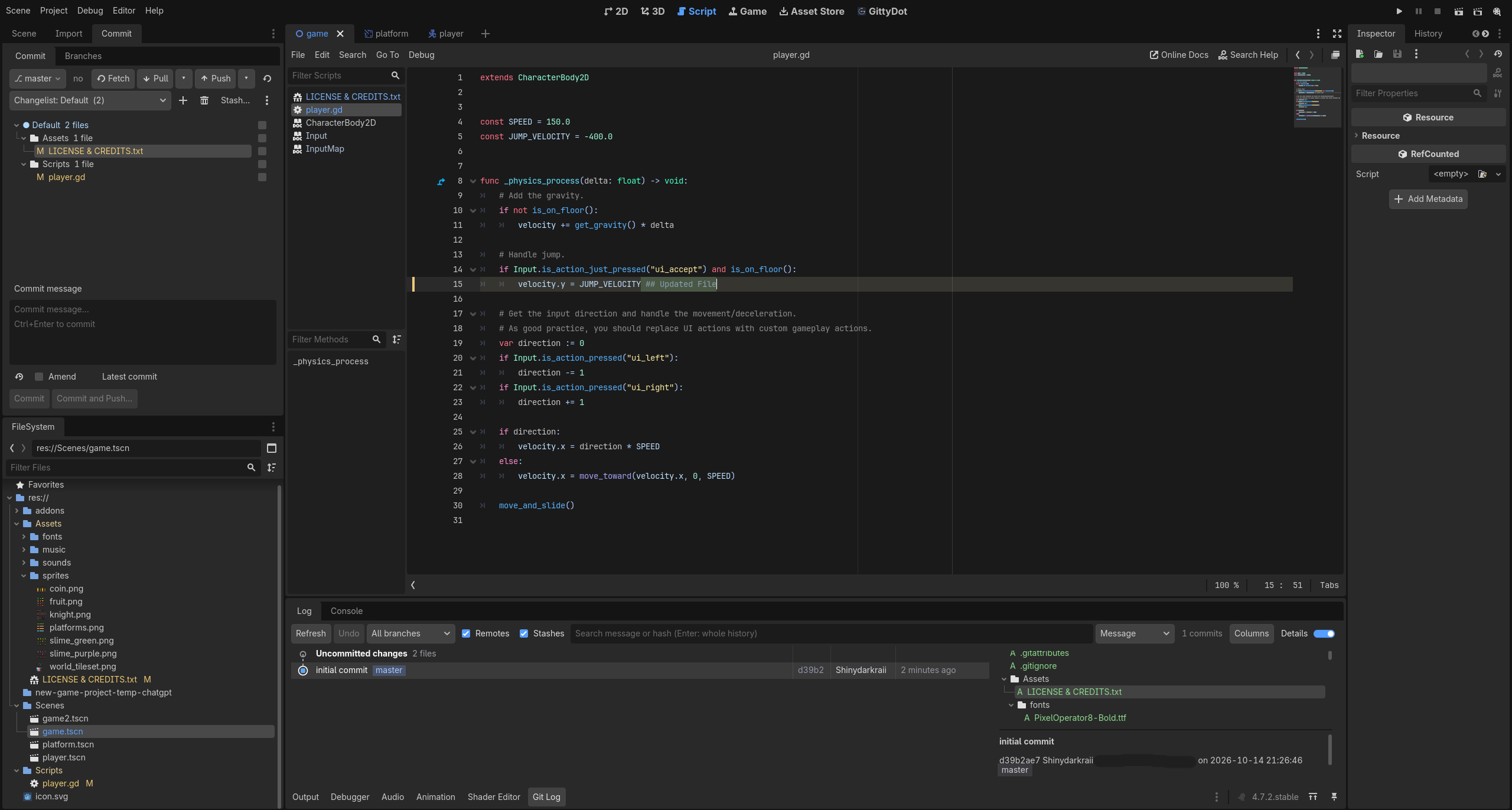
GittyDot brings an IntelliJ-inspired Git workflow to the Godot editor: a focused Commit dock, a central diff editor, changes marked in your scripts, and a Git Log for reviewing history.
It is a fork of Godit 1.1.1, retaining its Git CLI backend and extending its editor integration. GittyDot runs your installed git from GDScript; it does not need the Godot Git GDExtension or a separate Version Control plugin.
Important
0.2.0 is an early release. The verified configuration is Godot 4.7.2 on Windows. Other engine versions, operating systems, and every inherited Git operation have not been validated. This update addresses the five UI issues recorded for 0.2.0.
✨ Features
- Commit dock: stage and unstage files with checkboxes, organize work into changelists, write commit messages, amend, and commit or commit-and-push.
- FileSystem status: see modified, added, renamed, deleted, and conflicted files alongside your normal Godot files.
- File and folder actions: right-click to stage, unstage, add new files, move changes to a changelist, or add literal paths to
.gitignore. Ignoring a tracked file does not remove it from Git. - Central diff editor: choose Side by side or Unified, resize the split, and scroll both panes together. Scrollbars appear when content overflows.
- Editable working-file comparisons: edit the right pane in Latest commit → Working file or Unstaged changes. Save manually or use auto-save; staged snapshots and historical versions remain read-only.
- Finding changes: fixed +/− gutters and a clickable overview show changed ranges and the current viewport in editable comparisons, including deletion boundaries. Both remain visible while scrolling horizontally.
- Inline script changes: grouped gutter markers and character highlights show edits in Godot's Script editor. Click a marker to inspect the previous code, navigate changes, roll back a hunk, or open its diff.
- Automatic saving: project-backed scripts and editable working-file comparisons save after a 350 ms editing pause, preserving Undo and leaving staging untouched.
- Commit history: inspect the commit graph, search history, review file history, and double-click a changed file to open its diff in the main screen. Initial commits compare against an empty baseline.
- Selected-commit amend: select the latest or an earlier branch commit. Older-commit amendments require Git 2.45.0+, confirm the history rewrite, and support conflict Continue/Abort recovery.
- Git console and diagnostics: run Git commands, review their literal output, and use Show details in Console to jump to a failure. Destructive console operations ask for confirmation.
- Additional Git tools: inherited branch, tag, remote, stash, merge, rebase, cherry-pick, conflict-resolution, blame, image-diff, scene/config inspection, and optional Git LFS helpers remain available.
Read the usage guide for comparison modes, partial staging, draft recovery, and advanced workflows.
🛠 Installation
- Download a GittyDot release ZIP, or clone this repository.
- Place the complete
addons/gittydot/folder in your project'saddons/folder. Keep itsLICENSEandREADME.mdwith it. - Disable Godit if it is installed, then enable GittyDot in Project Settings → Plugins.
- Restart the editor after replacing an existing installation.
your-project/
├── project.godot
└── addons/
    └── gittydot/
        ├── plugin.cfg
        ├── plugin.gd
        ├── icon.png
        ├── LICENSE
        ├── README.md
        ├── dock/
        └── util/
Keep the folder named gittydot, directly under addons/. Enable only one of Godit and GittyDot.
Requirements
- Godot 4.7.2 on Windows is the tested setup.
- Git must be installed and available on the editor's
PATH. - The project must be inside a Git repository; GittyDot can initialize one through its dock.
- Configure Git authentication before using remote operations.
- Git 2.45.0+ is required specifically for amending an older commit.
- On Windows, GittyDot disables the legacy experimental filesystem-monitor option in its Git child commands. Git older than 2.37 also runs with filesystem monitoring disabled; this does not change global Git configuration.
- Git LFS is optional, needed when using the LFS helpers.
- GitHub CLI (
gh) is optional, used only to create/publish a GitHub repository from the initialization dialog. Missing installations are skipped quietly.
🚀 Quick start
- Open Commit and select a changed file to review it in the central GittyDot screen.
- Choose Side by side to edit a supported working file on the right, or Unified to inspect the diff.
- Tick the files you want to stage. Untick them to unstage; use a folder's context menu for actions on its displayed descendants.
- Enter a commit message, then choose Commit or Commit and Push.
- Open Git Log in the bottom panel to inspect history. Double-click or press Enter on a changed file to open its historical diff.
Auto-save is on by default. Automatic staging, adding new files, and background fetching are off. Saving never commits or pushes your work.
Use Project → Tools → GittyDot to toggle auto-save, blame, and background fetch. With auto-save off, editable comparisons still support Save and Ctrl/Cmd+S.
Which comparison should I use?- Latest commit → Working file: includes both staged and unstaged changes. The working file is editable in Side by side.
- Unstaged changes: compares the index with the working file. The working file is editable in Side by side.
- Staged changes: compares the latest commit with the index; read-only.
- Commit or stash history: compares saved revisions; read-only. A commit is compared with its first parent, or an empty tree for the initial commit.
Editable panes show complete documents. Collapsed context, patch buttons, whitespace/noise filtering, and structured Scene/Settings inspection are disabled in this mode. Use the Commit checkboxes to stage files, or an applicable read-only view for patch actions.
⚠️ Known limitations
The 0.2.0 acceptance checklist records the completed Commit dock, change gutter, overview, diff palette, and Open in Editor improvements.
Editable comparisons currently support existing project-local UTF-8 files up to 2 MiB / 20,000 lines. File symlinks, binaries, images, deleted files, staged snapshots, and historical revisions are read-only.
Multiple comparison tabs, broader keyboard shortcuts, and further image/scene workflow polish remain future work. FileSystem decorations depend on Godot's internal editor controls and need checking after engine upgrades.
🔑 Authentication and local data
Set up your system Git credentials first using a credential helper or SSH keys. GittyDot does not provide a password or token entry screen. Its child Git processes use noninteractive prompt/editor settings, restored when the plugin is disabled.
SSH is scoped to GittyDot's Git processes with ssh -o BatchMode=yes; the plugin does not change the editor's SSH environment or adopt a repository's core.sshCommand. A trusted user-supplied GIT_SSH_COMMAND takes precedence. See the guide for details.
Preferences and changelists live in .godot/gittydot/. Diff, blame, patch, and recovery files live in <project-name>-temp-chatgpt/gittydot/. These are local project files; the temporary-folder name is a development convention, not a callback or external service.
Git hooks and helpers run with your permissions. GittyDot does not sandbox repository code.
📖 Documentation
- Usage guide — comparisons, staging, amend, auto-save, recovery, preferences, and authentication.
- 0.2.0 roadmap — implemented UI fixes and acceptance checks.
- Maintainer notes — architecture, ownership, and behavior contracts.
- Upstream README and source baseline — Godit provenance; upstream installation instructions describe Godit.
🧪 Testing
The latest graphical verification on 2026-10-15 passed 265 editor integration checks, with 0 failures, 0 script errors, 0 engine errors, and none of the reported Unicode, missing-process, or raw-icon startup diagnostics. It ran on Godot 4.7.2 / Windows / Git 2.53.0. A separate 34-check graphical compatibility run also passed using Git 2.36.1.
The checks exercise real editor saves and Undo, partial staging, editable comparisons, recovery, historical diffs, selected-commit amendments, console diagnostics, file/folder actions, gutter geometry, and split-pane scrolling. Separate first-install and restart checks verified initialization with GitHub CLI absent.
From the standalone source repository, with Python 3, Git, and Godot installed:
python tools/test_gittydot.py --godot 'C:\Tools\Godot\Godot.exe'
python tools/test_gittydot.py --godot 'C:\Tools\Godot\Godot.exe' --visual
Replace the Godot path with your installation. Test fixtures stay inside the repository's temporary folder and do not stage or commit the source repository. These checks do not establish cross-platform support, all remote authentication setups, every inherited operation.
💬 Feedback and contributions
Report a bug or suggest a feature. For bugs, include your Godot and Git versions, operating system, reproduction steps, and relevant screenshots or errors. Remove credentials from logs before sharing them.
Contributions should preserve editor drafts, Undo, partial staging, and the Git backend's existing behavior. Read the maintainer notes and test changes in an isolated project.
© Credits and license
The GittyDot fork is maintained by Shinydarkraii. Its Git backend and many widgets originate in Godit, created by Michal Rychtar. The original copyright and attribution are retained under the MIT License.
Changelog for version GittyDot - Godot Git Plugin
2026-10-14 22:04:57
No changelog provided for this version.