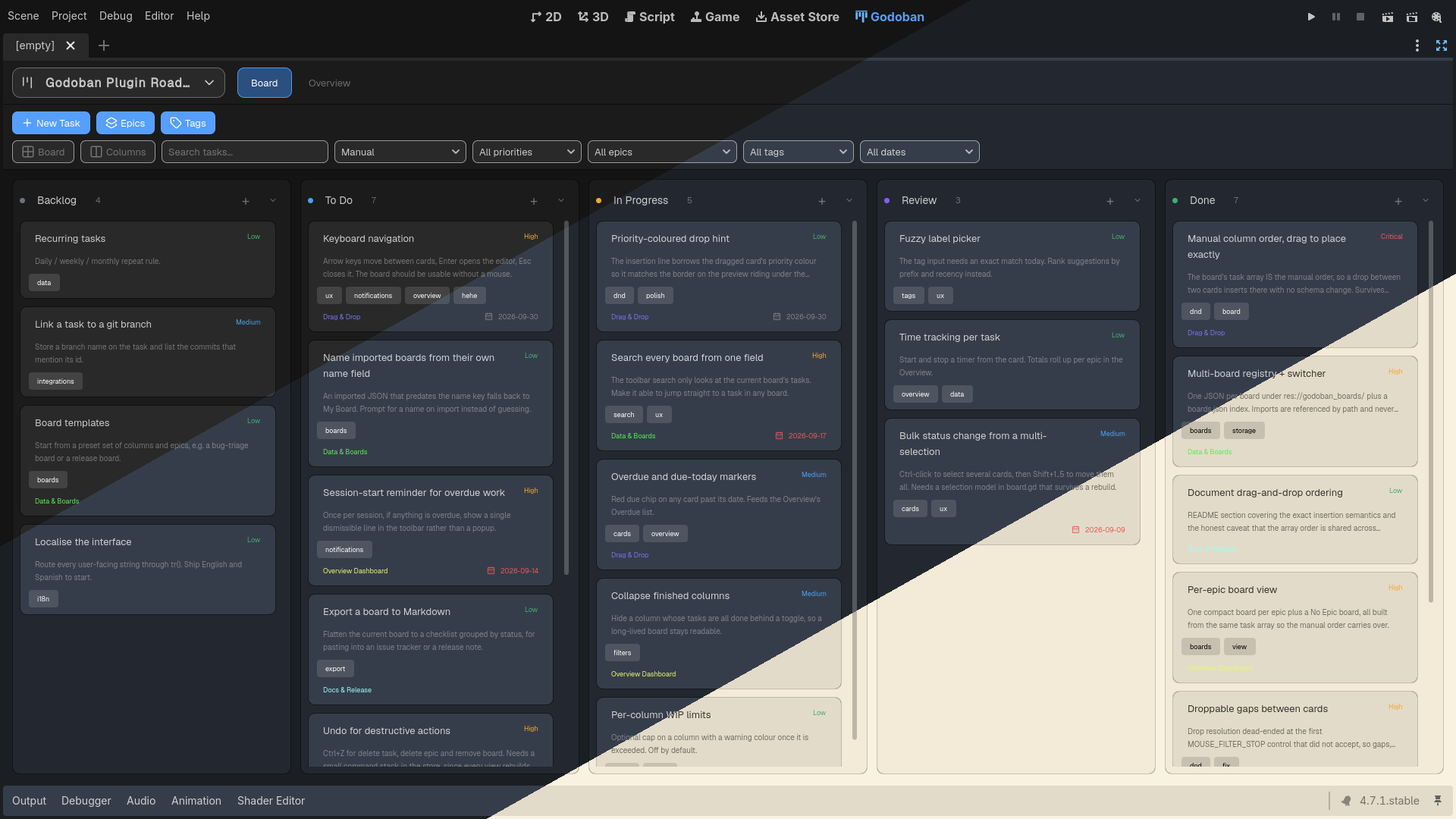
Godoban — Advanced Task Manager for Godot
Stop managing your project's work in spreadsheets, sticky notes, or scattered chat threads. Godoban brings a full, lightweight task-management system straight into the Godot editor, so you can plan, track, and ship right where you work.
Godoban runs as a first-class editor tab — right next to 2D / 3D / Script. It's a self-contained addon: drop it into any Godot 4 project and start planning.
Due to the Godot Asset Store's approval process, not every version will be uploaded. Since each submission has to be reviewed, minor fixes and updates may be bundled into a later release. To see all versions, visit the GitHub repo (View source code link in the store).
Migrating from a version before multiple boards? Godoban 1.1.0 introduced one file per board and no longer reads the old single-file layout. Your old board isn't lost — click the board chip → Import board and select your previous
godoban_data.json.
If you found Godoban helpful, a positive short review would mean a lot — it helps other devs find the plugin and tells me what to build next. 💙
If you stumble into a bug, issue, or vulnerability, please report it on the GitHub issue page in the repository. I will do my best to fix issues quickly and keep the extension smooth and bug-free. 😀
🗃️ Multiple Boards
Keep every project — or every area of one project — in its own board, and switch between them instantly from the toolbar.
- Board chip in the top bar shows the active board's name; click it to open the switcher.
- Board switcher popup lists every known board, plus New board and Import board.
- Per-board files — each board is its own named JSON under
res://godoban_boards/, indexed by aboards.jsonregistry that also marks which board is current. - Import by reference — imported boards stay exactly where you pick them, referenced by path. Godoban never copies, moves, or renames your file.
- Rename any board with the pencil on its row; the board's name is updated without renaming or moving the underlying file.
- Remove from list with the "×" — it only unregisters the board. The file is never deleted.
- Easy switching — every view, filter, and chart rebuilds for the active board automatically.
Godoban never creates a board for you: a fresh install opens on a friendly "No board yet" state, and you make or import your first board from the chip.
🗂️ Board & Tasks
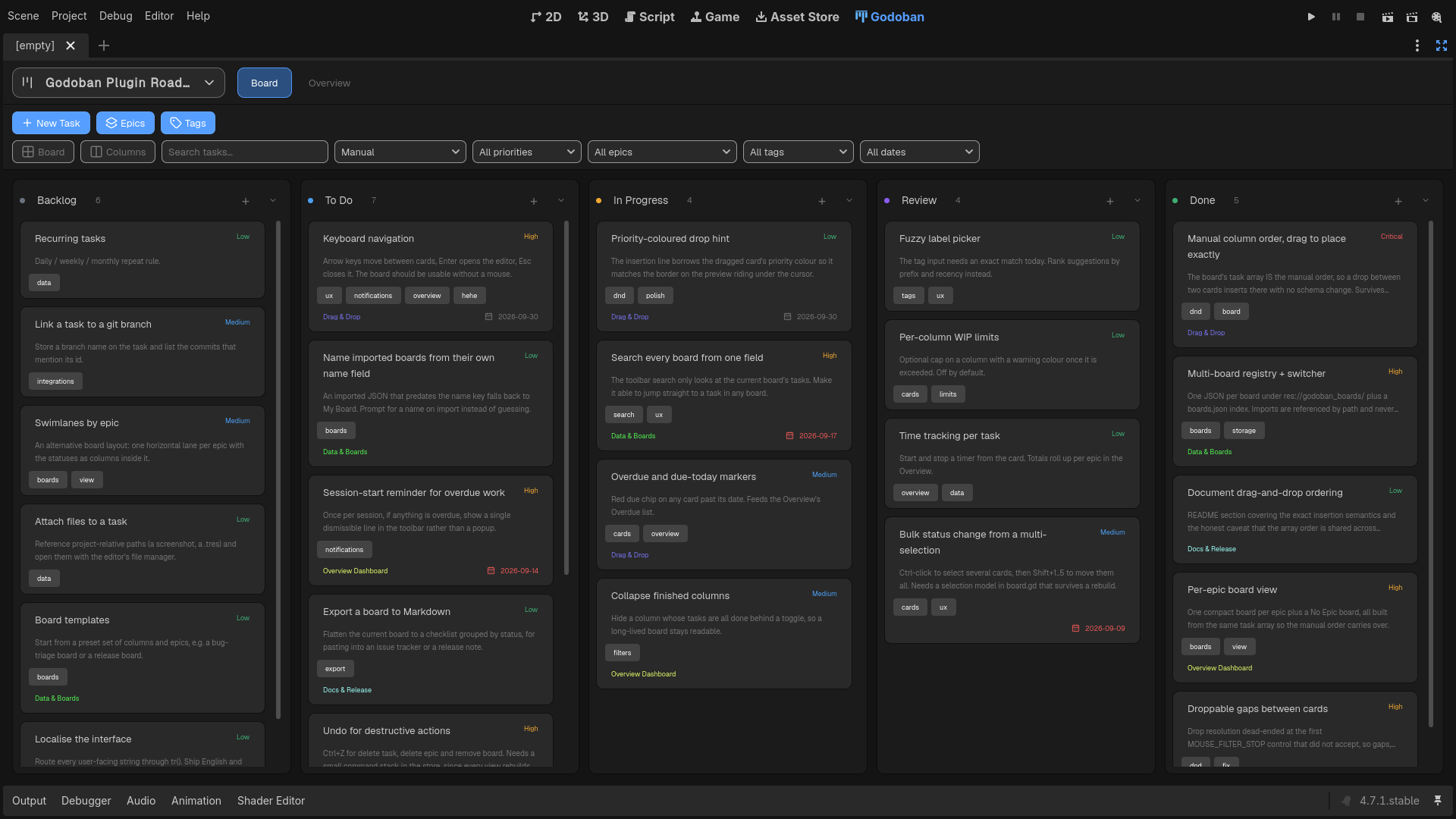
A familiar, intuitive kanban board with five fixed columns — Backlog, To Do, In Progress, Review, and Done.
- Drag & drop cards between columns to change status, and place them exactly where you want within a column.
- Manual ordering is the default — your card arrangement is saved and persists across editor restarts, board switches, and epic views.
- Precise placement — a live insertion indicator shows where a dragged card will land.
- Priorities — Low, Medium, High, and Critical, color-coded on every card.
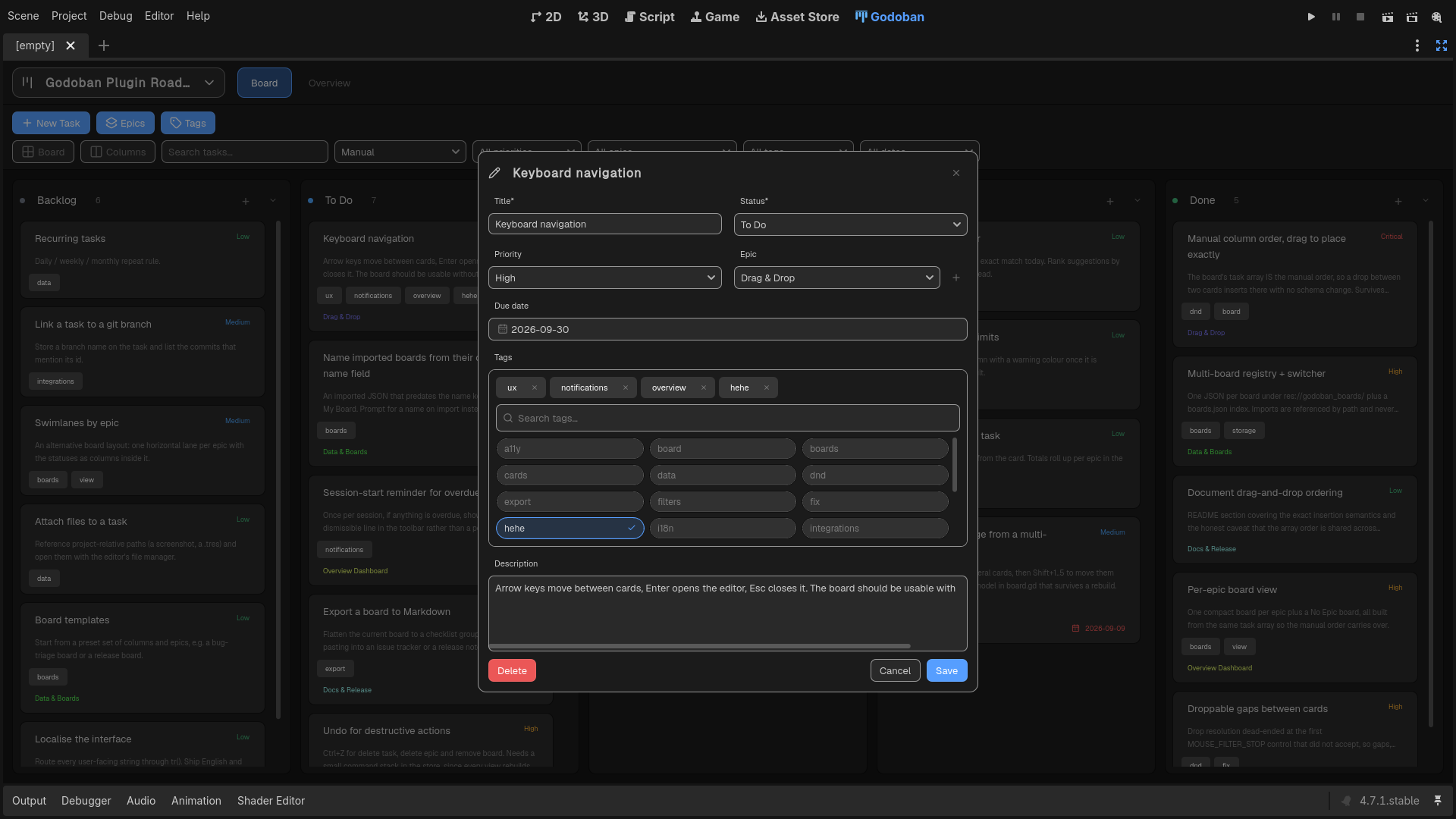
- Tags — free-form tags with a searchable picker. Create, rename, and delete tags from Manage Tags, with renames applied across tasks using that tag.
- Due dates — set them with a clean calendar popup (Godot ships no date picker, so one is included).
- Descriptions — multi-line notes on every task.
- Task details — click any card to view its details, including status, dates, tags, and description, with an Edit button when you want to make changes.
- Quick creation — each column has its own "+" button to add a task directly.
- Collapsible columns — fold a column to a narrow pill to reclaim screen space.
📚 Epics
Group related tasks under lightweight, color-coded umbrellas.
- Each epic is just a name + accent color — intentionally simple.
- Tasks reference an epic by id, so relabeling is a single field change.
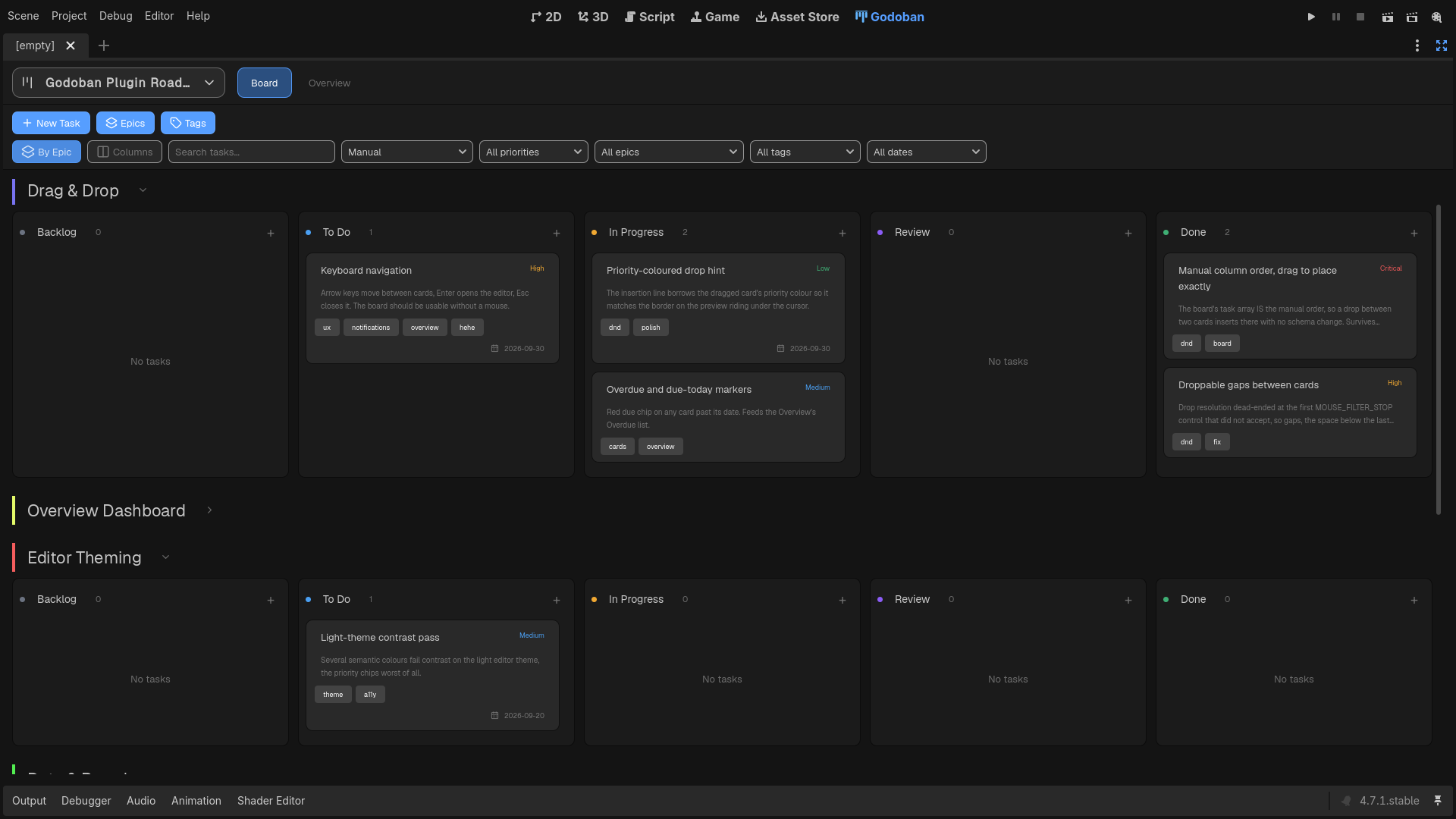
- Toggle from one big board to a compact board per epic, plus a "No Epic" board.
- Cards show a colored epic chip in the all-tasks view.
- The overview shows each epic's progress (
done/total). - Deleting an epic safely unassigns its tasks instead of orphaning them.
🔍 Search & Filters
Find exactly what you're looking for — fast.
- Live search across title, description, and tags.
- 7 sort modes — Manual, created (oldest/newest), latest edited, priority, due date, and alphabetical. Your manual arrangement is preserved underneath the other sorts and can be restored at any time.
- Filter by priority, epic, or tag.
- Date bounds — overdue, due today, due this week, or no due date.
- Every filter combines (AND), and empty results show a friendly hint.
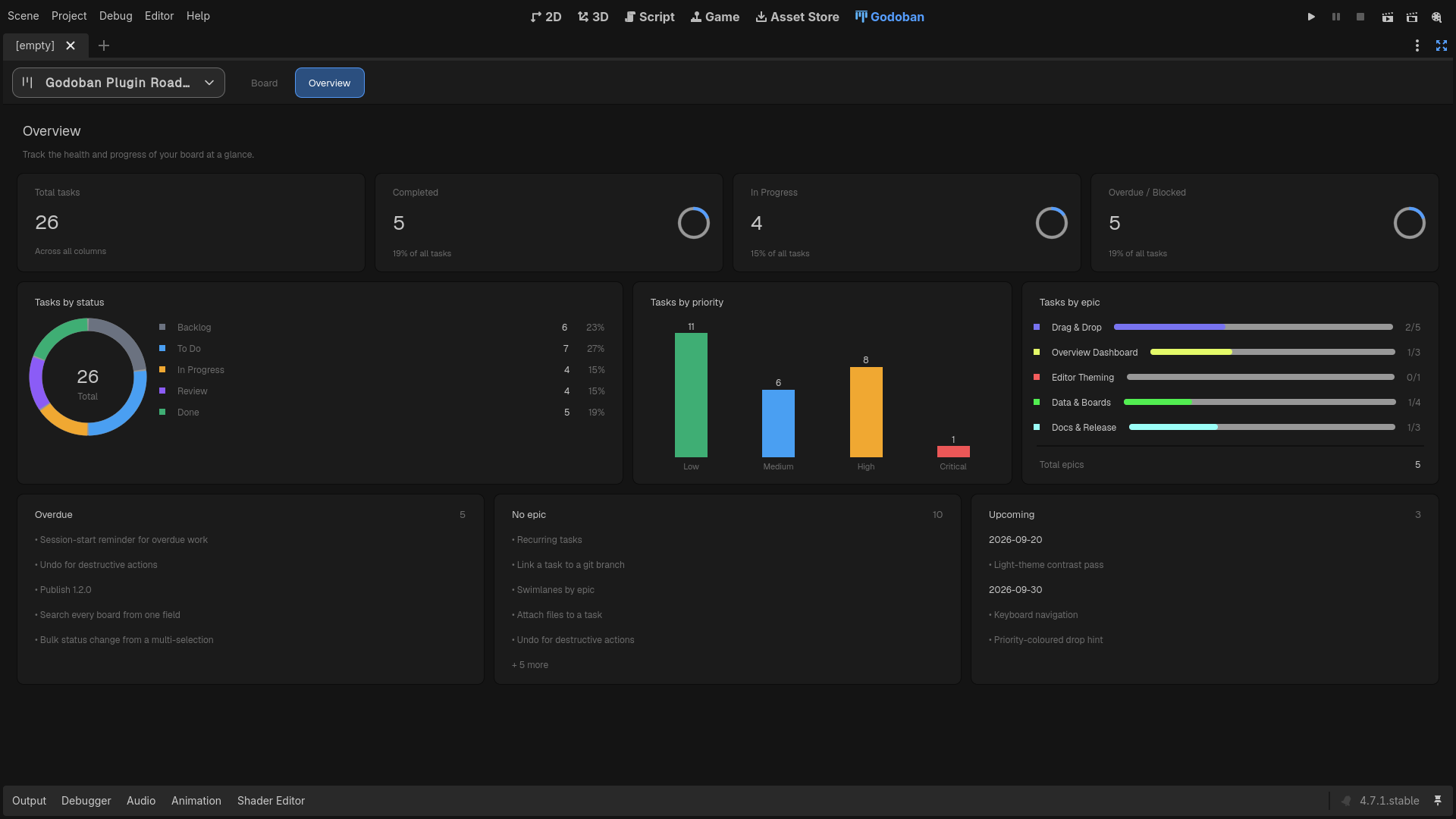
📊 Overview Dashboard
A full analytics page that rebuilds live with every change.
- Summary cards — total, completed, in-progress, and overdue/blocked, with progress rings.
- By-status donut with a per-status legend and percentages.
- Priority bars comparing task counts across priorities.
- Per-epic progress bars.
- Actionable lists — overdue tasks, tasks with no epic, and upcoming due dates grouped by day.
🔄 View Modes
The same data, presented the way you want it.
- All tasks on one board, or one board per epic.
- Vertical (classic columns) or horizontal (cards flow across a row per status).
- Equal-width columns keep the board balanced regardless of how many cards each column contains; collapsed columns remain narrow.
- Layout toggles are pure transforms — nothing about your data changes.
🎨 Editor-Native Theme
The board matches your editor theme, so it looks like it belongs right in the editor — and updates automatically whenever you change the theme.
- Matches the editor — colors follow your current theme, dark or light.
- Auto-updates — the palette re-syncs on every theme change.
💾 Data & Persistence
- Boards live under
res://godoban_boards/— one pretty-printed JSON per board, indexed by aboards.jsonregistry (id → name → path, plus which board is current). - Imported boards stay wherever you picked them and are referenced by path — they're not moved into the folder.
- Auto-saved on every change (debounced ~0.5s), plus on editor save and exit, and before any board switch so nothing is lost.
- Manual task order is persistent — each board's
tasksarray stores the arrangement of tasks in their manual column order, so drag-and-drop changes are preserved and appear as ordinary git-diffable changes. - Removing a board from the list only unregisters it — Godoban never deletes the underlying file. To delete a board for real, remove its JSON yourself.
- The JSON is git-diffable — easy to hand-edit, version, or move between machines.
- A board file with no
"name"field is imported as "My Board"; rename it anytime from the switcher.
🛠️ Installation
- Copy the
addons/godoban/folder into your project'saddons/directory. - Open Project → Project Settings → Plugins.
- Enable Godoban.
A Godoban tab appears next to 2D / 3D / Script. On first run, it shows a "No board yet" state. Click the board chip in the top bar to New board or Import board and start planning.
🧩 Compatibility
- Godot 4.7+
- GDScript (
@tool, runs entirely in the editor) - No scene files — the whole UI is built in code, with a central theme and rasterized SVG icons.
📄 License
Released under the MIT License. The bundled Geist font (used for the interface) is licensed under the SIL Open Font License.
Changelog for version v1.6.0
2026-09-15 03:22:23
No changelog provided for this version.
Reviews
 Recommended
by Lemon - 15 September 2026
Recommended
by Lemon - 15 September 2026
Very useful add on for every Godot user to track the development of your game
Recommended
by Loregret - 06 September 2026
This is what I was looking for! Thanks.
Recommended
by Gustavo Encinas - 17 September 2026
This is a game changer plugin. Specially if you are beginning. Listing and planning features and fixes its so simple. It also is a great way to feel the progress you make with your projects. Stragith to the point KAMBAN style. Im loving it. If I could request a feature, it owuld be to be able to nest the cards into each other.
Recommended
by Clemi dumi - 10 September 2026
I would recommend this to anyone using godot.
Recommended
by Joshua Hanson - 24 September 2026
Amazing, feature-rich addon, best task manager plugin on the asset store! So many features, from labels to organization to statistics and more!
Recommended
by Max Bartle - 06 October 2026
Login to write a review.