Godot AI connects MCP-compatible AI assistants (Claude Code, Codex, Antigravity, etc.) to a live Godot editor via MCP. Inspect and build nodes, scenes and polished UI. Edit and attach scripts, animate your scenes, create materials and particle effects, run tests, and read editor data all from the chat.
From the creators of MCP for Unity — the most widely used gamedev MCP, with 9,500+ GitHub stars and hundreds of thousands of users — built from the ground up for Godot. Robustness and deep QA are core to our approach, shaped by over a year of development and community feedback on MCP for Unity. Full docs and source on GitHub.
Discord: Join the community
Setup video: Watch on YouTube
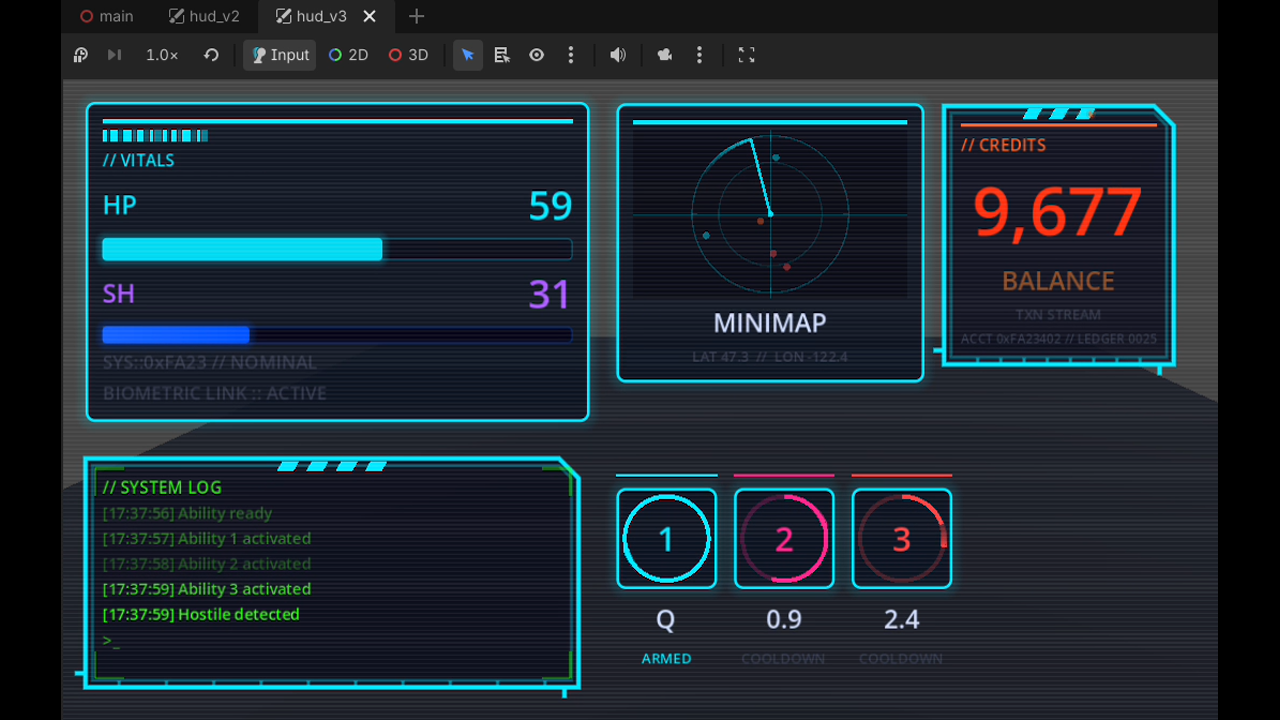
🎬 Demo project — a set of dynamic, interactive UI panels drawn with Godot AI 100% procedurally, no textures, sprites or shaders. About 2 hours of work: cyberpunk-hud-demo
✨ Features
- 120+ MCP tools spanning scenes, nodes, scripts, animations, UI, themes, materials, particles, input mapping, and project settings
- Materials:
StandardMaterial3D,ORMMaterial3D, andShaderMaterial - Particles: GPU + CPU, 2D + 3D, with seven presets (
fire,smoke,spark_burst,magic,rain,explosion,lightning) - Smart screenshots so AI agents can see the scene
- Build entire UI hierarchies from a single prompt
- One-click client setup for 18 MCP clients — Claude Code, Codex, Antigravity, Cursor, Windsurf, VS Code, Zed, Gemini CLI, Cline, Kilo Code, Roo Code, Kiro, Trae, Cherry Studio, OpenCode, Qwen Code, and more
- Authoring tools for AnimationPlayer (with
fade/slide/shake/pulsepresets), Camera2D/3D (configuration, follow, damping, limits), AudioStreamPlayer 2D/3D, and built-in Resources (meshes, shapes, curves, gradients, styleboxes — inline or as.tres) - Multi-instance support across multiple Godot editors
⚙️ Requirements
Godot 4.5+ (4.7+ recommended) and an MCP client.
🚀 Quick Start
- Install
uv(one-time):- macOS/Linux:
curl -LsSf https://astral.sh/uv/install.sh | sh - Windows (PowerShell):
irm https://astral.sh/uv/install.ps1 | iex
- macOS/Linux:
- Install the addon from the Asset Library (or drop
plugin/addons/godot_aiinto your project'saddons/folder). - In Godot: Project → Project Settings → Plugins — enable "Godot AI".
- Open the Godot AI dock and click your MCP client to configure it in one click.
- Open your MCP client and start prompting.
🔒 Privacy & Telemetry
Godot AI uses limited, anonymous telemetry to improve reliability. It does not collect file paths, project names, scene or source contents, or other user-identifying data. Telemetry can be fully disabled with GODOT_AI_DISABLE_TELEMETRY=true or DISABLE_TELEMETRY=true (no traffic, no UUID generated). More details: https://github.com/hi-godot/godot-ai/blob/main/docs/TELEMETRY.md
Changelog for version 3.2.1
No changelog provided for this version.
Reviews
 Recommended
by doglike cat - 29 April 2026
Recommended
by doglike cat - 29 April 2026
The best MCP tool in its class. Nothing else comes close. The developer is incredibly responsive. Fast communication, highly recommended!
Recommended
by Yichun Wang - 08 August 2026
Thank you!
Recommended
by Lee joe - 30 April 2026
Thank you !
Recommended
by Josh Lindsey - 21 June 2026
Super easy to get setup and started. Can't wait to see where this goes.
Recommended
by fire nado - 28 April 2026
So far, the tools available feel very fleshed out, and installation was very easy. I just noticed it updates by itself, I don't have to reinstall. Very polished plugin; I love it, wish i installed it sooner lol.
Recommended
by anna malovsky - 27 April 2026
Perfect for starting a new project and testing. LLM with live MCP tools to test with and debug is only the start.
Recommended
by ٴ ٴ - 05 July 2026
literally a total game changer
Recommended
by Marc - 26 April 2026
I’ve been using this plugin while building my Godot project, and it’s honestly been a huge help. Being able to ask my AI assistant to inspect scenes, check nodes, wire things up, and help debug without digging through everything manually saves me a ton of time. The dev is also super responsive and receptive to feedback, and I’ve even been able to contribute to the add-on myself.
 Not recommended
by Teoras - 07 September 2026
Not recommended
by Teoras - 07 September 2026
It's fine when it works, but the issue is it doesn't work most of the time :( Installed it following the steps, only for it to error out when configuring. Turns out that the provided steps to install were missing a step, which is to add a policy for your windows user in order for the MCP to be able to access powershell, which it cannot do without that step. After about half an hour it started working and I got some work done with it, great! Then I restarted the game and it stopped working again, only this time it stopped giving me any error codes. It no longer sees the AI's I configured earlier, either... I noticed that there was an update and I thought "hm, maybe that will fix my issue" but nope, the update didn't work either :D Yeah I don't know, maybe the other reviews are fake but it's just flat out broken on my end. Only way I can get it to work is to manually delete it, reinstall it and then update it.
Recommended
by Dennis Field - 20 June 2026
It kickstarted my game development like nothing else I've ever tried before. It's like a super power.
Recommended
by Herman - 07 September 2026
I don't know if I used all the features, but I use it when needed and it works. So recommend!
Recommended
by Tomasz Wieczorek - 08 August 2026
Guys UBER GREAT WORK - This work super good and stable. I personally use it with Claude Desktop and it works perfect. Super easy connection, easy updates - like is there anything else you can ask for ??? (beside more limits on Claude :P) Great job again team, keep it coming!
Recommended
by Kaev - 28 June 2026
Great tool, great community. Incredibly easy setup, works fine with latest Godot versions and had no problems with me working on a C# project.
Recommended
by Ismail Dev - 27 June 2026
Best MCP
Recommended
by Joevans - 31 July 2026
Amazing! But needs Grok integration.
Recommended
by Ruka - 02 July 2026
Amazing tool. Multiplies the speed at which you can work. Can't imagine working without it now.
Recommended
by Pio Sammut - 08 May 2026
Amazing add-on and very responsive dev i had an issue with setup and got a reply immediately, few minutes later ny godot-ai tool was up and running. :))
Not recommended
by Butab - 15 August 2026
ai slop
Recommended
by loopeverything - 07 September 2026
Recommended
by Bruno D. Dutra - 20 August 2026
Recommended
by ZByte 16 - 30 July 2026
Recommended
by freesnipergang#7134 - 14 June 2026
Recommended
by GamingFirstOne - 03 June 2026
Recommended
by melvspace - 02 June 2026
Recommended
by Leonid V. Fedorenchik - 31 May 2026
Login to write a review.