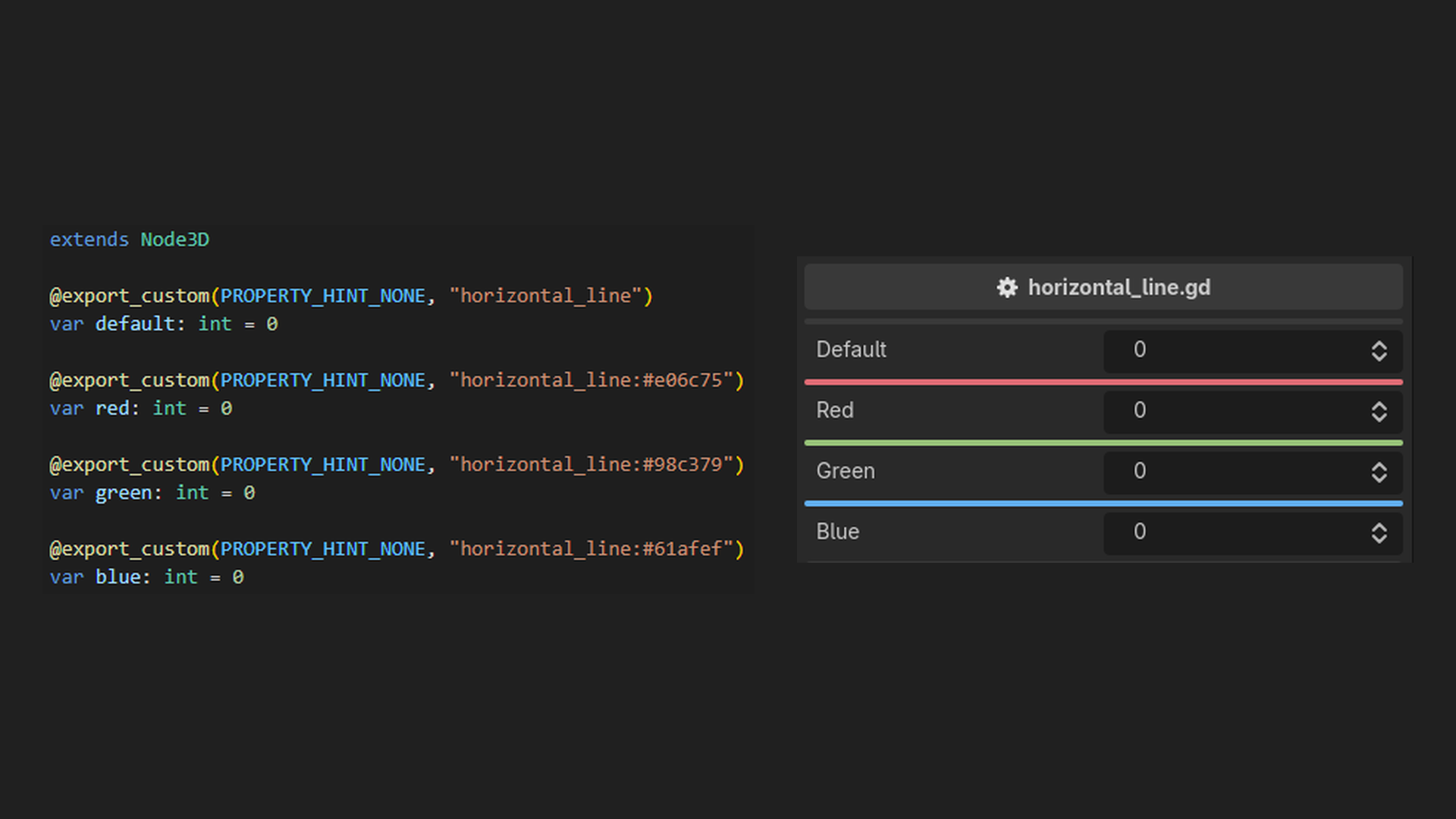
The addon expands the range of things you can say about an exported property, so that you can build powerful inspectors without writing an EditorInspectorPlugin or an EditorProperty of your own. Conditional visibility, value clamping, validation messages, help boxes and custom widgets are all written inline, next to the property they describe.
It's built as a GDExtension in Rust, and it is aimed at GDScript users.
The documentation covers every attribute.
Overview
There are four families - Decorator, Drawer, Meta and Validator attributes.
Decorator Attributes
Decorator attributes draw something extra above a property, instead of replacing the way the property itself is drawn.
Unlike drawer attributes, a property can have any number of decorator attributes, and they can be combined with a drawer attribute. They stack in written order.
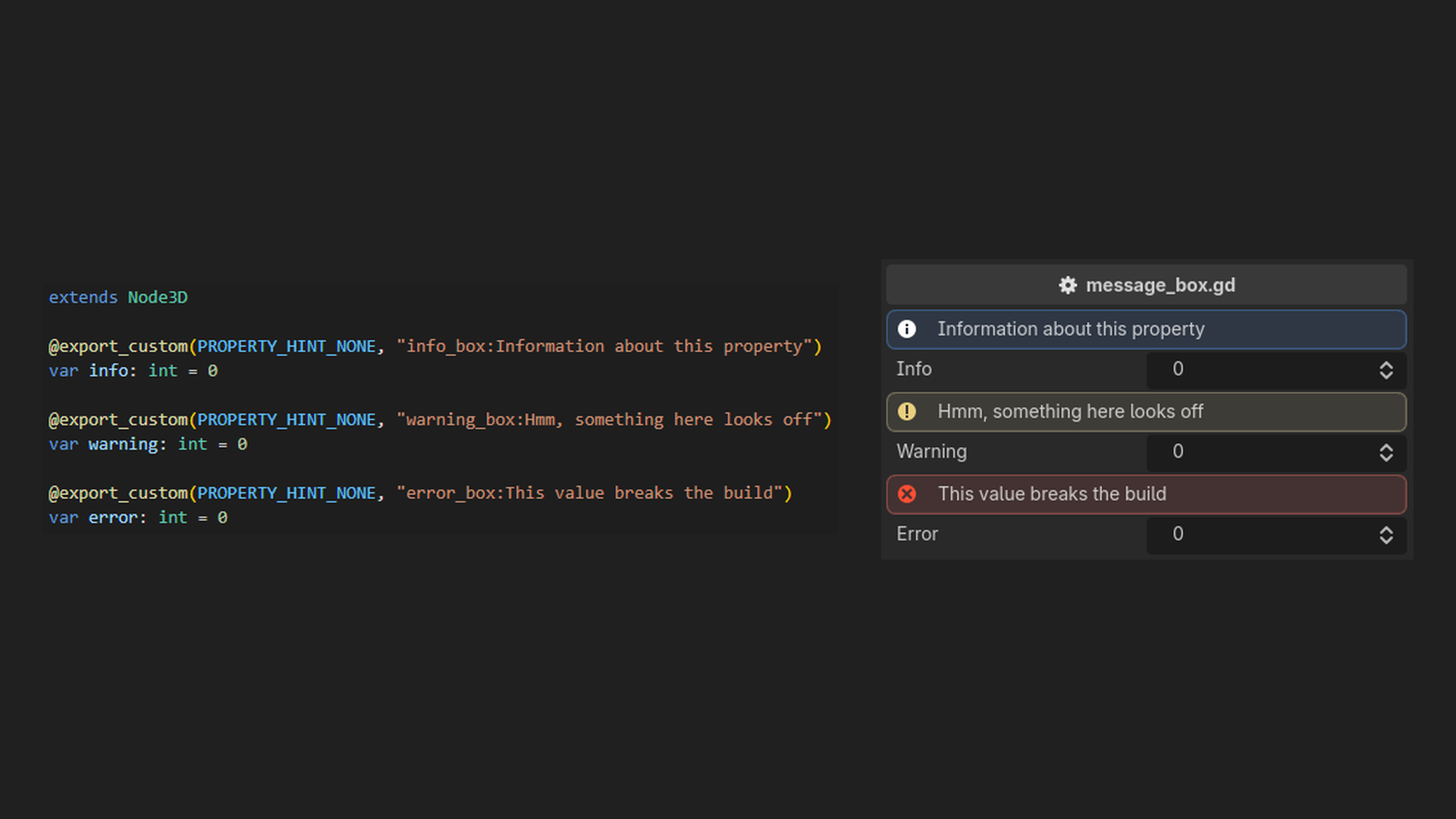
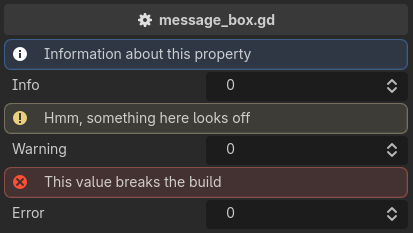
info_box / warning_box / error_box
Used for providing additional information.
extends Node3D

@export_custom(PROPERTY_HINT_NONE, "info_box:Information about this property")
var info: int = 0

@export_custom(PROPERTY_HINT_NONE, "warning_box:Hmm, something here looks off")
var warning: int = 0

@export_custom(PROPERTY_HINT_NONE, "error_box:This value breaks the build")
var error: int = 0
Drawer Attributes
Drawer attributes replace the property's widget with one of their own.
A property can have only one drawer attribute. If it has more, the last one wins and the others are reported as errors.
A drawer combines freely with the other families.
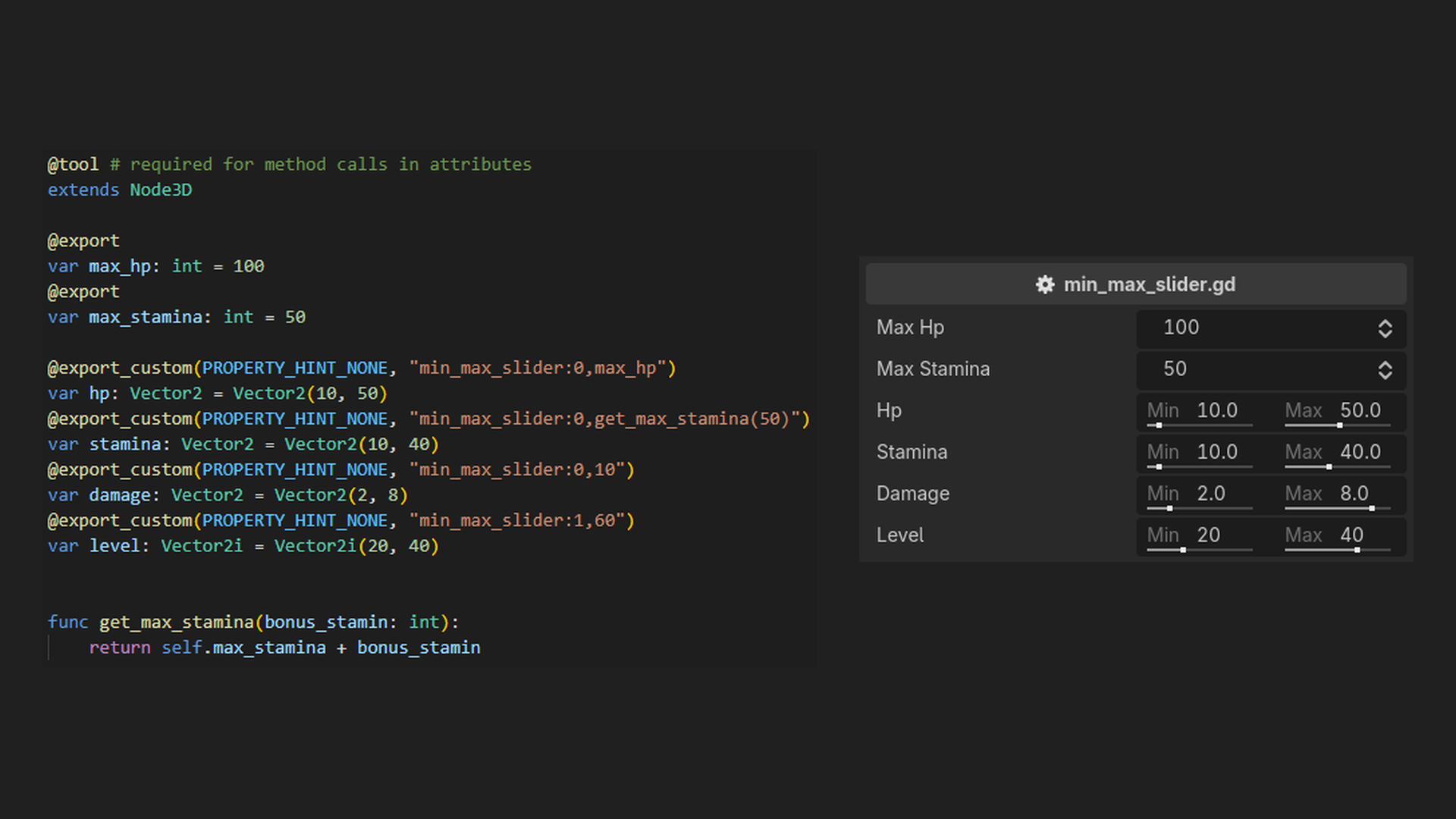
min_max_slider
A double slider. The min value is saved to the x component and the max value to the y component of a Vector2 or Vector2i property.
Both bounds are expressions, so a bound can be a literal, another property, or a method call, and the slider follows it when it changes.
@tool # required for method calls in attributes
extends Node3D

@export
var max_hp: int = 100
@export
var max_stamina: int = 50

@export_custom(PROPERTY_HINT_NONE, "min_max_slider:0,max_hp")
var hp: Vector2 = Vector2(10, 50)
@export_custom(PROPERTY_HINT_NONE, "min_max_slider:0,get_max_stamina(50)")
var stamina: Vector2 = Vector2(10, 40)
@export_custom(PROPERTY_HINT_NONE, "min_max_slider:0,10")
var damage: Vector2 = Vector2(2, 8)
@export_custom(PROPERTY_HINT_NONE, "min_max_slider:1,60")
var level: Vector2i = Vector2i(20, 40)


func get_max_stamina(bonus_stamina: int):
    return self.max_stamina + bonus_stamina
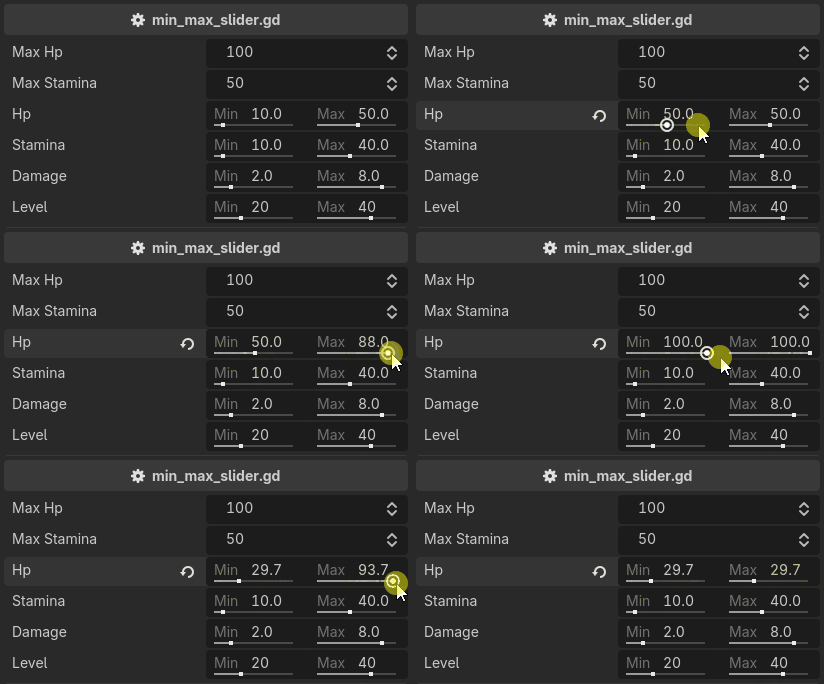
The attribute takes both bounds, in that order:
min_max_slider:{min},{max}. Applied to anything other than aVector2or aVector2i, it reports an error and the property falls back to its default widget.
Meta Attributes
Give properties meta data. A property can have more than one meta attribute.
A meta attribute draws nothing of its own. It answers a question about the property - is it visible, is it editable, what is it called, who should be told when it changes - and several conditions on one property are ANDed.
show_if / hide_if
Shows or hides the property, along with any decorators above it, based on some condition.
The condition is an expression evaluated against the edited object, so it can read a property, compare an enum value, or call a method.
@tool # required for method calls in attributes
extends Node3D

enum WeaponType { MELEE, RANGED, MAGIC }

@export
var is_immortal: bool = false

@export
var weapon_type: WeaponType = WeaponType.MELEE

@export_custom(PROPERTY_HINT_NONE, "show_if:weapon_type == WeaponType.MELEE")
var melee_class: String = "class_name"

@export_custom(PROPERTY_HINT_NONE, "show_if:!is_immortal")
var health: int = 100

@export_custom(PROPERTY_HINT_NONE, "hide_if:!is_at_max_health()")
var at_max_health: String = ""


func is_at_max_health():
    return self.health >= self.max_health
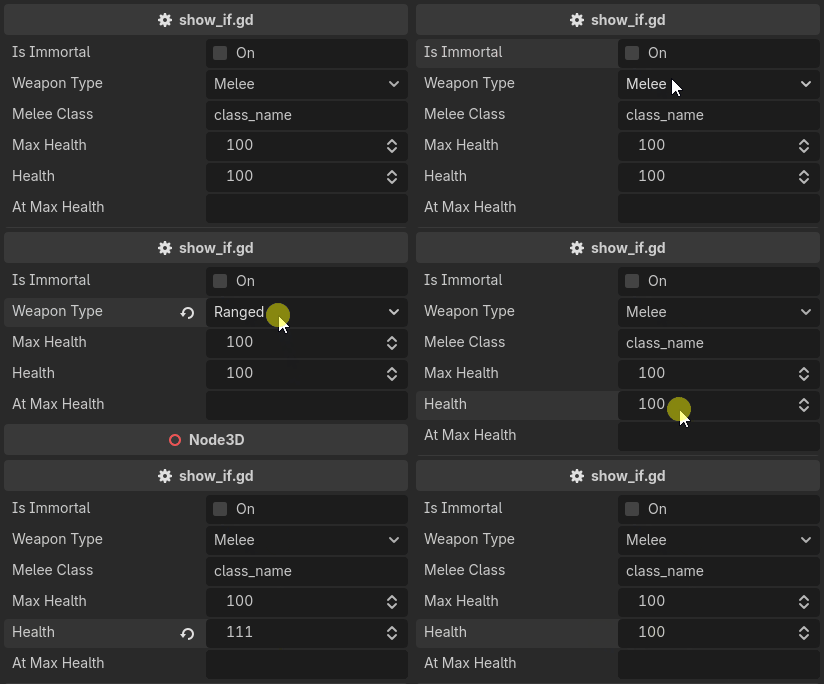
hide_if is show_if with the condition negated. The two are the same attribute written from either side.
You can have more than one condition. They are ANDed, and &&, ||, ! and parentheses are available inside a single condition as well:
@export_custom(PROPERTY_HINT_NONE, "show_if:flag_0; show_if:flag_1")
var show_if_all: int = 0

@export_custom(PROPERTY_HINT_NONE, "show_if:flag_0 || flag_1")
var show_if_any: int = 0
A condition that fails to evaluate counts as satisfied, so a property never disappears because of a typo. The failure is reported instead.
Validators do not run on a hidden property, and its message bubble hides with it.
Validator Attributes
Used for validating properties. A property can have any number of validator attributes.
A validator has two shapes over one job. It either corrects the value, as min_value / max_value does, or it rejects it and draws a message beside the property, as require does.
Validators run before a property's widget is built, and again across every visible property on every inspector edit, so a property whose bound reads another property re-validates when that one changes. They do not run on a property hidden by
show_if/hide_if.
min_value / max_value
Can be used to limit the range of a property. Can be applied to int, float, Vector2, Vector3, Vector4, Vector2i, Vector3i and Vector4i. A vector is clamped component-wise.
Both bounds are expressions, so a bound accepts a literal, another property, or a method call, and a bounded property re-clamps when its bound changes.
@tool # required for method calls in attributes
extends Node3D

@export
var min_hp: int = 0
@export
var max_hp: int = 100
@export
var min_ratio: float = 0.25
@export
var max_ratio: float = 0.75

@export_custom(PROPERTY_HINT_NONE, "min_value:min_hp; max_value:max_hp")
var hp: int = 50
@export_custom(PROPERTY_HINT_NONE, "min_value:get_min_ratio(); max_value:get_max_ratio()")
var ratio: float = 0.5
@export_custom(PROPERTY_HINT_NONE, "min_value:0; max_value:1")
var int_min_0_max_1: int = 0
@export_custom(PROPERTY_HINT_NONE, "min_value:0; max_value:1")
var vector3_min_0_max_1: Vector3 = Vector3.ONE * 0.5


func get_min_ratio() -> float:
    return self.min_ratio


func get_max_ratio() -> float:
    return self.max_ratio
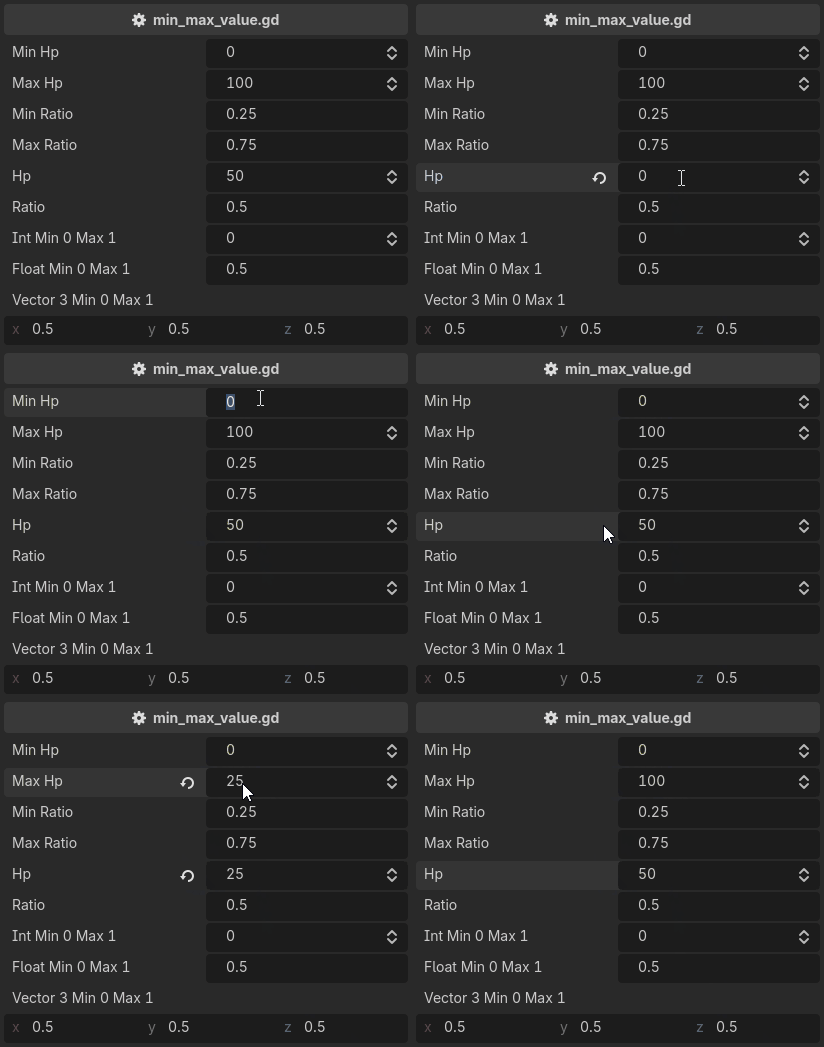
The two are one attribute mirrored, and either can be used on its own.
A correction is written into the value, so it enters the undo history. A drag leaves one undo entry, and undoing it restores what a property held before the drag started, not the value it was clamped to mid-drag.
A contradictory pair such as
min_value:10; max_value:5is not reported. Validators run in written order, so the last one wins, visibly.
Changelog for version v0.1.1
2026-09-17 08:12:10
No changelog provided for this version.
