Description
Changelog
Reviews (2)
Scatter is under active development. APIs, recipe formats, node behavior, and editor workflows may change. Use it in production only if you are comfortable tracking changes.
Why Scatter?
- Native scene structure — work directly on
MultiMeshInstance3D; no Scatter-specific scene nodes are required. - Visual authoring — compose shapes, placement algorithms, transforms, filters, and instance data in a GraphEdit-based editor.
- Editor-only generation — build once in the editor and use the saved MultiMesh buffer at runtime.
- Reusable recipes — graphs are external
.tresresources referenced by scene metadata. - Deterministic output — seeded random operations are reproducible and individual nodes can use independent seeds.
- Viewport tools — draw paths and paint regions directly in the 3D editor.
- Godot-native editing — Undo/Redo, node enable controls, right-click menus, Delete, copy, cut, paste, and duplicate are integrated with the editor.
- Extensible architecture — custom value types, node models, views, gizmos, and viewport tools can be registered by other addons.
Current capabilities
Shape and path authoring
- Box and sphere regular regions with exact direct sampling.
- Editable paths with viewport handles, open/closed modes, and arc-length sampling.
- Painted surface regions driven by physics collision queries.
- Path Tube Region and Path Extrude for converting paths into volumes.
- Shape Transform with adaptive
Shape,Region,Regular Region, andPathports. - Union, Intersection, and Subtract operations with configurable result pivots.
- Global and MultiMesh-local authoring spaces.
Placement
- Random volume or path placement.
- 3D grid placement with Global, Local, and shape-instance coordinate spaces.
- Deterministic Poisson placement for volumes and paths.
- Random, even, and continuous placement along paths.
- Single-instance creation and explicit instance-stream merging.
Instance processing
- Position, rotation, scale, and combined transform editing.
- Random transform and random rotation.
- Array duplication, Look At, snapping, relaxation, and mask-based clustering.
- Physics projection onto colliders.
- Remove Outside and Remove Random filters.
- Random color and custom-data generation.
- Proxy Graph for using the output of another Scatter-enabled
MultiMeshInstance3D. - Ordered, variadic Final Output inputs for combining multiple instance streams.
Requirements
- Godot 4.7 or newer.
- A 3D project using
MultiMeshInstance3D. - Collision geometry is required for Paint Region and collider projection workflows.
- No C# or GDExtension dependency is required; the addon is implemented in GDScript.
Installation
- Download or clone this repository.
- Copy the
addons/scatterdirectory into your Godot project so the plugin file is located at:res://addons/scatter/plugin.cfg - Open the project in Godot.
- Go to Project > Project Settings > Plugins.
- Enable Scatter.
If the project was already open while copying or updating the addon, allow Godot to finish importing the scripts. Restart the editor if the plugin does not appear immediately.
Quick start
- Add a
MultiMeshInstance3Dto your scene. - Assign the mesh you want to instance to its
MultiMeshresource. Scatter can create a compatible localMultiMeshduring Build, but it still needs a mesh to render. - Select the
MultiMeshInstance3D. - In the Inspector, click Create to save and link a new Scatter recipe, or click Load to link an existing
.tresrecipe. - Click Open Editor to open the Scatter bottom panel.
- Edit the graph and click Build.
- Click Save or press Ctrl+S while the Scatter editor has focus to save the recipe.
- Save the scene to persist the recipe link and generated MultiMesh buffer.
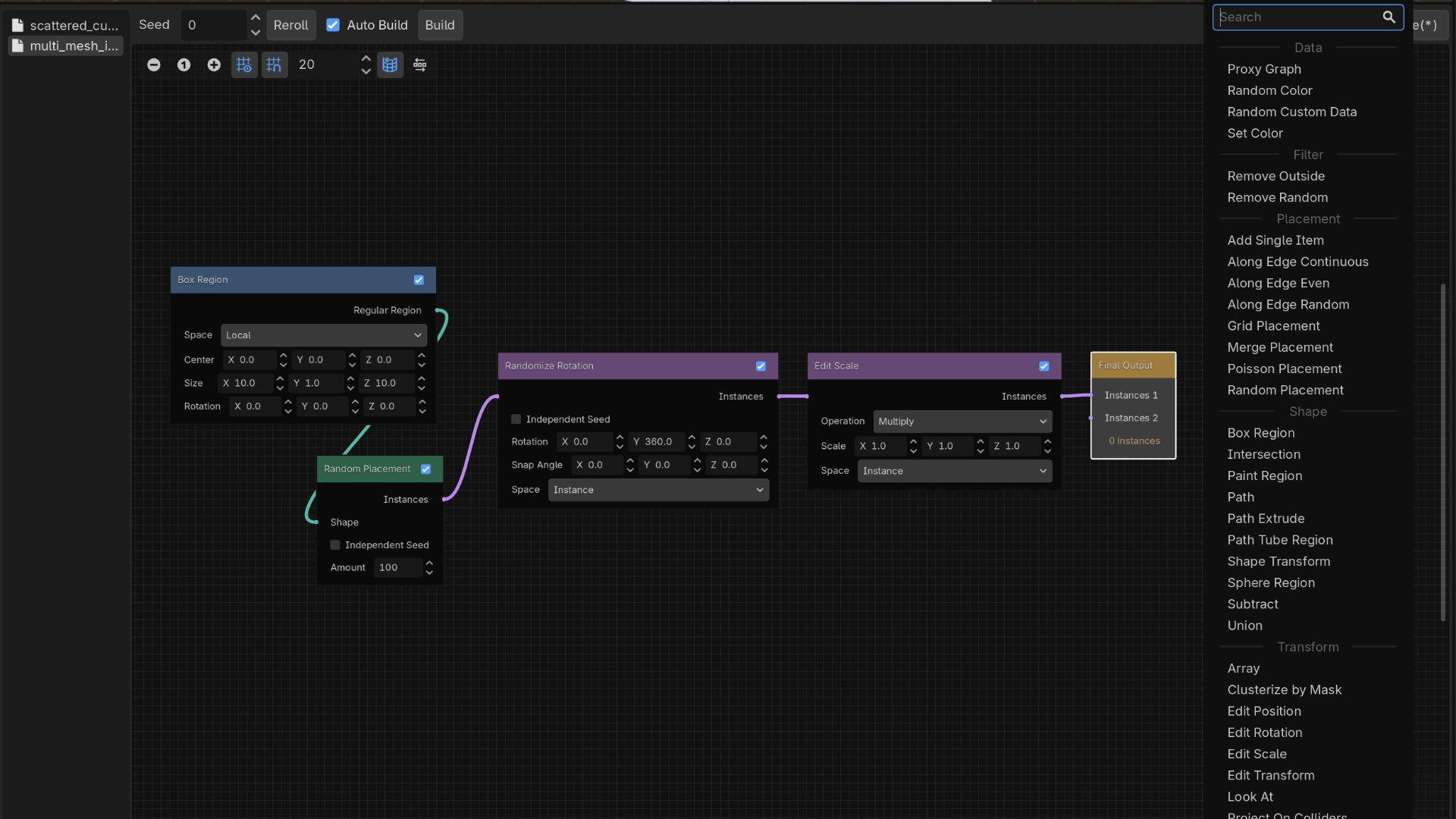
The default recipe starts with this graph:
Box Region
    |
Random Placement
    |
Randomize Rotation
    |
Edit Scale
    |
Final Output
Change the Box size, adjust the Random amount, and press Build to see the first result.
Changelog for version v0.0.1-alpha
2026-07-14 12:48:00
No changelog provided for this version.
