Description
Changelog
Reviews (0)
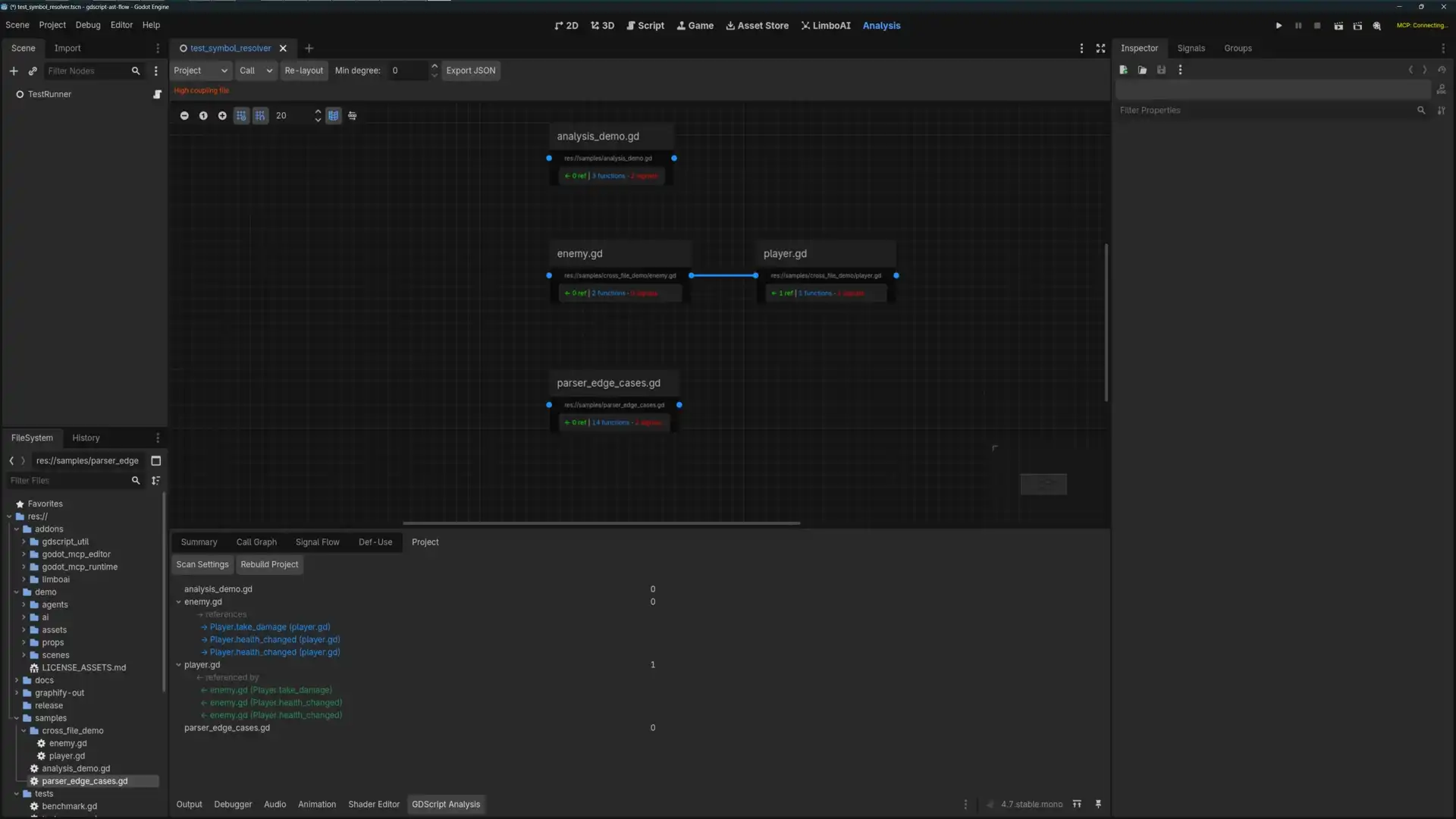
A Godot 4.7 GDScript AST parser + logic flow analysis tool. Integrated as an EditorPlugin, supporting signal connection tracing, method call graphs, variable def-use chain analysis, cross-file reference tracking, and scene/resource structure visualization.
Authors: Original by あるる / きのもと 結衣 @arlez80 (Godot 3.x bytecode parser) · This version by kenyonxu (Godot 4.7 AST rewrite)
What Can It Do for You?
🎮 Game Developers
- Refactor with confidence — See every caller before renaming a function. Know what will break.
- Debug signal spaghetti — Where is
health_changedactually emitted? Who connected to it? Signal flow panel traces the entire chain. - Track variable flow — "When did this value change?" Def-Use panel lists every read and write site.
- Understand inherited code — Drop into someone else's project, run a project scan, and build a mental model from the call graph.
- Export for AI consumption — One-click CodeGraph JSON export. Let Claude or other AI read your code structure directly.
🔌 Plugin Developers
- Analyze any GDScript project — Use as the analysis backend for your own plugin. Read sources, run the pipeline, get structured results.
- Build visual programming tools — Auto-generate blueprint nodes and connections from call graphs.
- Auto-generate documentation — Walk function lists and call relationships to output API docs.
- Cross-file dependency analysis — Track class_name references to understand module coupling in large plugins or frameworks.
Features
Three-Phase Analysis Pipeline
.gd source → [GDScriptTokenizer] → Token stream → [GDScriptParser] → AST → [GDScriptSymbolResolver] → AnalysisResult
Analysis Capabilities
- Call Graph — 7 call pattern detection (self/super/external/connect/signal_connect/lambda/emit)
- Signal Flow — Full tracing: signal declaration → emit sites → connect sites
- Def-Use Chain — Variable define/read/write tracking
- Cross-File Analysis — Resolve cross-file method calls and signal connections via class_name
- Graph Visualization — Interactive GraphEdit-based call/signal graphs with hub highlighting, degree filtering, and jump-to-definition
- JSON Export — Structured CodeGraph JSON consumable by AI agents
Scene Visualization (new in 2.1)
- Three-view visualization of
.tscn/.tres: node tree (scene structure + node detail) / script lookup (which scenes use a script) / signal graph (node-to-node signal connections) - Instance sub-scene expansion — recursively parses
instance=ExtResource(...), merges sub-scene node tree (with override nodes + cycle detection) - View linking — click node in lookup/signal graph → jump to node tree view
- Real-world project support — limboai behavior trees, instantiated scenes, modern Godot syntax (
%Node/ expression suffixes / UID references / line continuation, etc.)
Editor Integration
- Bottom panel: Summary / Call Graph / Signal Flow / Def-Use / Project tabs
- Main screen "Flow Visualizer" tab: Scope × Graph switching + degree filter + legend + auto-layout
- Tool menu:
GDScript AST Flow → Parse Current / Scan Settings... - Auto re-analysis on resource save
Quick Start
Installation
- Copy
addons/gdscript_ast/into your Godot project'saddons/directory - Open Project → Project Settings → Plugins, enable GDScript Util
First Analysis
- Open any
.gdscript - Menu Project → Tools → GDScript AST Flow → Parse Current
- Check the bottom panel Summary / Call Graph tabs
Project Scan
- Menu Project → Tools → GDScript AST Flow → Scan Settings...
- Check Enable Project Scan, Browse to add directories to scan
- Click Save, then switch to Project Tab and click Rebuild Project
- Explore cross-file call relationships and signal flows
Documentation
| Document | Description |
|---|---|
| User Guide | Installation, single-file analysis, project scan, graph navigation, export |
| Developer Guide | API reference, integration patterns, as infrastructure for other plugins |
Changelog for version v2.4.0
2026-08-12 03:51:52
No changelog provided for this version.