InputManager - Advanced Input System for Godot 4.5+
Description
InputManager is a plugin for Godot 4.5x used to receive and handle gamepad events, as well as to configure inputs in an easier and more practical way. Each gamepad action can be named and assigned a key to be handled according to the player's actions. Action buttons can have their states changed to PRESSED (when held down), RELEASED (when the button is released), ONESHOT (for a single shot), and TOGGLE (to toggle the value).
Features include:
- Select the device connected to the pc
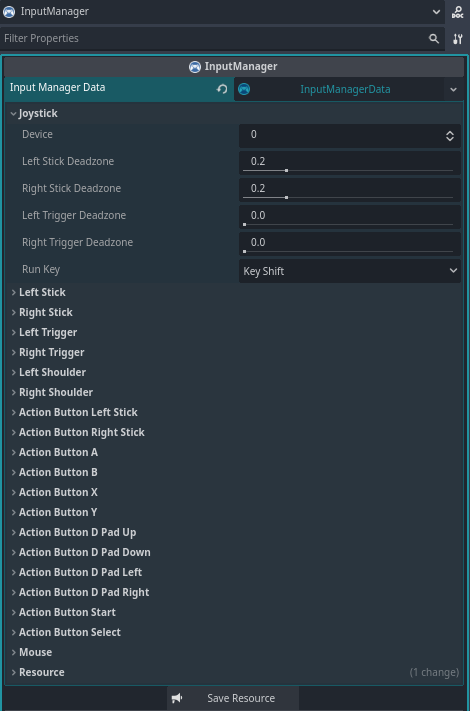
- Configurable Deadzone for analog sticks and triggers buttons
- Toggle, Oneshot, and Release Events
- Dynamic Action and Button Mapping
- Support for Multiple Gamepads
- Built-in Signals for easy integration
- Controller Vibration (Rumble)
- Script or Inspector Configuration
Perfect for 3D or 2D games of any genre — platformer, shooter, racing, RPG, and more.
Key Features
| Feature | Description |
|---|---|
| Input Mapping | Supports keyboard, mouse, and multiple gamepads |
| Deadzone | Defines analog stick neutral zone |
| Toggle / Oneshot | Persistent and pulse-style events |
| Built-in Signals | Easily connect to scripts and nodes |
| Vibration | Configurable controller rumble |
| Auto Detection | Detects devices and actions in real-time |
Installation
- Download the plugin files.
- Extract the files into the
res://addons/directory of your Godot project. - Enable the plugin in Godot by going to
Project > Project Settings > Pluginsand activating InputManager.
Basic Usage
Analog Control
@onready var input_manager: InputManager = $InputManager

func _physics_process(delta: float) -> void:
    if input_manager.get_left_stick().length() > 0.0:
        var direction: Vector2 = input_manager.get_left_stick()
        #var direction: Vector2 = input_manager.get_action_stick("move")
        #var direction: Vector2 = input_manager.get_action("move") as Vector2
        $Player.move(direction)
Toggle
@onready var input_manager: InputManager = $InputManager

func _physics_process(delta: float) -> void:
    $Player.crouch = input_manager.get_left_shoulder_toggle()
Check if an action is pressed
@onready var input_manager: InputManager = $InputManager

func _physics_process(delta: float) -> void:
    # Check if button A has been pressed and fire several shots while the button is held down.
    if input_manager.get_button_a_pressed():
        $Player.shoot()
One-shot action
@onready var input_manager: InputManager = $InputManager

func _physics_process(delta: float) -> void:
    if input_manager.get_button_a_oneshot():
        $Player.shoot()
Released action
@onready var input_manager: InputManager = $InputManager

func _physics_process(delta: float) -> void:
    if input_manager.get_button_y_realesed():
        $Player.stop_dash()
Controller Vibration
# Start vibration (left_strength: float, right_strength: float, duration: float)
input_manager.start_vibration(0.0, 0.5, 0.3)

# To stop a vibration in progress.
input_manager.stop_vibration()
Save configurations
# Save configurations
input_manager.save()
Signals
| Signal | Description |
|---|---|
on_device_changed(device: int, connected: bool) |
Emitted when a gamepad is connected or disconnected via USB, Wi-Fi, or Bluetooth. |
on_mouse_motion_changed(value: Vector2) |
Emitted when you move the mouse on the screen. |
on_left_stick_changed(value: Vector2, length: float) |
Emitted when the left stick gamepad (L) is moved. |
on_right_stick_changed(value: Vector2, length: float) |
Emitted when the right stick gamepad (R) is moved. |
on_left_trigger_changed(length: float) |
Emitted when the left trigger button on the gamepad (L2) is pressed. |
on_right_trigger_changed(length: float) |
Emitted when the right trigger button on the gamepad (R2) is pressed. |
on_left_shoulder_changed(pressed: bool) |
Emitted when the left shoulder button on the gamepad (L1) is pressed. |
on_right_shoulder_changed(pressed: bool) |
Emitted when the right shoulder button on the gamepad (R1) is pressed. |
on_left_stick_button_changed(pressed: bool) |
Emitted when the left stick button gamepad (L3) is pressed. |
on_right_stick_button_changed(pressed: bool) |
Emitted when the right stick button gamepad (R3) is pressed. |
on_button_a_changed(pressed: bool) |
Emitted when the A button (Xbox) or X button (PS) on the controller is pressed. |
on_button_b_changed(pressed: bool) |
Emitted when the B button (Xbox) or Circle button (PS) on the controller is pressed. |
on_button_x_changed(pressed: bool) |
Emitted when the X button (Xbox) or Square button (PS) on the controller is pressed. |
on_button_y_changed(pressed: bool) |
Emitted when the Y button (Xbox) or Triangle button (PS) on the controller is pressed. |
on_dpad_up_changed(pressed: bool) |
Emitted when the diagonal up button on the gamepad is pressed. |
on_dpad_down_changed(pressed: bool) |
Emitted when the diagonal down button on the gamepad is pressed. |
on_dpad_left_changed(pressed: bool) |
Emitted when the diagonal left button on the gamepad is pressed. |
on_dpad_right_changed(pressed: bool) |
Emitted when the diagonal right button on the gamepad is pressed. |
on_start_changed(pressed: bool) |
Emitted when the Menu (Xbox) or Options (PS) button on the controller is pressed. |
on_select_changed(pressed: bool) |
Issued when the View (Xbox) or Share (PS) button on the gamepad is pressed. |
on_action_button(action_name: String, pressed: bool) |
Emitted when any action button on the gamepad is pressed. (buttons that return true or false). |
on_action_trigger(action_name: String, value: float) |
Emitted when any gamepad trigger button is pressed (buttons that return float like L2 and R2). |
on_action_stick(action_name: String, value: Vector2) |
Emitted when the sticks of the gamepad is moved. |
on_action_changed(action_name: String, valur: Variant) |
Emitted when any stick, button, or trigger on the gamepad is moved or pressed. |
Screenshots
Screenshot InputManager
❤️ Support
If this project helps you, consider supporting:
https://github.com/sponsors/Saulo-de-Souza
https://www.paypal.com/donate/?hosted_button_id=G24W4KL9ALH64
Changelog for version 3.0.0
2026-01-08 22:22:00
No changelog provided for this version.