ResourceTables
If you have used Unreal before, you might be wondering: "What is Godot's equivalent to DataTables?"
I have spent years supporting Unreal DataTable workflows on AAA games and I believe there is a better design hidden in Godot data formats already: Treating Resources as rows in a table.
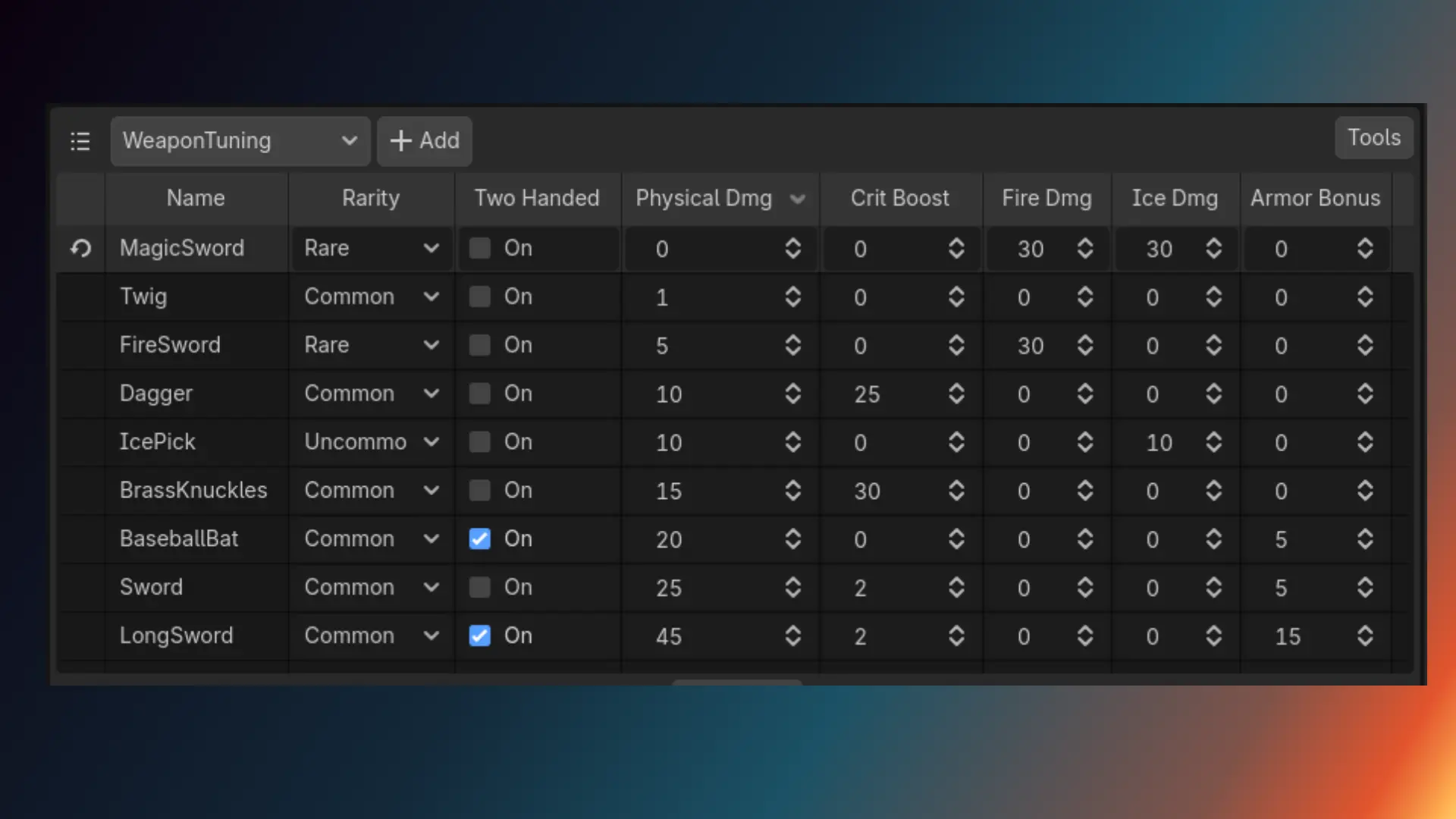
Resources Table Editor
In my experience, the main reason DataTable is used in Unreal is because it's convenient to edit groups of related things together.
This feature has nothing to do with the data format, it's a tools problem. This extension adds a Resources view in the bottom dock panel where you can bulk edit all the resources you have in your game.
This is a high-quality view, limited only by what editor functionality is exposed to a GDExtension. You can import and export to CSV and these functions are exposed so you can automate this yourself if you want (make a workflow to sync your resources from Google Sheets for example).
ResourceTable for Runtime
The other reason people use DataTable is to be able to iterate over all rows at runtime. This is a data format problem.
You might have a list of all WeaponDrop resources in the game and you can loop over all of them at runtime to determine what loot to spawn. So you want an AllWeaponDrops table somewhere.
ResourceTables adds a lightweight @tool generator interface that is hooked up to run when saving new resources or exporting the game.
It has no restrictions on your output table formats or location, or even the number of outputs it has.
100% Editor-only
The API has been carefully constructed so your project does not need any runtime dependencies on this library. Pre-4.8 you will get a warning about missing exports.
Why ResourceTables Are Better Than DataTables
While DataTables are convenient for editing, their data format is kind of a problem, because it introduces a dependency between rows.
The entire DataTable is rarely referenced directly, usually you reference an individual row with DataTableRowHandle. This means in Unreal you have to load the entire table to find one row, which may require loading unnecessary extra resources. Godot referencing Resources directly is essentially the same thing as a row reference, but with no extra overhead.
DataTables are difficult to manage across a team, because any edits to one row lock the entire table. Merging across branches becomes a real bottleneck. But in Godot Resources are individual files, it only has per-"row" edit conflicts.
DataTables that contain management information, like loot drop tables, end up having to live somewhere, and it quickly becomes arcane knowledge to remember what 10 tables needs to be updated to make stuff work. Because ResourceTables are generated from rows anywhere on disk, you can keep all of your resources for a feature in the same folder.
Unreal also tried to address these issues and introduced a way to combine multiple DataTables into one thing, which is what DataRegistries are. This is an entirely new API that also breaks the primary reason people use DataTables: to edit stuff in one place.
ResourceTables solve this problem before it begins.
Documentation
To use the Resources Table view, select your resource type from the drop-down. This type must have a class_name to appear. You can use the + Add button to create a new resource of that type. And you can import/export the table to CSV using options in the Tools menu button.
To create a generator select Tools | New ResourceTable Generator.... This will prompt to create a basic generator script template you can then modify.
Custom ResourceTables
By default, the new generator script makes a GenericResourceTable type. You might want to create special list types with known types, as well as sort or filter them in a special way. Maybe only add 'enabled' items to your list, for example. You do that here.
The docs for the generator utility functions are here (also available in the Godot in-editor doc browser).
When you generate a ResourceTable, it too will inherit from Resource, and in order to make it not appear in the resource list, and let you declare your own resource table types, you must make it a @tool script and add the following static variable:
static var _show_in_resource_table_view := false
This will be reflected by the table view so it can skip this resource type. You can also add this to any type you wish to ignore for other reasons.
Changelog for version v0.9.3
2026-10-07 18:25:59
No changelog provided for this version.