A singleton providing easy access to icons representing classes and types, from values or members. Useful for addon developers.
This is not a GUI, it's a GDScript utility. If you are looking for a GUI to look up editor icons, you may want to use Yuri Sizov's Godot Editor Theme Explorer.
Note: In 4.3, there will be a few warnings at installation due to script UIDs that were introduced in 4.4.
Features / How to use
The addon is only made of one static class called AnyIcon. It provides easy access to icons representing the type of a value or the type expected by the member of an Object.
Most methods accept an optional fallback parameter,
which is the name of the icon that will be fetched from the "EditorIcons"
theme type in case no icon is found for a type
(this is very unlikely to happen since all types are covered and classes
will at least inherit Object and thus it's icon)
You can look at the documentation generated by Godot for more information.
(By default: F1 then search for AnyIcon.)
Getting the icon for the expected type of the member of an Object
There are a few methods providing icons for the type of members, such as
get_property_icon(object: Object, property_name: StringName, fallback: StringName = &"").
Getting the icon for the type of a value
The main method provided by AnyIcon
is get_variant_icon(any_value: Variant). It's a static method that returns
the icon associated with the passed value. It can handle any value, from built-in
types (bool, int, Packed*Array), to custom classes with @icon("path") specified.
There are more specific methods that you can use if you already know if the value you pass is a built-in type, a built-in class, or a custom class.
Type unions
Some members expect type unions, such as "CanvasItemMaterial,ShaderMaterial"
for material in CanvasItem.
By default, this addon will generate icons by concatenating the icons in a row.
You can disable this behavior by setting AnyIcon.allow_generating_union_icons = false.
Installation
You can download the addon:
- On GitHub:
Code→Download ZIP. - Through the editor:
AssetLib→ Search for "AnyIcon"
You can exclude *.editor/* or any_icon.editor/ from your export presets
because this addon is editor-only.
ℹ️ Important: If you distribute an addon using this addon, don't forget to add it in your
.gitattributes:/addons/any_icon.editor !export-ignore /addons/any_icon.editor/** !export-ignore
Examples
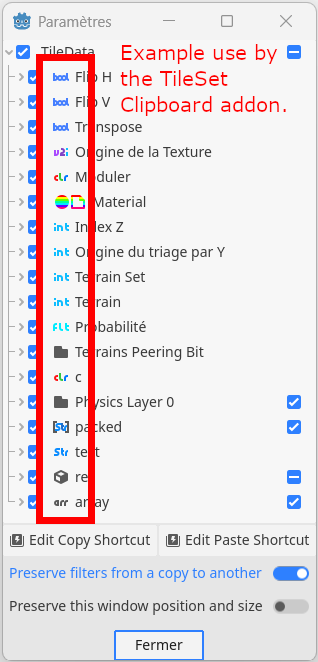
Example use by my TileSet Clipboard addon:
Godot version
Godot version: 4.3+
Note: In 4.3, there will be a few warnings at installation due to script UIDs that were introduced in 4.4.
Won't work with 4.2 due to missing methods required by this addon.
Development status
LTS (Only bug fixes)
Changelog for version v1.2-stable
2026-08-16 09:37:00
No changelog provided for this version.