English
GDSQL is a database SQL workbench plugin built entirely on the ConfigFile system. Pure GDScript, zero external dependencies, no database server required — install and use immediately, AI friendly.
Storage & Philosophy
All data lives in .cfg plain text files, Godot's native configuration format. Every change is visible in git diff, editable in any text editor, and accessible outside the editor. Unlike binary databases, your data is always human-readable and version-control friendly.
The same API works identically in-editor and in exported games — no need to maintain separate data access layers for development and runtime.
SQL Query Engine
A complete SQL engine built in pure GDScript, supporting:
- Statements: SELECT, INSERT, UPDATE, DELETE, REPLACE
- Conditions: WHERE with AND, OR, IN, NOT IN, BETWEEN, LIKE, IS NULL / IS NOT NULL
- Sorting & Grouping: ORDER BY (multi-column, ASC/DESC), GROUP BY with HAVING
- Pagination: LIMIT and OFFSET
- Joins: LEFT JOIN with chainable multi-table support
- Set Operations: UNION ALL
- Subqueries: Both correlated and non-correlated
- Aggregates: COUNT, SUM, AVG, MIN, MAX, GROUP_CONCAT
- Expressions: Arithmetic operators, string concatenation, function calls, type conversion, SQL-compatible NULL semantics (three-valued logic)
- INSERT variants: INSERT IGNORE (skip on duplicate key), INSERT ... ON DUPLICATE KEY UPDATE (upsert)
- LRU Cache: Auto-caches the last 1024 parsed SQL statements for faster repeated queries
You can execute raw SQL strings directly via SQLParser.parse_to_dao(), or use the visual SQL editor in the workbench.
Visual Workbench
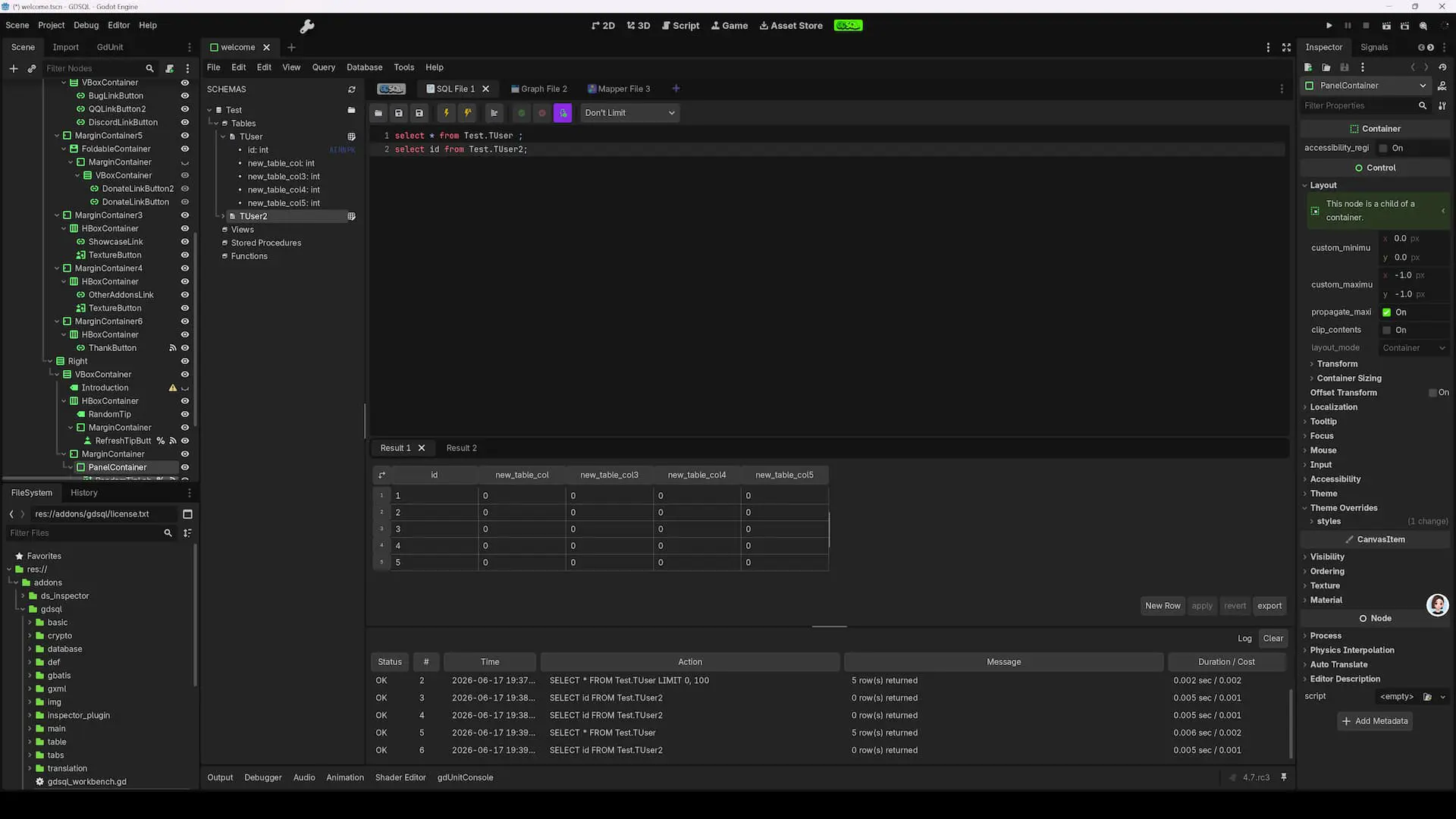
A dedicated main screen in the editor, consisting of integrated panels:
Database Tree Browser — Navigate all databases and tables hierarchically. Right-click for context menus (create, delete, rename, etc.).
Data Table Viewer — Browse and edit data in an Excel-like grid. Click any cell to edit inline with instant commit. Drag column borders to resize. Sort by clicking column headers. Supports type-appropriate editors for int, float, Vector2, and more.
Table Structure Editor — View and modify column definitions: name, data type, default value, comments, primary key, and auto-increment settings.
Schema Management — Visually create and delete databases and tables through dialog-based workflows.
SQL Query Editor — Write and execute SQL with syntax awareness. Results appear in a grid panel below. Query history is automatically recorded. Export results as CSV, JSON, or CFG.
Diff View — Compare table content between two versions with color-coded highlights: added rows (green), deleted rows (red), modified rows (yellow).
Table Inspector — Detailed column definitions, table metadata, and data statistics in the right panel.
Smart Auto-Fill
Accelerates data entry with intelligent pattern prediction:
- Least-squares fitting: Analyzes existing numeric samples to predict subsequent values
- Multi-type support: Numbers, strings with numeric placeholders (e.g.
"enemy_001"→"enemy_002"), Vector2/3/4, Vector2i/3i/4i, Resource paths - Pattern recognition: Detects numbering sequences and fills accordingly
- Drag-to-fill: Select a range, drag the fill handle, and watch values populate automatically
Fluent DAO API
Complete database operations through GDScript method chaining — no SQL strings or XML files needed:
# SELECT
var result = GDSQL.BaseDao.new() \
    .use_db("GameConfig") \
    .select("id, name, hp") \ # or .select("id", "name", "hp")
    .from("c_hero") \
    .where("hp > 100 AND mp >= 50") \
    .order_by("hp DESC") \
    .limit(10) \
    .query()

# Or:
var result = GDSQL.SQLParser.parse_to_dao("select id, name, hp from GameConfig.c_hero where hp > 100 and mp >= 50 order by hp desc limit 10").query()

# INSERT
GDSQL.BaseDao.new() \
    .use_db("GameConfig") \
    .insert_into("c_hero") \
    .values({"id": 101, "name": "NewHero", "hp": 200}) \
    .query()

# Or:
GDSQL.SQLParser.parse_to_dao("insert into GameConfig.c_hero(id, name, hp) values(101, 'NewHero', 200)").query()

# UPDATE
GDSQL.BaseDao.new() \
    .use_db("GameConfig") \
    .update("c_hero") \
    .sets({"hp": 300}) \
    .where("id == 101") \
    .query()

# Or:
GDSQL.SQLParser.parse_to_dao("update GameConfig.c_hero set hp = 300 where id == 101").query()

# DELETE
GDSQL.BaseDao.new() \
    .use_db("GameConfig") \
    .delete_from("c_hero") \
    .where("id == 101") \
    .query()

# Or:
GDSQL.SQLParser.parse_to_dao("delete from GameConfig.c_hero where id == 101").query()
Additional capabilities: LEFT JOIN chaining, UNION ALL, REPLACE INTO, INSERT IGNORE, INSERT OR UPDATE, password-based access to encrypted tables, and database selection by name, path, or preset (use_user_db, use_conf_db).
GBatis ORM Framework
A MyBatis 3-inspired ORM that separates SQL from code via XML mapping files:
Dynamic SQL: <if>, <where>, <set>, <foreach>, <trim>, <bind> — build conditional queries without string concatenation.
Result Mapping: <resultMap> with <id>, <result>, <association> (one-to-one), <collection> (one-to-many), <discriminator> (polymorphic mapping).
Caching: L1 (session-level, enabled by default) and L2 (mapper-level, configurable per statement).
Auto-Mapping: NONE and PARTIAL levels for unmapped columns.
useGeneratedKeys: Auto-populate auto-increment primary keys after insert.
<mapper namespace="HeroMapper">
    <resultMap id="heroResult" type="HeroEntity">
        <id property="id" column="id"/>
        <result property="name" column="name"/>
        <result property="hp" column="hp"/>
    </resultMap>
    <select id="selectByHp" resultMap="heroResult">
        SELECT * FROM c_hero WHERE hp > #{minHp}
    </select>
</mapper>
Create a class extending GBatisMapper, point to the XML file, and SQL methods become directly callable.
Mapper Graph Visual Editor
A drag-and-drop graph editor for designing table relationships:
- Display tables as visual nodes with column names and types
- Draw connections between related columns to define foreign keys
- One-click code generation: Entity class (
.gdwithclass_nameand typed properties), XML mapping file (.xmlwith complete GBatis mapper), Mapper Graph file (.gdmappergraphfor layout persistence) - Automatic type inference: database column types mapped to GDScript types (int, float, String, bool, Vector2, Color, etc.)
- Incremental sync: detects schema changes and highlights differences before regenerating, preventing accidental overwrite of manual customizations
Two workflows supported: visual generation for rapid scaffolding, then manual fine-tuning; or full manual authoring for complete control.
Data Encryption
- Granularity: Encrypt entire databases or individual tables
- Editor integration: Opening encrypted data prompts for password; without it, data remains inaccessible
Data Import / Export
- CSV: Standard comma-separated values
- JSON: Structured data interchange
- CFG: Godot's native ConfigFile format
Import and export available for both table data and SQL query results.
XML Editor
Built-in XML editor with syntax highlighting, find and replace, tree view navigation, and multi-tab editing — designed for authoring GBatis mapping files.
Internationalization
13 languages supported out of the box: Simplified Chinese, Traditional Chinese, English, Japanese, Korean, French, German, Spanish, Italian, Portuguese (BR), Russian, Polish, Turkish.
Quick Start
- Place into your project's
addons/directory - Enable in Project Settings → Plugins
- Click the GDSQL button at the top of the editor
- Create databases and tables in the workbench
- Use
GDSQL.BaseDaoor GBatis for runtime queries
Limitations
- Pure GDScript — not designed for high-throughput real-time scenarios
- No concurrent writes (main thread only)
- Local file-based storage only, no server mode
- Transaction is not fully implemented
中文
GDSQL 是一款完全基于 ConfigFile 系统构建的数据库 SQL 工作台插件。纯 GDScript 编写,零外部依赖,无需数据库服务器——安装即用,对AI友好。
存储理念
所有数据以 .cfg 纯文本文件存储,这是 Godot 原生配置格式。每一次变更在 git diff 中清晰可见,可在任何文本编辑器中修改,也可在 Godot 之外直接访问。与二进制数据库不同,数据始终人类可读、对版本控制友好。
同一套 API 在编辑器和导出后的游戏中完全一致——无需为开发和运行时维护两套数据访问层。
SQL 查询引擎
纯 GDScript 实现的完整 SQL 引擎,支持:
- 语句类型:SELECT、INSERT、UPDATE、DELETE、REPLACE
- 条件查询:WHERE 配合 AND、OR、IN、NOT IN、BETWEEN、LIKE、IS NULL / IS NOT NULL
- 排序与分组:ORDER BY(多列、升序/降序)、GROUP BY 配合 HAVING
- 分页:LIMIT 和 OFFSET
- 连接:LEFT JOIN,支持链式多表连接
- 集合运算:UNION ALL
- 子查询:相关子查询与非相关子查询
- 聚合函数:COUNT、SUM、AVG、MIN、MAX、GROUP_CONCAT
- 表达式求值:算术运算、字符串拼接、函数调用、类型转换、SQL 兼容的 NULL 三值逻辑
- INSERT 变体:INSERT IGNORE(主键冲突跳过)、INSERT ... ON DUPLICATE KEY UPDATE(Upsert)
- LRU 缓存:自动缓存最近 1024 条已解析 SQL,重复查询跳过解析阶段
可通过 SQLParser.parse_to_dao() 直接执行原始 SQL 字符串,也可在工作台的可视化 SQL 编辑器中操作。
可视化工作台
编辑器中的专属主屏幕,由多个集成面板组成:
数据库树形浏览器 —— 以层级结构浏览所有数据库和表。右键菜单支持创建、删除、重命名等操作。
数据表格查看器 —— 以类 Excel 网格展示和编辑数据。点击单元格即可内联编辑并即时生效。拖拽列边框调整宽度。点击列标题排序。支持 int、float、Vector2 等不同类型对应的编辑器。
表结构编辑器 —— 查看和修改列定义:名称、数据类型、默认值、注释、主键、自增设置。
Schema 管理 —— 通过对话框向导可视化创建和删除数据库及表。
SQL 查询编辑器 —— 具备语法感知的 SQL 编写区域。结果在下方网格面板中展示。自动记录查询历史。支持将结果导出为 CSV、JSON 或 CFG。
表检查器 —— 右侧面板展示详细的列定义、表元数据和数据统计信息。
智能自动填充
通过智能模式预测加速数据录入:
- 最小二乘拟合:分析已有数值样本预测后续值
- 多类型支持:数值、含数字占位符的字符串(如
"enemy_001"→"enemy_002")、Vector2/3/4、Vector2i/3i/4i、Resource 路径 - 模式识别:检测编号序列并按规律填充
- 拖拽填充:选中区域后拖拽填充柄,数值自动按规律填入
链式 DAO API
通过 GDScript 方法链完成所有数据库操作——无需 SQL 字符串或 XML 文件:
# 查询
var result = GDSQL.BaseDao.new() \
    .use_db("GameConfig") \
    .select("id, name, hp") \ # 或者 .select("id", "name", "hp")
    .from("c_hero") \
    .where("hp > 100 AND mp >= 50") \
    .order_by("hp DESC") \
    .limit(10) \
    .query()

# 或者:
var result = GDSQL.SQLParser.parse_to_dao("select id, name, hp from GameConfig.c_hero where hp > 100 and mp >= 50 order by hp desc limit 10").query()

# 插入
GDSQL.BaseDao.new() \
    .use_db("GameConfig") \
    .insert_into("c_hero") \
    .values({"id": 101, "name": "NewHero", "hp": 200}) \
    .query()

# 或者:
GDSQL.SQLParser.parse_to_dao("insert into GameConfig.c_hero(id, name, hp) values(101, 'NewHero', 200)").query()

# 更新
GDSQL.BaseDao.new() \
    .use_db("GameConfig") \
    .update("c_hero") \
    .sets({"hp": 300}) \
    .where("id == 101") \
    .query()

# 或者:
GDSQL.SQLParser.parse_to_dao("update GameConfig.c_hero set hp = 300 where id == 101").query()

# 删除
GDSQL.BaseDao.new() \
    .use_db("GameConfig") \
    .delete_from("c_hero") \
    .where("id == 101") \
    .query()

# 或者:
GDSQL.SQLParser.parse_to_dao("delete from GameConfig.c_hero where id == 101").query()
额外能力:LEFT JOIN 链式调用、UNION ALL、REPLACE INTO、INSERT IGNORE、INSERT OR UPDATE、密码访问加密表,以及按名称、路径或预设选择数据库(use_user_db、use_conf_db)。
GBatis ORM 框架
受 MyBatis 3 启发的 ORM 框架,通过 XML 映射文件将 SQL 与代码分离:
动态 SQL:<if>、<where>、<set>、<foreach>、<trim>、<bind> —— 无需字符串拼接即可构建条件查询。
结果映射:<resultMap> 配合 <id>、<result>、<association>(一对一)、<collection>(一对多)、<discriminator>(多态映射)。
缓存:L1(会话级,默认启用)和 L2(映射器级,可按语句配置)。
自动映射:NONE 和 PARTIAL 两种级别处理未映射列。
useGeneratedKeys:插入后自动回填自增主键。
创建继承 GBatisMapper 的类,指向 XML 文件,SQL 方法即可直接调用。
Mapper Graph 可视化编辑器
拖拽式图形编辑器,用于设计表关系:
- 以可视化节点展示表及其列名和类型
- 在相关列之间拖拽连线定义外键关系
- 一键代码生成:实体类(
.gd,含class_name和类型化属性)、XML 映射文件(.xml,含完整 GBatis 映射器)、Mapper Graph 文件(.gdmappergraph,持久化布局) - 自动类型推断:数据库列类型 → GDScript 类型(int、float、String、bool、Vector2、Color 等)
- 增量同步:检测 Schema 变更并高亮差异,避免意外覆盖手动修改
支持两种工作流:可视化生成快速搭建后手动微调;或完全手动编写以获得完整控制权。
数据加密
基于 Godot 原生 AESContext 的 AES-256-CBC 加密:
- 粒度:可加密整个数据库或单张表
- 编辑器集成:打开加密数据时弹出密码输入框
数据导入/导出
支持 CSV、JSON、CFG 三种格式的表数据和 SQL 查询结果导入导出。
XML 编辑器
内置 XML 编辑器,支持语法高亮、查找替换、树形导航和多标签页编辑,专为编写 GBatis 映射文件设计。
国际化
开箱支持 13 种语言:简体中文、繁体中文、英语、日语、韩语、法语、德语、西班牙语、意大利语、葡萄牙语(巴西)、俄语、波兰语、土耳其语。
快速开始
- 放入项目的
addons/目录 - 在项目设置 → 插件 中启用
- 点击编辑器顶部的 GDSQL 按钮
- 在工作台中创建数据库和表
- 使用
GDSQL.BaseDao或 GBatis 进行运行时查询
局限性
- 纯 GDScript 实现,不适用于高吞吐实时场景
- 不支持并发写入(仅主线程)
- 仅本地文件存储,无服务器模式
Changelog for version v0.5.17
2026-10-07 13:04:54
No changelog provided for this version.
Reviews
 Recommended
by Fellow Roach - 03 July 2026
Recommended
by Fellow Roach - 03 July 2026
This tool is REALLY good, there is a ton of potential, specially with the easy possibility to export/import using CSV, JSON or CFG file, which is not found in other tools. No need to create the resources, they are all saved in a cfg based table. There is documentation inside the repository, but none inside the project or a online docs (yet).
Login to write a review.