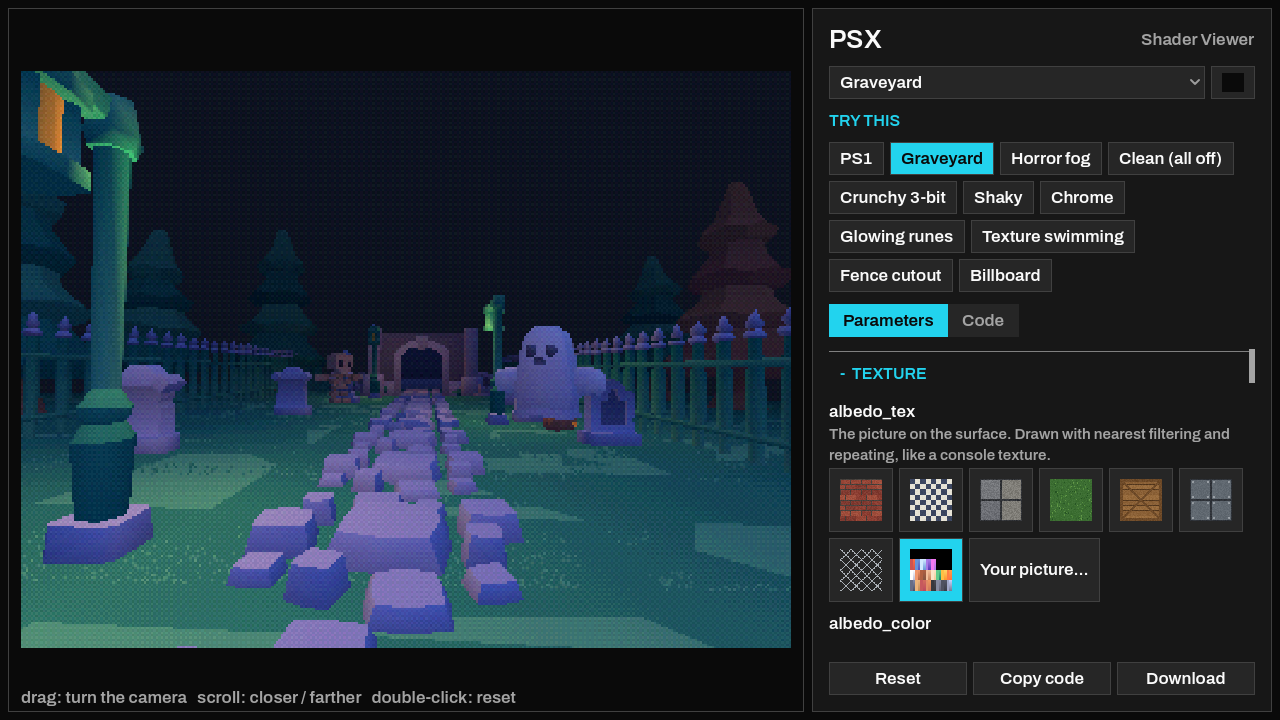
PSX gives 3D meshes in Godot the look of the PlayStation 1: wobbling vertices, swimming textures, flat 15-bit color and dither.
What is inside
- A material for 3D meshes (
psx.gdshader) and three variants: double-sided, transparent and additive. - A screen effect (
psx_screen.gdshader): chunky pixels, 15-bit color and dither on the final image, light and fog included. - Vertex snapping to a pixel grid, with optional jitter; affine texture mapping with a slider and a soft cap.
- Light and fog calculated at the vertices, vertex colors for painted light, and no engine shadows (like the console).
- 15-bit color with a 4x4 ordered dither, an optional Nintendo 64 three-point texture filter, and alpha cutout.
- Metal from a picture of a sphere (matcap), emission from a texture, and billboards (full or upright) for sprites.
- 12 textures and matcaps made for the project, and an example scene: a torch-lit hall that cycles through six looks, plus a graveyard built from Kenney's Graveyard Kit (CC0).
Install and use
The files install to res://addons/psx_shader/. There is nothing to enable. On a MeshInstance3D, create a ShaderMaterial and assign psx.gdshader (or load psx_material.tres), then set your picture in albedo_tex. For the screen effect, add a CanvasLayer with a full-rect ColorRect and give it a ShaderMaterial with psx_screen.gdshader. Open example/example.tscn to see everything working.
Every parameter is explained in the README and in the shader comments. Works in the Compatibility, Mobile and Forward+ renderers. Tested on Godot 4.6.
Public domain (CC0): use it in any project, commercial or not, without attribution.
A browser viewer with sliders and ready-made looks is on the Itch.io page: https://fcidade.itch.io/psx-godot-shader-free
Changelog for version v1.0.0
2026-10-05 19:33:13
No changelog provided for this version.