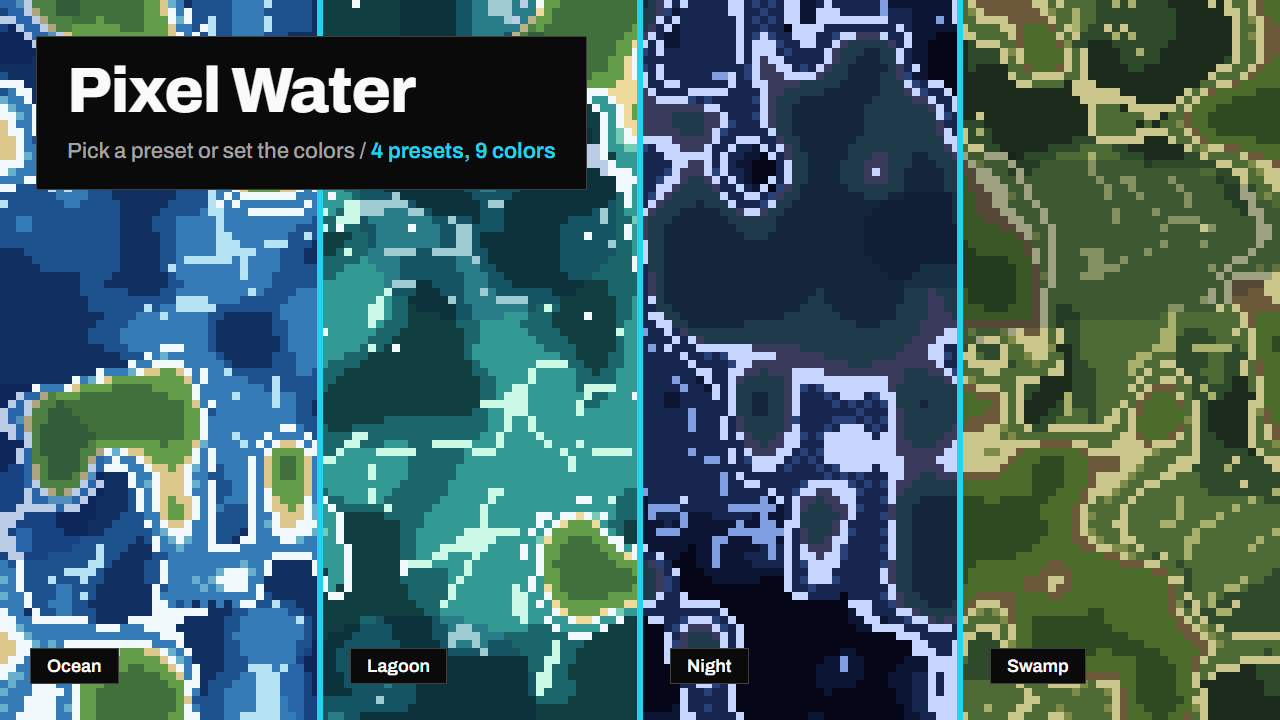
Pixel Water draws flowing pixel art water inside Godot, with no textures at all.
Put the shader on a ColorRect of any size and you get a sea: waves in flat shades of blue, thin light crests, islands with a beach, shallow water near the coast and foam. Waves keep rolling onto the sand. Use it as a map background, the water of a top-down level, a title screen or a looping GIF.
Try it in your browser first. A viewer with sliders and live code editing is on the Itch.io page: https://fcidade.itch.io/pixel-water-godot-shader-free
What you get
- The shader file, with no textures and no other dependencies.
- Water in three flat shades with thin crest lines, pixelated to the size you choose.
- Procedural islands (sand and two greens), lighter shallow water near the coast, dithered depth steps and foam. Waves travel from the open water to the beach and fade out there.
- Long swells in the open water, drifting cloud shadows and tiny glints.
- Four ready-made color sets (Tropical, Lagoon, Swamp and Night) and nine color parameters for your own.
- An example project with eight looks.
- The animation repeats exactly: with the default speed it loops every 8 seconds, handy for GIFs.
How to use it
- Install the asset. The shader is at
addons/pixel_water_shader/shaders/pixel_water.gdshader; use it from there or copy it into your project. - Add a
ColorRectof any size, create aShaderMaterialon it and assign the shader. - Tweak the parameters in the Inspector.
What each parameter does
pixel_size: size of one big pixel, in screen pixels. 4 is the default; higher is chunkier.seed: any number gives a different pattern and different islands. The same seed gives the same water.speed: animation speed, in loops per second. The animation repeats after1 / speedseconds (0.125 = 8 s). 0 freezes it.scale: size of the waves and islands. Higher means more and smaller ones.flow_angle: direction the water flows, in radians (0 is right, 1.57 is down).turbulence: how much the waves bend the pattern. At 0 the ripples are straight.depth: brightness balance. Negative is darker, deeper water; positive is lighter and shallower.crest_amount: how many white crest lines sit on the waves. 0 removes them.land_amount: how much land there is. 0 is open water.foam_width: width of the foam on the coast and spacing of the waves that reach the beach. 0 removes the foam.shallow_width: width of the lighter shallow water along the coast.swell: height of the long swells in the open water. 0 removes them.cloud_shadow: how much of the scene is covered by drifting cloud shadows. 0 removes them.sparkle_amount: how many tiny glints flash on the water. 0 removes them.preset: a ready-made color set: Tropical, Lagoon, Swamp or Night. "Custom (ocean)" uses the color parameters below.color_deep,color_mid,color_light,color_shallow: the four water colors (only used with preset on "Custom (ocean)"), from the deepest to the shallowest.color_crest,color_foam: the crest lines and the foam.color_sand,color_grass,color_forest: the land colors, from the beach inland.
Compatibility: Godot 4.x (GL Compatibility, Mobile and Forward+), CanvasItem shader. The node's modulate is not applied.
License: CC0 (public domain). Use it in commercial games, change it, no credit needed (but I'd love to see what you make with it).
More assets by me: https://fcidade.itch.io
Changelog for version v1.0.0
2026-10-07 16:02:41
No changelog provided for this version.