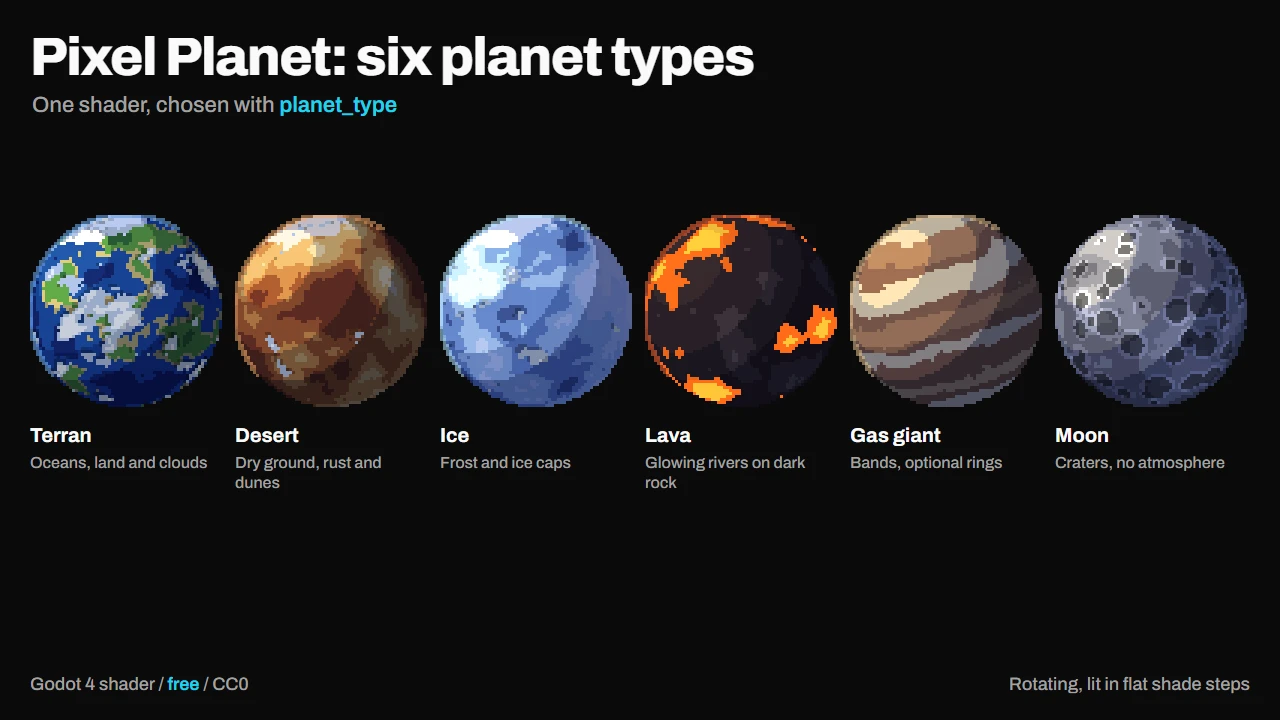
Pixel Planet draws a spinning pixel art planet inside Godot, with no textures at all.
Put the shader on a square ColorRect, pick a planet type and a seed, and you have a planet for a title screen, a space map, a menu background or a GIF for social media. Change the seed and you get a whole new world.
This exists because of Deep-Fold's Pixel Planet Generator. If you like planets in pixel art, go download it first: https://deep-fold.itch.io/pixel-planet-generator. It is beautiful, free, MIT licensed, and it is what made me want to try this. My version is a shader you can drop straight into a Godot project, but the idea of a procedural pixel planet is theirs, and they did it wonderfully.
Try it in your browser first. A viewer with sliders and live code editing is on the itch.io page: https://fcidade.itch.io/pixel-planet-godot-shader-free
What you get
- The shader file, with no textures and no other dependencies.
- 6 planet types: Terran, Desert, Ice, Lava (the rivers keep glowing on the dark side), Gas giant and Moon (craters).
- Rings, axis tilt, polar caps, clouds that cast shadows and an atmosphere glow.
- An example project that goes through all six types.
- Clouds turn exactly twice as fast as the ground, so one full turn of the planet loops cleanly. Handy for GIFs.
How to use it
- Install the asset. The shader is at
addons/pixel_planet_shader/shaders/pixel_planet.gdshader; use it from there or copy it into your project. - Add a square
ColorRect, create aShaderMaterialon it and assign the shader. - Pick
planet_typeand play with the parameters in the Inspector.
What each parameter does
planet_type: Terran (oceans, land, clouds), Desert (dry ground, rust and dunes), Ice (frost and ice caps), Lava (dark rock with glowing rivers), Gas giant (bands) or Moon (craters, no atmosphere).pixels: how many big pixels wide the planet is. 64 is the default. Lower values look chunkier, like a tiny sprite (32), higher values show more detail (128). With rings the planet only fills about half of the picture, so use 96 or more.seed: any number gives a different world. The same seed always gives the same planet.spin: rotation speed, in turns per second. Negative spins the other way, 0 stops the planet.scale: size of the features: continents, gas bands, craters. Higher means more and smaller ones.sea_level: how much of the surface is low ground. On Terran it is water, on Desert it is canyons, on Lava it is the glowing rivers. Higher means more of it.light_dir: where the light comes from (x to the right, y up, z toward you).shade_steps: how many flat steps the light is cut into, from 2 (hard light and shadow) to 6 (smoother).tilt: how far the north pole leans toward the camera. It is what lets you see the polar caps. At 0 you see the planet from the side.ice_caps: size of the polar ice caps on Terran, Desert and Ice. 0 removes them.cloud_cover: how much of the sky is cloudy on Terran, Desert and Ice. The clouds throw a shadow on the ground. 0 means a clear sky.atmosphere_strength: how bright the glow around the edge of the planet is. Its color depends on the planet type. 0 turns it off.rings: turns the rings on. The planet gets smaller to leave room for them.ring_open: how open the rings look. 1 is seen from above, close to 0 is seen edge-on.ring_angle: turns the rings around on the screen.
Compatibility: Godot 4.x (GL Compatibility, Mobile and Forward+), CanvasItem shader. The node's modulate is not applied.
License: CC0 (public domain). Use it in commercial games, change it, no credit needed (but I'd love to see what you make with it).
More assets by me: https://fcidade.itch.io
Changelog for version v1.0.0
2026-10-07 16:05:31
No changelog provided for this version.