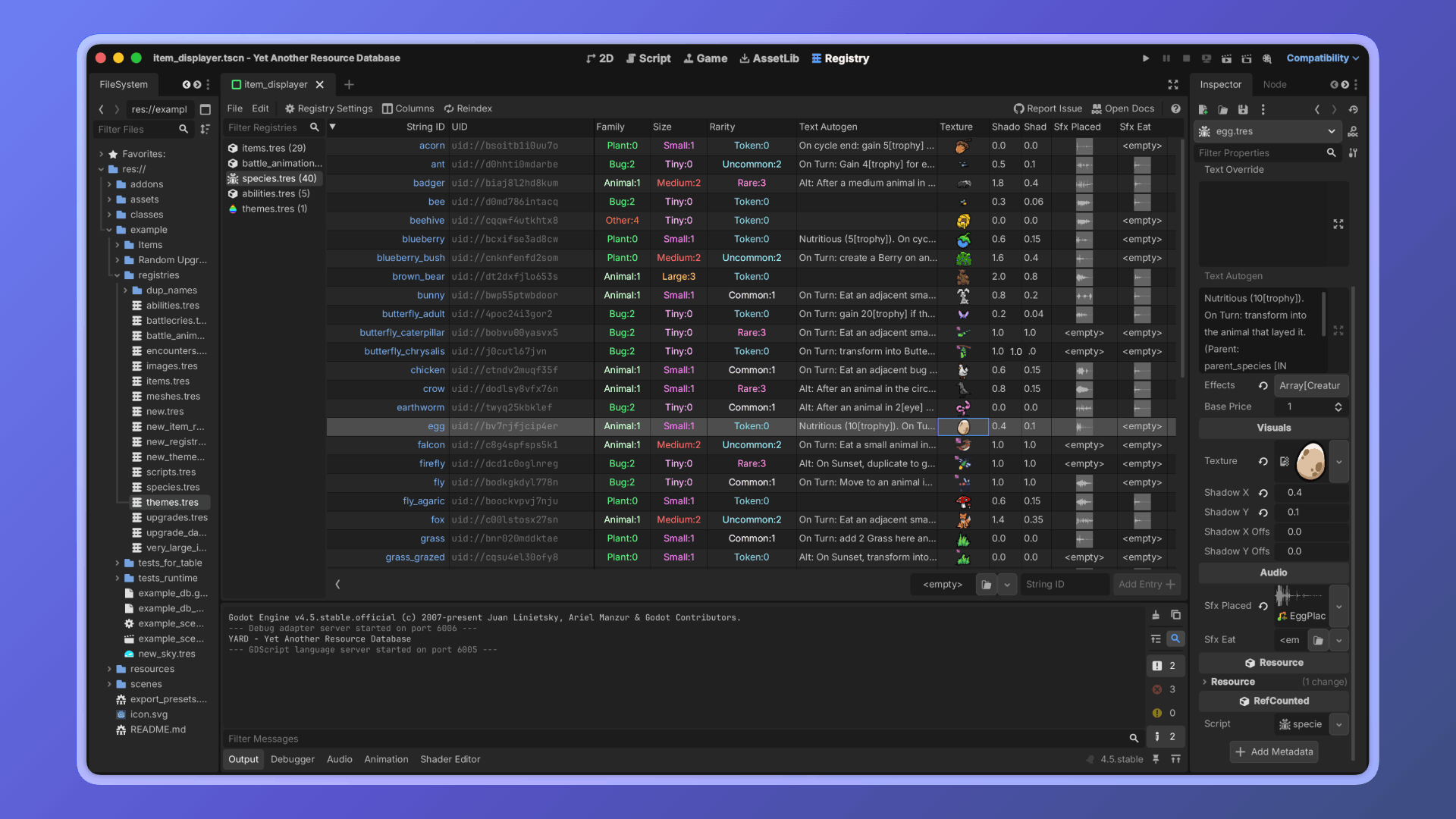
A Godot 4 plugin for managing and querying collections of resources, with a spreadsheet-like editor and a lightweight runtime API.


Overview
YARD builds on Godot's resource system. The editor tab lets you create and manage registries: collections of resources backed by a small .tres file that stores only IDs, not the resources themselves. You control if and when resources are loaded.
Features
- 📊 Browse and edit resources as entries in a spreadsheet-like table, right in the editor
- 🏷 Reference resources by stable string IDs instead of file paths or autoloads
- 🔒 Restrict entries to a specific Resource subclass
- 🔄 Keep a registry in sync with a directory as files appear or disappear
- 🔍 Filter entries by property value at runtime, without loading a single resource
- 🔽 Pick a registry entry from an inspector dropdown using
@export_customin your scripts
Installation
- Copy the
addons/yardfolder into your project'saddons/directory - Enable the plugin in Project > Project Settings > Plugins
Usage
Creating a registry
Open the Registry tab in the editor, click File > New Registry, and configure:
- Class restriction: only resources of this class (or its subclasses) will be accepted
- Scan directory: the registry will stay in sync with resource files in this folder
- Indexed properties: property names to bake into the index for runtime filtering
Adding entries
If a scan directory is set, entries are managed automatically. Otherwise, you can add entries manually in two ways:
- Drag and drop resources from the FileSystem dock into the registry table. They must match the class restriction.
- Create a new resource on the spot using the resource picker at the bottom of the table. When you press Add Entry, it creates and saves the file, then immediately registers it.
Inspector dropdown with @export_custom
Registry.PROPERTY_HINT_CUSTOM enables a dropdown in the inspector for any StringName, String, Array[StringName], or Array[String] property, populated with the string IDs of a given registry.
@export_custom(Registry.PROPERTY_HINT_CUSTOM, "res://data/item_registry.tres") var item: StringName
Loading entries at runtime
const ENEMIES: Registry = preload("res://data/enemy_registry.tres")

# Load a single entry by string ID
var skeleton: Resource = ENEMIES.load_entry(&"skeleton")

# Load all entries at once (blocking)
var all_enemies: Dictionary[StringName, Resource] = ENEMIES.load_all_blocking()

# Load all entries via background threads
var tracker: RegistryLoadTracker = ENEMIES.load_all_threaded_request()
To look up the string ID of an already-loaded resource:
var string_id := ENEMIES.get_string_id_of(loaded_resource)
Querying entries through the property index
Set up indexed properties in Registry Settings and press Reindex to bake the index. At runtime, queries run without loading any resource.
# Single property (exact value or predicate)
var legendaries := WEAPONS.filter(&"rarity", Rarity.LEGENDARY)
var high_level  := WEAPONS.filter(&"level", func(v): return v >= 10)

# AND query across multiple properties (exact values or predicates)
var forest_without_boss := ROOMS.where({
    &"biome": Biome.FOREST,
    &"tier": func(t): return t != RoomData.Tier.Boss,
})
Properties support dot notation for nested resources: &"weapon.rarity" resolves the rarity property of the subresource stored in weapon.
The full
RegistryAPI is documented in the in-editor class reference: Help > Search Help > Registry.
Contributing
Contributions are welcome. See CONTRIBUTING.md before opening a pull request.
For major changes, open an issue first to discuss what you have in mind.
AI Policy
The YARD codebase may contain code generated with the help of LLMs, as contributors aren't required to disclose their use of AI tools. Every change is reviewed on its own merits regardless of how it was produced.
However, AI-generated text is not allowed in PR descriptions or issue bodies. Contributors must write these themselves, as reviewers should not be expected to spend time reviewing text that the contributor did not write.
If, for legal or ethical reasons, you can't use software that may contain AI-generated content, please refrain from using YARD or integrating it into your team's workflow.
This policy may be revised as the volume of PRs requiring review increases.
License
Changelog for version v1.3.1
2026-10-08 18:24:46
No changelog provided for this version.
Reviews
 Recommended
by Sacha Lasry - 01 August 2026
Recommended
by Sacha Lasry - 01 August 2026
Very useful ! We have to manage a lot of items and change their properties very often (for example, their types, their date type, battle, etc.). Using the YARD interface allows us to do it as if we were doing it in Excel, but inside Godot directly, which is very nice. Only features that are missing for me : - The ability to edit multiple rows of data at once - Editting data in object as if they were columns (like if a property is a resource with its own properties, being able to edit and filter them as well)
Recommended
by Jonathyn Stiverson - 28 June 2026
This is an absolutely fantastic tool for managing assets in your Godot game. The ability to edit resources as if they're on an excel spreadsheet is a amazing. In addition, the ability to query the YARD database in GD script makes me feel much better about the code I'm writing.
Recommended
by Lukas Nordlin - 10 August 2026
This functionality is essential! Don't miss out on it!
Recommended
by Brain On Oxygen - 11 September 2026
Super useful. I used it to organize dozens of resources, and it made that a lot easier. It also has attention to details in areas I didn't first expect.
Recommended
by untabouret - 29 June 2026
Just used this with my team in our latest game jam and it has become a must-include in all our future projects. Insane QoL, makes resource-based workflows much smoother, the UI is great, and the runtime query system is the icing on the cake.
Recommended
by The Milk Man - 19 May 2026
I love graph 😊 I used to click around my resource folder to edit resource based item properties, but now I can edit every single item in my game on one nice looking sheet. As well as mess around with my resource based NPC system soooooo easily. Just like the other review on here, I can't imagine not using it, I don't know why this isn't built in feature for Godot.
Recommended
by venn177 - 08 September 2026
I absolutely love this, just as a way to handle resources in a spreadsheet. The one thing I'd really like to see is an option to do something such as 'exclude subclasses'. IE, I have an ItemData class and an EquipmentData class. EquipmentData extends ItemData, but I can't have the non-equipment items in one registry, and equipment ones in another. But again, very minor and I absolutely love what it can do.
Recommended
by Salvatore S. - 20 May 2026
I absolutely love this addon and I think it's the best resource management system for Godot at the moment. The latest 1.2 udpate made everything even better.
Recommended
by gomaproi - 26 May 2026
Fixes a fairly big annoyance that I had with Godot: getting a list of resources at runtime without having to manually add them in an exported property or without relying on hacky code. Plus it comes with a spreadsheet editor to quickly glance at multiple resources at once, very useful! :-)
Recommended
by Morgan Walkup - 02 July 2026
Excellent resource editor! Been using it for a few weeks, really enjoying it.
Recommended
by Cameron Penner - 31 March 2026
Clean solution for editing resources as a table in Godot 4. So far I haven't tried the runtime data querying yet, as I have my own solution at the moment, but even just for editing the resources this is already better than the alternatives. Edit: I have now replaced my own resource managemeny system with YARD, it is very slick, even allowing my to use custom exports to let me pick id strings as dropdowns in the inspector, rather than having to hand type id strings anywhere. Edit: They're also super responsive on Github! I left an issue, and it was resolved in 2 days. Crazy! I can't imagine starting a project without this plugin. It's just too useful.
Recommended
by Cuppixx - 19 June 2026
Best resource database / editor Ive used so far. Stable and clean. Cheers!
Recommended
by pixel-boy - 04 September 2026
Recommended
by equoosh - 19 August 2026
Recommended
by mojosulo - 15 July 2026
Recommended
by Ian Pichardo - 01 July 2026
Recommended
by Resonant Weaver - 27 June 2026
Recommended
by CoMiGo Games - 21 June 2026
Recommended
by Leandro Benedet Garcia - 18 June 2026
Recommended
by freesnipergang#7134 - 14 June 2026
Recommended
by Bwindo - 06 June 2026
Login to write a review.