Description
Changelog
Reviews (0)
Overview
- A two-stage NTSC/CRT television shader for Godot 4, packaged as a drop-in
CRTScreennode. - Stage 1 (
crt_signal.gdshader) builds and degrades the video signal; Stage 2 (crt_display.gdshader) draws it on a simulated tube. - Works with any picture: a
Texture2D, theViewportTextureof your game'sSubViewport, or an entire scene added to the node. - Extracted from TurnTV, a desktop capture tool that shows any part of the Windows desktop as if it were on a CRT television.
Not a look-alike filter
- Most CRT shaders paint scanlines and a mask over a finished image. This one reproduces the mechanism, and the artifacts fall out of it.
- The picture is converted to YIQ and modulated onto an NTSC color subcarrier, so an actual composite signal exists inside the shader.
- That signal is degraded the way a received RF signal is, then demodulated again.
- The rainbow false color, dot crawl, and color bleeding you see are what the round trip failed to recover, not effects drawn on afterward.
- The recovered picture is written by a beam onto an RGB phosphor mask, with beam width driven by brightness.
- Because the artifacts come from the process, they respond correctly to content: fine vertical detail turns into false color, sharp color edges bleed, and a still image still crawls.
Stage 1 — NTSC composite signal
- Cross-color: luminance detail leaks into the modulated chroma and returns as rainbow false color. Gated to luminance edges, so flat areas stay neutral.
- Cross-luminance: modulated chroma leaks into luminance, producing the dotted fringe along color boundaries.
- Imperfect Y/C separation modeled as a notch-filter television, not as a clean split.
- Separate horizontal bandwidth limits for Y, I, and Q, standing in for roughly 4.2 MHz, 1.3 MHz, and 0.4-0.6 MHz. Q is the blurriest channel, as on a real set.
- Chroma delay in pixels, pushing color to the side of the edge it belongs to.
- Subcarrier phase controlled per pixel and per line, with a two-frame cycle that makes dot crawl move on a still picture.
- Phase jitter per line and per frame for analog instability.
- Multipath ghosting: a faint second and third image offset horizontally, with brightness renormalized.
- Independent luminance and chroma noise.
- A 17-tap FIR filter does modulation, mixing, band limiting, and demodulation in a single pass, with no extra texture fetches for the chroma delay.
- An RGB bypass ratio for an RGB/SCART connection, which skips the filter entirely.
Stage 1 — RF reception
- One master amount scales the whole RF group, so a single slider takes you from a clean cable to a noisy antenna.
- Horizontal sync jitter: per-line horizontal wobble, standing in for a sync PLL that does not track perfectly.
- Tuning error: a phase gradient across the picture plus a slow drift over time, so hues shift from left to right.
- Color burst phase noise: residual error in burst phase lock, seen as hue wobble that changes line by line.
- RF snow: fine reception noise plus occasional white impulses.
- AGC wobble: slow amplitude drift, as if automatic gain control were lagging behind.
- Post-demodulation hue and saturation trim, matching the controls on a real receiver.
Stage 2 — CRT display
- Scanlines with luminance-dependent beam width: dark pixels get a narrow beam and blacker gaps, bright pixels widen and bloom into neighboring lines.
- Three phosphor mask types, selectable at runtime:
- Slot mask, typical of consumer televisions, with the sub-pixel rows offset and vertical slot gaps.
- Aperture grille, the Trinitron-style vertical RGB stripe.
- Shadow mask, a delta triad with the RGB order shifted every other row.
- Mask pitch is measured in displayed pixels, so the pattern stays stable at non-integer scales.
- Mask darkness and edge softness are adjustable; at zero softness the mask uses a hard step and skips
fwidthentirely. - Brightness compensation in linear space gives back the light that scanlines and the mask took away.
- Separate input and output gamma, so the whole tube is composited in linear space.
- Barrel curvature of the tube face, with anything warped off the edge treated as bezel.
- Rounded screen corners, edge vignette, and bezel darkening.
- Interlace: even and odd source lines are drawn on alternating fields, with adjustable dimming of the field that is not being drawn and a slight vertical bob between fields.
Stage 2 — CRT optics
- Horizontal sharpening: a light unsharp mask using the neighboring source texels, the pre-sharpening common to CRT shader chains.
- RGB convergence error: red and blue shifted in opposite directions, horizontally and vertically, measured in displayed pixels. Small values give the colored edges a real, slightly misaligned tube shows.
- Halation: light bleeding from bright phosphors into their surroundings, with an adjustable radius and a luminance threshold. Added after the mask, so it crosses the mask's dark gaps the way real glass glow does.
- Every optical parameter has a zero value that removes its texture samples completely, so quality and cost scale together.
Vertical (tate) games
- Two independent quarter-turn rotations cover every vertical arrangement.
screen_rotationturns the whole CRT plane. Scanlines and the phosphor mask rotate with the tube, exactly like physically turning an arcade monitor on its side. This is not a portrait crop of a horizontal CRT.content_rotationturns the picture inside the tube instead, leaving the tube upright and the scanlines horizontal.- The two combine:
screen_rotation = DEG_90withcontent_rotation = DEG_270gives the classic cabinet, a landscape tube on its side with the game drawn upright. - A quarter turn transposes the drawing area, so
get_content_size()returns 240x320 for a 320x240 signal, and thecontent_size_changedsignal tells your game to lay itself out for the new shape. - Games already authored portrait need only
signal_resolutionset to the portrait size andscreen_rotationalone. display_fitdecides what happens when the Control is not the same shape as the tube: keep the tube's aspect ratio and letterbox the rest, or stretch to cover the Control.screen_aspectsets the tube's shape explicitly for non-square pixels, for example 4:3 for a 256x224 picture on a television.- The letterbox color is configurable, including fully transparent so the scene behind shows through.
Presets
- Composite TV: the defaults, a composite-video television.
- CRT Studio: a clean sharp monitor. No RF instability, more sharpening, halation, and a visible convergence error.
- Famicom RF: an 8-bit console in the antenna socket. Heavy false color, bleeding, sync instability, tuning error, snow, and AGC wobble.
- RGB Direct: an RGB/SCART connection. No composite artifacts at all, but still a CRT, and Stage 1's filter never runs.
- Lightweight: scanlines and phosphor mask only, for weak GPUs.
- Presets only set video parameters, and a preset that omits a parameter leaves it at its default, so they never surprise you with a hidden change.
Node and API
CRTScreenextendsControl, so it drops into any UI or scene and follows anchors and containers.- The whole pipeline is internal: the low-resolution canvas, the Stage 1 SubViewport, and the Stage 2 display pass are created and resized by the node, and are not saved into your scene file.
source_texturedisplays anyTexture2D, with four layout modes: 1:1 centered, fit, fill, and whole-number integer scaling with nearest filtering.get_content_root()returns the node your own scene belongs under, to run a whole game through the CRT.get_signal_texture()exposes the Stage 1 output if you need it for a secondary effect.signal_resolutionsets the simulated signal size, which is what Stage 1 costs are tied to.animateandframes_per_secondcontrol the frame counter that drives dot crawl, noise, sync jitter, and the interlace field flip. Turn it off to freeze the picture for screenshots.background_colorfills the canvas area not covered by the picture, reading as the no-signal border of a real television.- Runs in the editor: assign a
CRTSettingsresource and the viewport updates live while you drag sliders.
Settings resource
- All 48 shader parameters live in one
CRTSettingsresource, grouped in the inspector as Signal, RF, Display, and Optics. - Every property is generated from a single parameter table, so the inspector rows, the demo sliders, the JSON format, and the presets can never drift apart.
- Each parameter carries its own range and step, so the inspector shows a correctly bounded slider.
- Right-click revert works: every parameter knows its own default.
to_dict()/from_dict()andto_json()/from_json()round-trip the whole set, ready for your own options screen or save file.- Loading ignores missing keys, so a settings file written by an older version still loads and new parameters keep their defaults.
- Saving a
CRTSettingsas a.tresgives you a reusable look you can share between scenes or ship as a graphics option. set_param()andget_param()change one parameter at a time without touching the rest.
Performance
- Stage 1 runs its 17-tap filter at the signal resolution, not at display resolution, so its cost does not grow when the window does.
- Stage 2 runs per displayed pixel and adds at most eight extra texture samples: four for halation, two for convergence, two for sharpening.
- Every expensive feature has a zero value that branches its samples away, so the shader can be scaled down without editing it.
- Setting
signal_amountto 0, or bypassing Stage 1 for an RGB connection, skips the 17-tap loop entirely. - No frame drops in normal use. Measured at a steady 60 FPS, vsync-limited, at 1280x768 with the default composite preset.
- The Lightweight preset is the recommended starting point for integrated graphics.
Demo project
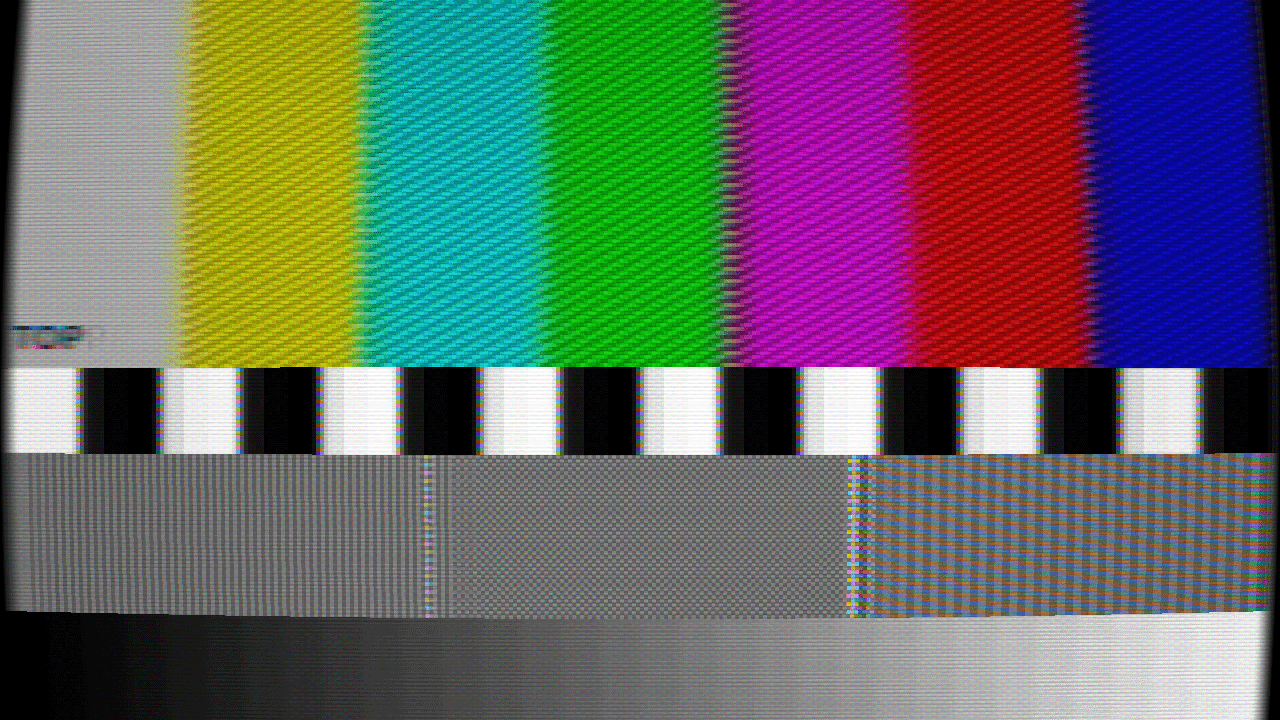
- An animated NTSC test pattern: 75% color bars, castellations, fine 1-pixel line and checkerboard blocks that trigger cross-color, a luminance ramp, and moving objects that reveal dot crawl and sync jitter.
- Every one of the 48 parameters exposed as a live slider, checkbox, or dropdown, grouped by stage.
- Preset switching, screen and content rotation, signal resolution presets, and tube fit, all from the panel or the keyboard.
- Drop an image file on the window, or open one from a dialog, to view your own artwork through the CRT.
- Copy the current settings to the clipboard as JSON, ready to paste into your project.
- The interface is available in English and Japanese.
- Environment variables drive scripted screenshots, including a clean capture mode with the interface hidden.
Compatibility
- Godot 4.6 or later.
- Verified on both the Forward+ (Vulkan) and Compatibility (OpenGL) renderers, with identical output.
- Both shaders are
canvas_itemshaders with no external dependencies and no compute or GDExtension requirement. - No plugin activation needed:
CRTScreen,CRTSettings, andCRTPresetsregister throughclass_nameand appear in the Create New Node dialog immediately. - The addon folder is self-contained and refers to its own files relatively, so it can be moved or renamed and does not have to live under
addons/. - The download contains only the addon; the demo and documentation live in the repository.
- MIT licensed, so it can be used in commercial games.
- Full parameter reference included in English and Japanese, and the shader source is commented line by line.
Changelog for version v1.0.0
2026-08-12 09:02:32
No changelog provided for this version.