Description
Changelog
Reviews (0)
Global Asset Manager
A powerful, highly performant in-editor asset hub for Godot 4.
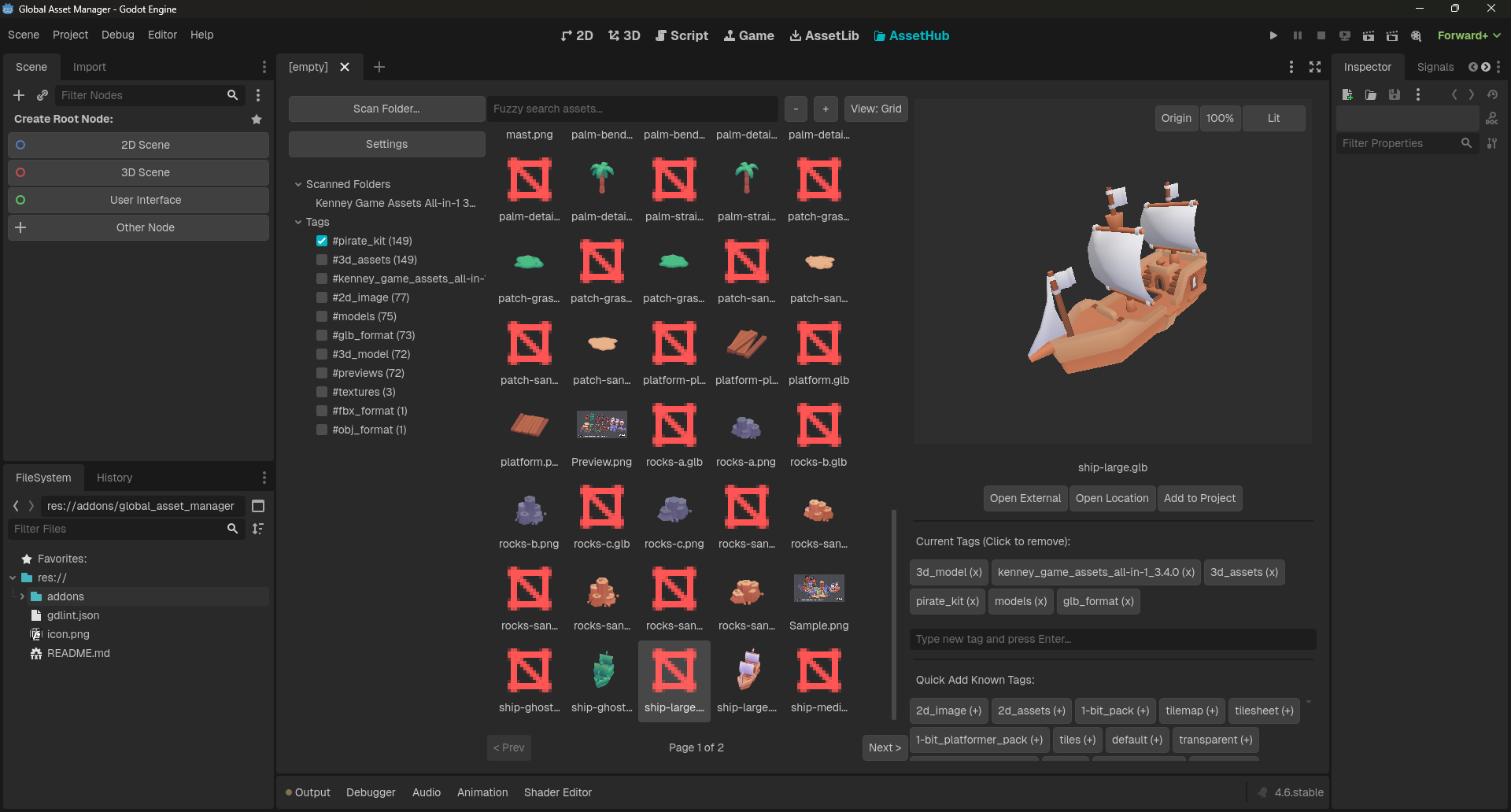
The Global Asset Manager allows you to scan massive local asset libraries (like the 65,000+ file Kenney All-in-One pack), dynamically filter them with tags and fuzzy search, preview them, and instantly copy them into your active project—without ever leaving the Godot Editor.
Features
- Massive Library Support: Asynchronous background loading and pagination ensure the editor never freezes, even when browsing tens of thousands of files at once.
- Smart Auto-Tagging: Automatically generates tags based on your local folder structure (e.g.,
sounds/impacts/wood.wavautomatically gets#soundsand#impactstags). - Dynamic Tag Filtering: Multi-select tags in the sidebar to drill down results. Tags instantly update to show how many assets they contain, unrelated tags hide automatically, and selected tags pin to the top.
- Fuzzy Search: Instantly find what you need. A search for swrd will confidently pull up
wooden_sword_01.glb. Exact matches are automatically prioritized to the top.- Search for only exact matches by using quotes around your search query. Searching for "fall" returns _leaves_fall.jpg_ instead of _leaves_fall.jpg_, _football.jpg_, and _fireball.jpg_.
- In-Editor Previews:
- 3D Models: Click and drag to smoothly spin models in a custom 3D viewport.
- 2D Images: Crisp, nearest-neighbor filtered previews perfect for pixel art.
- Audio: Playback controls with built-in, real-time downsampling for 24-bit and 32-bit float
.wavfiles (which Godot normally cannot play at runtime).
- One-Click Project Import: Select single or multiple assets and hit "Add to Project". They will instantly copy to designated
res://assets/...folders and trigger Godot to refresh the FileSystem dock. - Global Tag Management: Add custom tags to selections, or right-click a tag in the sidebar to delete it globally across your entire database.
- External Integration: Instantly open the asset's file location, or open the asset in your default external editing program (Blender, Aseprite, Audacity, etc.).
Supported Formats
You can enable or disable these formats individually from the Settings menu to prevent your database from cluttering with unwanted file types:
- 3D Models:
.glb,.gltf,.fbx - 2D Images:
.png,.jpg,.jpeg,.webp - Audio:
.wav,.ogg,.mp3
Installation
- Download or clone this repository.
- Move the
global_asset_managerfolder into your Godot project'saddonsdirectory (res://addons/global_asset_manager/). - Open your project in Godot 4.
- Go to Project > Project Settings > Plugins.
- Find Global Asset Manager and check the Enable box.
- The tool will appear as a new "AssetHub" tab in your main central workspace.
How to Use
- Scan your files: Click "Scan Folder..." in the sidebar and point it to a local folder on your hard drive (e.g.,
C:/GameDev/Downloaded_Assets). The app will recursively scan and index everything. - Find what you need: Use the fuzzy search bar or click tags in the left sidebar to narrow down your list.
- Preview: Click any item in the grid to preview it on the right panel. Hold
ShiftorCtrlto select multiple items at once. - Import: Click Add to Project to copy the selected files into your current Godot project.
Configuration
Click the Settings button in the sidebar to access the configuration menu. Here you can:
- Set the maximum preview volume for audio files.
- Define exactly which
res://subfolders different asset types should be imported to. - Toggle which specific file extensions the scanner should look for.
- Safely reset all settings to default, or completely wipe the asset database to start fresh.
Built by an indie dev, for indie devs. Happy developing!
Changelog for version v2.0.1
2026-03-30 22:01:01
No changelog provided for this version.