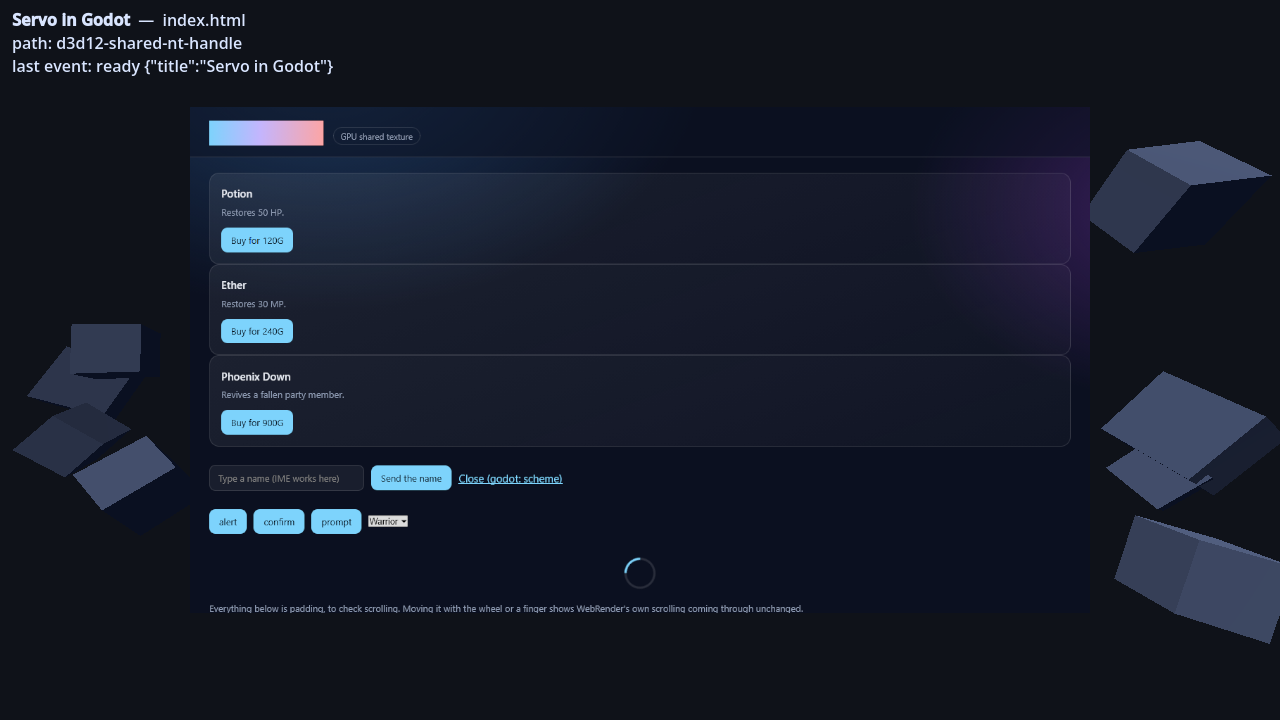
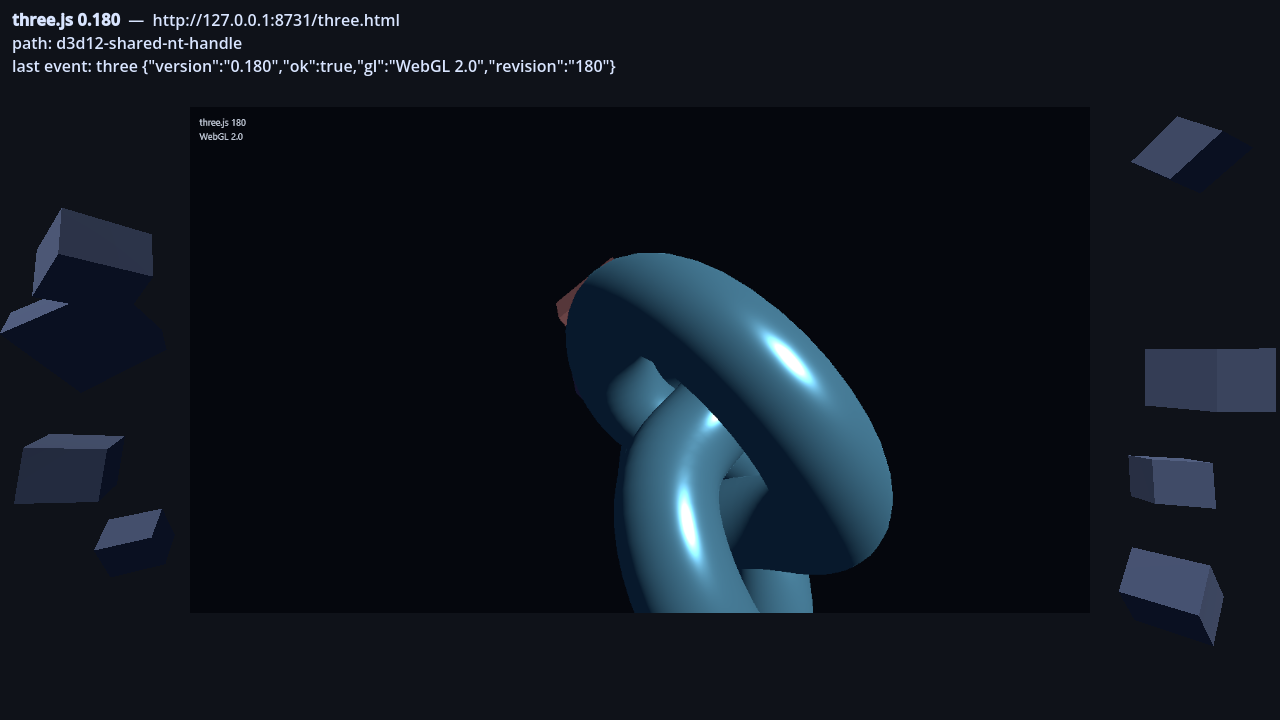
An in-game browser. godot-servo embeds Servo, the Rust browser engine, into Godot 4 as a GDExtension and hands the rendered page over as a GPU texture, so a web page can be a monitor the player walks up to and clicks, a shop or a quest log authored in HTML and CSS, a launcher or a patch-notes panel, or a web app hosted inside an editor tool.
The page never leaves the GPU. Servo's compositor draws into memory Godot's renderer can sample directly, so no pixels travel over the bus each frame: raising the resolution costs GPU bandwidth rather than a bigger trip through system memory, which is what makes a full-screen page, WebGL, or a running CSS animation affordable at all. And it arrives as a plain Texture2D, so it goes on a 3D panel, a material or a TextureRect like any other, and any shader or material you already use applies to it.
Add a ServoWebView node, set url and view_size, and point a material or a TextureRect at get_texture(). The extension registers the node itself, along with the ServoServer singleton that holds its settings, so there is no editor plugin and nothing to enable in the Plugins tab.
HIGHLIGHTS
- No CPU round trip — Servo draws into a surface Godot shares. Where a platform offers no sharing path the extension reads pixels back instead of refusing to start, and get_backend_name() reports which route a running instance actually took.
- Real web rendering — HTML, CSS, JavaScript, WebGL 1 and 2, WebGPU, and three.js, including the current release over WebGL 2.
- In-game, not an overlay — the page is a Texture2D. No separate window, no compositing step, nothing to keep aligned with the game's own rendering.
- Mouse, touch and keyboard — touch reaches the page as real touch events, so Servo does its own scrolling and flinging. Godot's mouse/touch emulation is filtered out, so one gesture stays one gesture.
- IME composition — Japanese and other languages type into the page through the OS IME. The caret rectangle comes back with the signal, so the candidate window can be placed over a panel standing anywhere in the world.
- Two-way — forward input in, get page events back as signals:
window.godot.emit("buy", {item: "potion"})from JavaScript, or a plain<a href="godot:buy?item=potion">link with no JavaScript at all. - The page's dialogs are yours to draw —
alert(),confirm(),prompt()and<select>arrive as signals carrying their text and options, for the game to present in its own style and answer. - Two nodes and you are done — attach the addon's TextureRect or 3D-panel component, point it at the WebView, and the texture, the coordinate maths, the input, the cursor and the IME anchor are all taken care of. What is left is the URL and the page's events, which are the parts only your game can answer.
- Bundled pages that survive an export — a page under
res://has no file behind it once it is packed, so afile://URL onto it fails in a shipped build while working in the editor, and neither the path norFileAccess.file_exists()will warn you.local_pages.gdunpacks the tree touser://and hands back a URL that works in both.
REQUIREMENTS
- Godot 4.4+
- Forward+, Mobile, or Compatibility. All three run. Which one you pick, together with the platform, decides whether the page is shared on the GPU or read back through the CPU — see below.
PLATFORM SUPPORT
The page is shared on the GPU wherever the platform allows it. Where it does not, the extension reads the pixels back through the CPU instead of refusing to start: the same picture, at the cost of a round trip per frame. get_backend_name() reports which of the two a running instance took.
- Windows (x86_64) — Forward+ and Mobile share on the GPU with Project Settings > Rendering > Rendering Device > Driver > Windows (Advanced Settings) set to "d3d12". On the default "vulkan" driver, see the note below. On a machine with two GPUs, Servo renders on the one Godot uses, so pointing --gpu-index at either keeps the page on the GPU.
- macOS (Apple silicon) — Forward+ and Mobile share on the GPU on the default "metal" driver. The page arrives bottom-up on this one; is_texture_flipped_v() says so, and the material flips it. For "vulkan" (MoltenVK), see the note below.
- Linux (x86_64) — Forward+ and Mobile share on the GPU, on a stock Godot with nothing to configure.
- Android (arm64-v8a) — all three renderers share on the GPU. Compatibility needs a
shader that declares
samplerExternalOES; the addon ships one for a 3D panel and one for a Control, and needs_external_sampler() tells you when it applies. Verified on an Adreno 710. - Compatibility on desktop — CPU readback.
A note on Vulkan, on Windows and on macOS through MoltenVK. Both paths are implemented and verified, but sharing there needs a Vulkan device extension enabled before Godot creates the device, which only the project can ask for. The setting that would do it (godotengine/godot#114940) has not landed in a released Godot, so on stock builds these two combinations run on CPU readback and log why. Windows has the D3D12 driver above as the GPU-shared option in the meantime, and macOS has Metal, which is its default anyway.
INSTALL
- Download godot-servo-X.Y.Z.zip and unzip it.
- Merge the addons/godot_servo/ folder into your project, so that it lands at res://addons/godot_servo/.
- Reopen the project. Nothing to enable in the Plugins tab — the extension registers the ServoWebView node by itself.
Keep exactly one copy of godot_servo.gdextension; two manifests register the extension twice.
Or start from the demo project
Every release also carries godot-servo-demo-X.Y.Z.zip, a Godot project that runs as it
is: the addon with its binaries already in place, the 3D and 2D demo scenes, and the
pages they load. Unzip it, open the folder in Godot and press play. It is the quickest
way to see which sharing path your machine takes, and the scenes are the worked version
of everything in Quick Start below — the coordinate conversion, the IME anchor, and how
the addon's own cursor map, <select> picker and external-sampler shader get wired in.
https://github.com/shiena/godot-servo/releases
QUICK START
The addon ships two components that do most of this for you. Attach servo_texture_rect.gd to a TextureRect, or servo_panel_3d.gd to a MeshInstance3D with a QuadMesh and a CollisionObject3D child, and point the script's browser at the WebView node. Between them they own the texture, the coordinate conversion, the input forwarding, the cursor and the IME anchor — everything in this section except the URL and what the page sends back. The TextureRect one also follows its control's size, so the page reflows with the window rather than being scaled up. What follows is what they do, for a project that wants to do it itself.
Put a page on a TextureRect
@onready var view: TextureRect = $View
var browser: ServoWebView

func _ready() -> void:
    browser = ServoWebView.new()
    browser.view_size = Vector2i(1280, 720)
    browser.url = "https://example.com"
    browser.frame_updated.connect(_on_frame_updated)
    add_child(browser)   # autostart is on: the URL opens once the scene is ready

func _on_frame_updated() -> void:
    if view.texture != null:
        return   # the same texture for the whole run, so bind it once
    view.texture = browser.get_texture()
    view.flip_v = browser.is_texture_flipped_v()   # true on the macOS Metal path
    print("path: ", browser.get_backend_name())
Put it on a 3D panel
@onready var screen: MeshInstance3D = $Screen
var texture_bound := false

func _on_frame_updated() -> void:
    if texture_bound:
        return
    var texture: Texture2D = browser.get_texture()
    if texture == null:
        return
    texture_bound = true

    if browser.needs_external_sampler():
        # Android's Compatibility renderer hands the buffer over as a
        # GL_TEXTURE_EXTERNAL_OES texture, which a sampler2D reads as black.
        # The addon ships the shader that reads it.
        var shader_material := ShaderMaterial.new()
        shader_material.shader = load("res://addons/godot_servo/servo_external.gdshader")
        shader_material.set_shader_parameter("servo_texture", texture)
        screen.material_override = shader_material
        return

    var material := screen.material_override as StandardMaterial3D
    material.albedo_texture = texture
    if browser.is_texture_flipped_v():
        material.uv1_scale = Vector3(1.0, -1.0, 1.0)
        material.uv1_offset = Vector3(0.0, 1.0, 0.0)
Open a page you shipped with the game
A file:// URL onto res:// works in the editor and fails in an exported build, where
the page is inside the PCK with no file behind it. This hands back one that works in
both, unpacking the tree to user:// the first time if it has to.
const LocalPages = preload("res://addons/godot_servo/local_pages.gd")

# "res://ui" is the directory the page and everything it references sit under.
# The whole of it travels together, because a page's <link> and <script> resolve
# against wherever the page itself ended up.
browser.url = LocalPages.url("res://ui", "shop.html")
Forward input
feed_input() takes the event and a position in WebView pixels, so convert first. Pass mouse and touch through together: Godot's emulate_mouse_from_touch turns every touch into a synthetic mouse event as well, and the extension drops those, so one gesture stays one gesture.
# From a TextureRect's gui_input signal.
func _on_view_gui_input(event: InputEvent) -> void:
    if event is InputEventKey:
        browser.feed_input(event, Vector2.ZERO)
        view.accept_event()   # so Tab does not move the focus on
        return
    var local: Vector2
    if event is InputEventMouse:
        local = (event as InputEventMouse).position
    elif event is InputEventScreenTouch:
        local = (event as InputEventScreenTouch).position
    elif event is InputEventScreenDrag:
        local = (event as InputEventScreenDrag).position
    else:
        return
    browser.feed_input(event, local * (Vector2(browser.view_size) / view.size))

func _on_view_mouse_exited() -> void:
    browser.notify_pointer_left()
# From a 3D panel's CollisionObject3D.input_event signal.
func _on_panel_input(
    _camera: Node, event: InputEvent, hit: Vector3, _normal: Vector3, _shape: int
) -> void:
    var local := screen.global_transform.affine_inverse() * hit
    var quad := (screen.mesh as QuadMesh).size
    # A QuadMesh is centred on its origin. Flip Y to put (0, 0) at the top left.
    var uv := Vector2(local.x / quad.x + 0.5, 0.5 - local.y / quad.y)
    browser.feed_input(event, uv * Vector2(browser.view_size))
Receive events from the page
The extension injects window.godot into every page. godot.emit() triggers no navigation, so it leaves page state alone; the link form needs no JavaScript at all.
godot.emit("buy", { item: "potion", price: 120 }); // payload arrives as a JSON string
<a href="godot:close?reason=done">Close</a> <!-- payload is the query string -->
browser.bridge_event.connect(func(event_name: String, payload: String) -> void:
    match event_name:
        "buy":
            var data: Variant = JSON.parse_string(payload)
            if data is Dictionary:
                print("bought ", data.get("item"), " for ", data.get("price"))
        "close":
            get_tree().quit()
)
Answer the page's dialogs and pickers
alert(), confirm(), prompt() and <select> all block the page's JavaScript until
the embedder answers, and the extension has no UI of its own. Each arrives as a signal
for the game to present however it likes. Always answer: a page waiting on a dialog
nobody answered is stuck for good.
browser.dialog_confirm.connect(func(message: String) -> void:
    var accepted: bool = await my_dialog.ask(message)
    browser.respond_to_dialog(accepted, "")
)

browser.select_element_requested.connect(func(options: Array, _multiple: bool) -> void:
    # options: [{ id, label, disabled, group }, ...], with <optgroup>s flattened.
    # Servo draws no dropdown, so clicking a <select> looks like nothing happened
    # until the game puts a menu on screen. addons/godot_servo/select_picker.gd
    # is a ready-made PopupMenu if you would rather not write one.
    var chosen: int = await my_menu.pick(options)
    browser.respond_to_select([chosen])
)

# When the game's own UI closes without a choice.
if browser.has_pending_dialog():
    browser.cancel_pending_dialog()
Because the text comes from the page, present it so it cannot be mistaken for the game's own UI.
Place the IME candidate window
The OS puts the candidate window in window coordinates, so the extension cannot guess where a 3D panel appears on screen. Project the caret yourself and assign ime_anchor; without it, candidates appear at the top left of the window.
# On a 3D panel: WebView pixels to world, then to screen.
browser.ime_requested.connect(func(caret: Rect2, _multiline: bool) -> void:
    var bottom_left := Vector2(caret.position.x, caret.position.y + caret.size.y)
    browser.ime_anchor = camera.unproject_position(view_pixels_to_world(bottom_left))
)

# On a TextureRect: undo the control's scaling.
browser.ime_requested.connect(func(caret: Rect2, _multiline: bool) -> void:
    var bottom_left := Vector2(caret.position.x, caret.position.y + caret.size.y)
    browser.ime_anchor = view.global_position \
        + bottom_left * (view.size / Vector2(browser.view_size))
)
To drive composition from your own input UI instead of the OS IME, call feed_ime_composition(state, text) with "start", "update" or "end". The text passed with "end" is what gets committed.
Turn WebGL 2 or WebGPU off
Both are on by default. They are settings on the ServoServer singleton, not on the node, because every WebView shares one Servo. Servo reads them once, when the first ServoWebView starts, and then runs until the game exits, across scene changes. Setting them after that only logs a warning. Set them from an autoload's _init(), or from any _ready() in the scene when the WebView uses autostart, which waits until the whole scene is ready.
# In an autoload.
func _init() -> void:
    ServoServer.enable_webgpu = false
KNOWN LIMITATIONS
- Size. Servo brings SpiderMonkey, Stylo, WebRender, wgpu and the ICU data with it. The archive is about 189 MB for all four platforms, and the stripped arm64-v8a library alone is 126 MB — a demo APK lands around 153 MB. Budget for it before shipping to mobile.
- WebGPU needs a page served over HTTP. A file:// page has no host, and Servo drops its adapter request without an answer, so requestAdapter() never settles. That rules out the bundled-page route above for WebGPU content. On Android it is verified under Compatibility; through MoltenVK on macOS, compute runs but canvas rendering is unverified.
- No GPU-to-GPU semaphore. Godot's RenderingDevice offers no way to attach an external semaphore to a submission, so ordering between Servo's writes and Godot's reads rests on glFlush(). No tearing has been observed here, but a compositor-style workload that resamples under fast motion is the case where it would show.
- Cancelling an IME conversion leaves the preedit text in the field. Servo's compositionend handler only clears the selection when the data is empty, and its composition API offers no way to delete a preedit.
- The file picker, colour picker and context menu are not surfaced. Servo offers all three; none is a signal yet, so they answer with the default and the page carries on.
- Scene color feedback is not available, so CSS backdrop-filter cannot blur the game behind the page. The Godot side is CompositorEffect; the Servo side needs a fork.
- iOS is not supported. Neither surfman nor Servo targets it, and iOS forbids JIT and dlopen.
- One ServoWebView. Multiple nodes share a single Servo instance by design, and that arrangement is untested.
Dual-licensed MIT or Apache-2.0, at your option. Servo itself is MPL-2.0 and is used unmodified, so its file-level copyleft does not reach your own code.
Full documentation, the API reference, per-platform notes and build-from-source instructions: https://github.com/shiena/godot-servo
Changelog for version v1.2.1
2026-10-24 17:17:00
No changelog provided for this version.
