Description
Changelog
Reviews (0)
TileMap Collision Baker
TileMap Collision Baker is a Godot 4 editor addon that generates StaticBody2D collision from the physics layers of a TileMapLayer.
Instead of creating individual collision shapes for every tile, the baker detects tiles with collision on each physics layer and merges adjacent cells into larger rectangular collision shapes.
Features
- Bake collision directly from a TileMapLayer in the Inspector.
- Supports all physics layers configured in the TileSet.
- Automatically detects which cells contain collision for each physics layer.
- Merges adjacent collision cells into rectangular regions.
- Generates a separate StaticBody2D for each physics layer that contains collision.
- Preserves the TileSet's collision layer and collision mask settings.
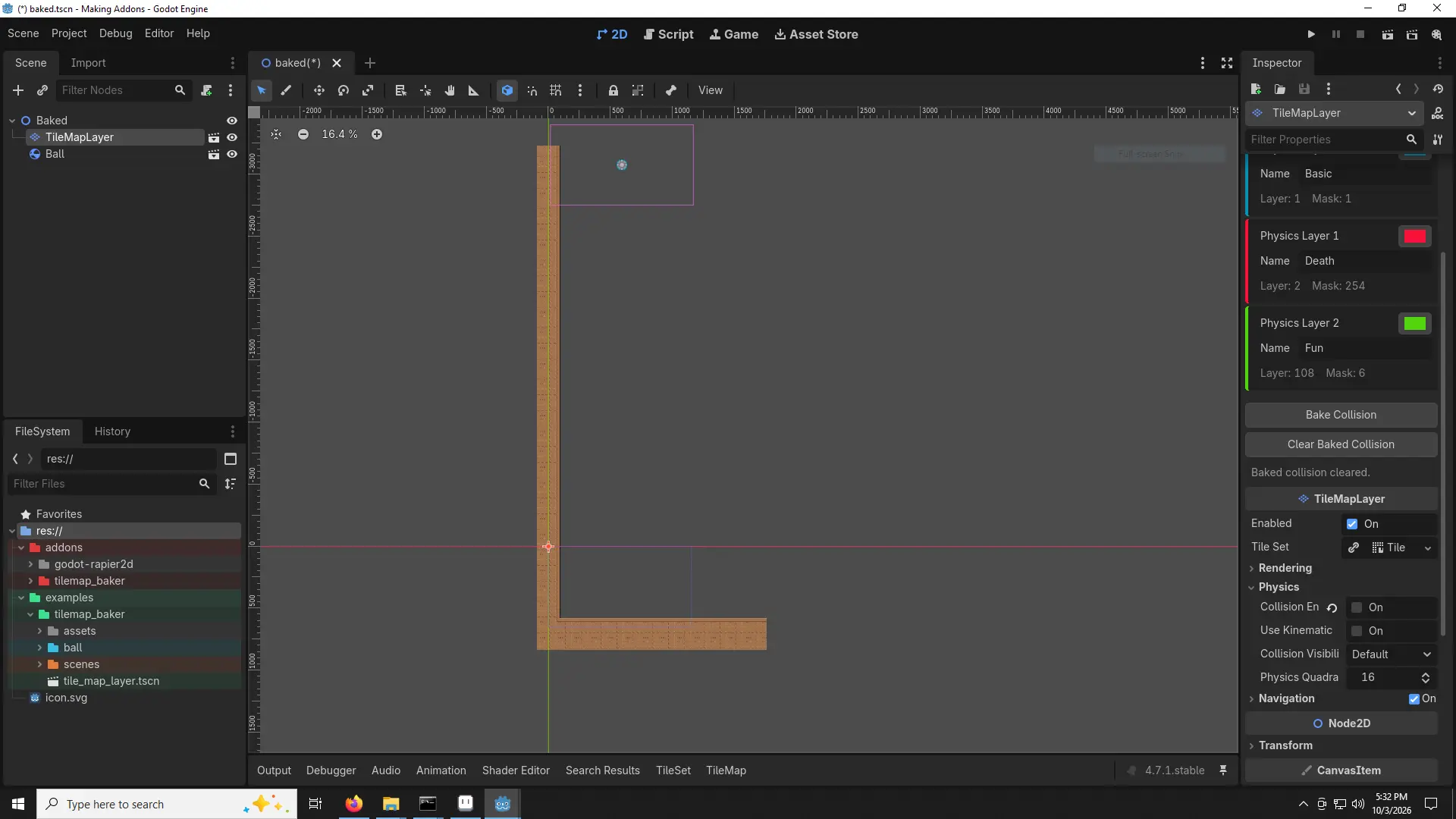
- Configure custom names and colors for physics layers.
- Preview generated collision shapes using the configured colors.
- Clear previously generated collision with a single button.
- Generated collision is saved with the scene.
Requirements
- Godot 4.7 (might work with newer versions, idk).
- A TileMapLayer with a TileSet assigned.
- At least one physics layer configured in the TileSet.
- Tile collision polygons configured for the tiles you want to bake.
Installation
- Copy the tilemap_baker folder into your project's addons directory:
res://addons/tilemap_baker/ - Then enable the plugin from:
Project → Project Settings → PluginsEnable Nick's Tilemap Baker.
Usage
- Configure your TileSet
- Create or select a TileSet for your TileMapLayer.
- Add one or more physics layers to the TileSet and configure the collision polygons for your tiles.
- The baker uses the TileSet's physics layers and collision data as the source for the generated collision.
- Select a TileMapLayer
- Select a TileMapLayer in the scene tree.
- The Tilemap Baker section will appear in the Inspector.
- The plugin displays all physics layers detected in the TileSet, along with their collision layer and collision mask values.
- Configure physics layers
- Each physics layer can have a custom name and color.
- The name is used for the generated StaticBody2D, while the color is used to display the generated collision shapes in the editor.
- These settings are shared between TileMapLayer nodes in the project.
- If a layer has no custom name, it will use:
Physics Layer 0,
Physics Layer 1,
Physics Layer 2,
etc
- Bake the collision
- Click Bake Collision in the Tilemap Baker section of the Inspector.
- The baker will:
- Read the physics layers from the TileSet.
- Find every used cell containing collision for each physics layer.
- Merge adjacent collision cells into rectangular regions.
- Create a StaticBody2D for each physics layer containing collision.
- Create CollisionShape2D nodes using the merged rectangles.
- Apply the TileSet's collision layer and collision mask settings.
- The bake result is reported in the Inspector, including the number of physics layers, active layers, source cells, and generated rectangles.
- Clear generated collision
- Click Clear Baked Collision to remove collision previously generated by TileMap Collision Baker.
- Only collision generated by the addon is removed. Other children of the TileMapLayer are left untouched.
- How Collision Merging Works
- The baker operates on the grid occupied by the TileMapLayer.
- For each physics layer, it identifies cells whose tile data contains collision polygons.
- Adjacent cells are then combined into rectangular regions where possible.
- For example, a 4×3 block of collision cells can be represented by a single rectangular collision shape instead of twelve individual shapes.
- This reduces the number of generated CollisionShape2D nodes and can make large tile-based collision layouts more compact.
- The generated rectangles are based on the TileSet's tile size and the TileMapLayer's map coordinates.
Physics Layers
TileMap Collision Baker keeps the physics configuration of each TileSet physics layer.
For every generated physics body, the addon copies the corresponding:
- Collision Layer
- Collision Mask
This allows different types of tile collision to remain separated according to the physics configuration of the TileSet.
Generated Scene Structure
- Generated collision is added as children of the TileMapLayer.
- The generated StaticBody2D nodes and their collision shapes are marked internally by the addon so they can be safely identified and removed when Clear Baked Collision is used.
Limitations
- TileMap Collision Baker currently generates rectangular collision shapes based on occupied tile cells.
- It does not reproduce the exact geometry of each tile's collision polygon. Instead, it uses the presence of collision on a cell to determine which grid cells should be included in the generated rectangular collision.
- Because of this, the resulting collision may be less precise than the original per-tile collision polygons for tiles with irregular or non-rectangular shapes.
- The addon is best suited for tilemaps where collision can be reasonably represented by rectangular regions.
License
- TileMap Collision Baker is released under the MIT License.
- See the included LICENSE file for the full license text.
Changelog for version v1.0.0
2026-10-04 17:38:00
No changelog provided for this version.