Description
Iso & Orbit is a documented, configurable set of Godot components for isometric and top-down games. Start with the
assembled PlayableHero, or combine individual components in your own project. The movement and camera components
can also be reused in other 3D games.
Version 1.3.0 adds NPC patrol routes, setup warnings in the editor and a preview of the camera's starting view. Clicks no longer interrupt automatic camera following. The demo now includes two patrolling characters.
Movement you can configure
- Click to move around obstacles using a baked navigation mesh, or hold the mouse button for direct steering or movement along a path. With camera-relative keyboard movement, the character can face in the camera's viewing direction or turn toward its movement direction.
- Tune running speed, acceleration, braking, turning, sprint, jump, falling, step height and ledge protection. Sprint can use stamina. Jumps support a short grace period after leaving an edge and buffered presses before landing.
- Enable an optional floating appearance: the model hovers above the ground and glides over stairs while the collision body still uses normal ground movement.
Manual or automatic camera control
- Orbit with the mouse and zoom with the wheel; optionally control vertical tilt with the mouse too. Configure distance and tilt limits, sensitivity and smoothing.
- While the character runs, independently enable horizontal turning to follow its movement direction, adjustment toward a chosen vertical tilt, and adjustment toward a chosen camera height. Each has its own adjustment time.
- Smooth out height changes on stairs, limit automatic turn speed and prevent unwanted camera turns during sharp changes of direction, reversals or runs toward the camera. Automatic following continues smoothly through repeated clicks. You can also pause automatic adjustments after manually orbiting the camera.
CameraArmkeeps the camera out of world geometry. It can move closer when an obstacle hides the character and fade the model when the camera gets too close. An optional silhouette shows the character through obstacles.
Patrol routes for NPCs
- Draw a route with
Path3D, andPatrolControllerwalks the character along the exact line shown in the editor, turning smoothly through bends. Navigation guides the character from its current position to the route and can bring it back to its starting position. - Repeat routes with a pause between rounds and at individual waypoints, or supply route points from a script.
- Patrols stop for characters ahead, with configurable detection distance and angle. A signal reports when a character has blocked the way for a chosen time, so you can trigger dialogue or another response.
Set up scenes in the editor
Components show warnings for missing references, missing input actions and conflicting settings in the Scene dock.
The warnings update as you edit. OrbitCameraRig previews the starting camera view at its target, using your initial
rotation and zoom settings, so you can check the framing before running the game.
Try different configurations in the demo
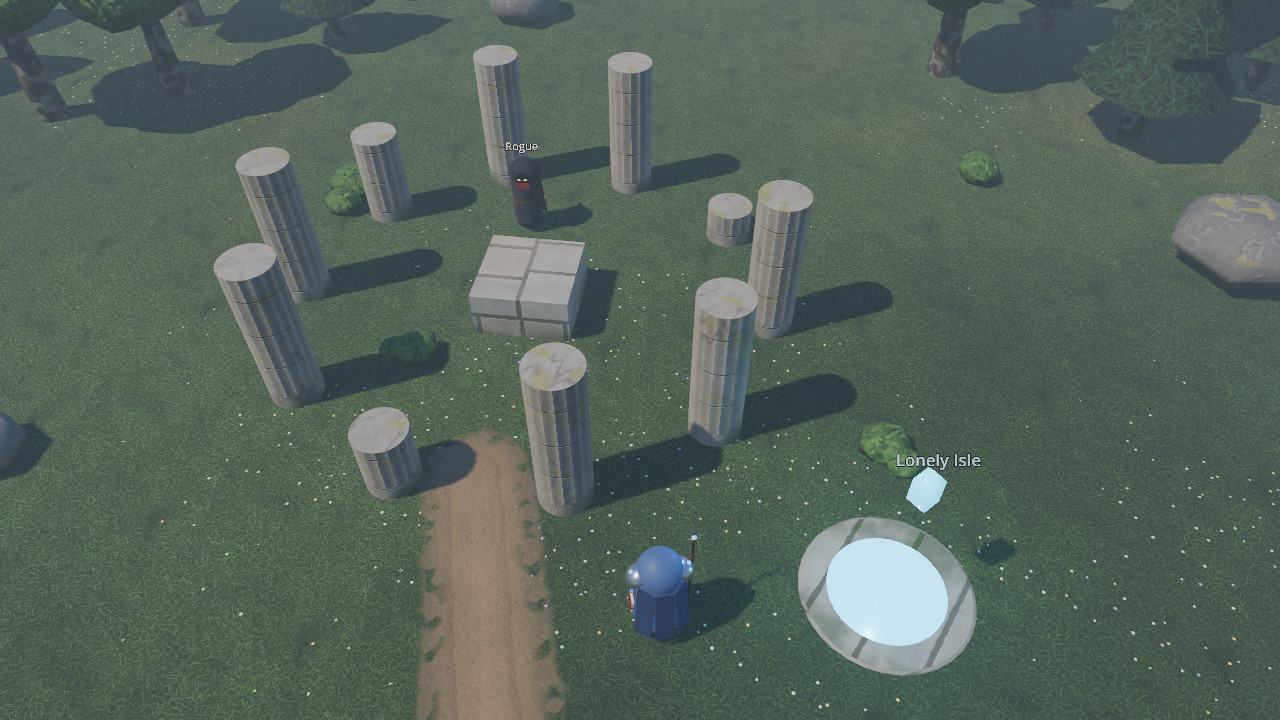
Explore two connected levels with ten hero appearances and two patrolling NPCs. A knight walks through the hedge maze and stops when the hero blocks his way. A ranger follows a shorter route on Lonely Isle.
The settings window lets you compare mouse and keyboard movement modes, jump and sprint options, floating, and manual or automatic camera behavior. Your menu choices are saved, and Reset all restores the defaults configured in the scene.
The menu exposes a selection of controller settings. Inspector properties, resources and script APIs offer more, including base running speed and acceleration, whether a path-following run stops when you release the mouse button, and the physics layers that the camera checks for obstacles. Use the demo to try the behavior, then configure the components for your own game.
Documented and reusable
Guides cover transferring the assembled PlayableHero, using individual components, setting up input, collision and
navigation, editing scenes, creating patrols, and three example configurations with specific settings. Documentation
and the demo interface are available in
English, Spanish, Japanese, Brazilian Portuguese, Russian, Turkish and Simplified Chinese.
Seven addons use plain GDScript classes, with no editor plugin to enable. Each addon can be used on its own, except
that ground_character needs click_to_move. The camera works with any Node3D target, and the movement components
can be driven by player input or AI. Character data and signals let you connect your own animations, effects and UI.
Also included: level loading with portals and spawn points, place-discovery messages, a UI window stack and helpers that put current Input Map key and mouse-button names into interface text.
Technical details
Godot 4.7, tested on 4.7.2. 545 automated checks. The demo uses Forward+, Jolt Physics and a perspective camera. Demo characters are built from primitives, textures are generated, and sounds are synthesized.
MIT license, except for the Godot logo in icon.svg (CC BY 4.0).
Changelog for version v1.3.0
2026-10-12 23:26:41
No changelog provided for this version.