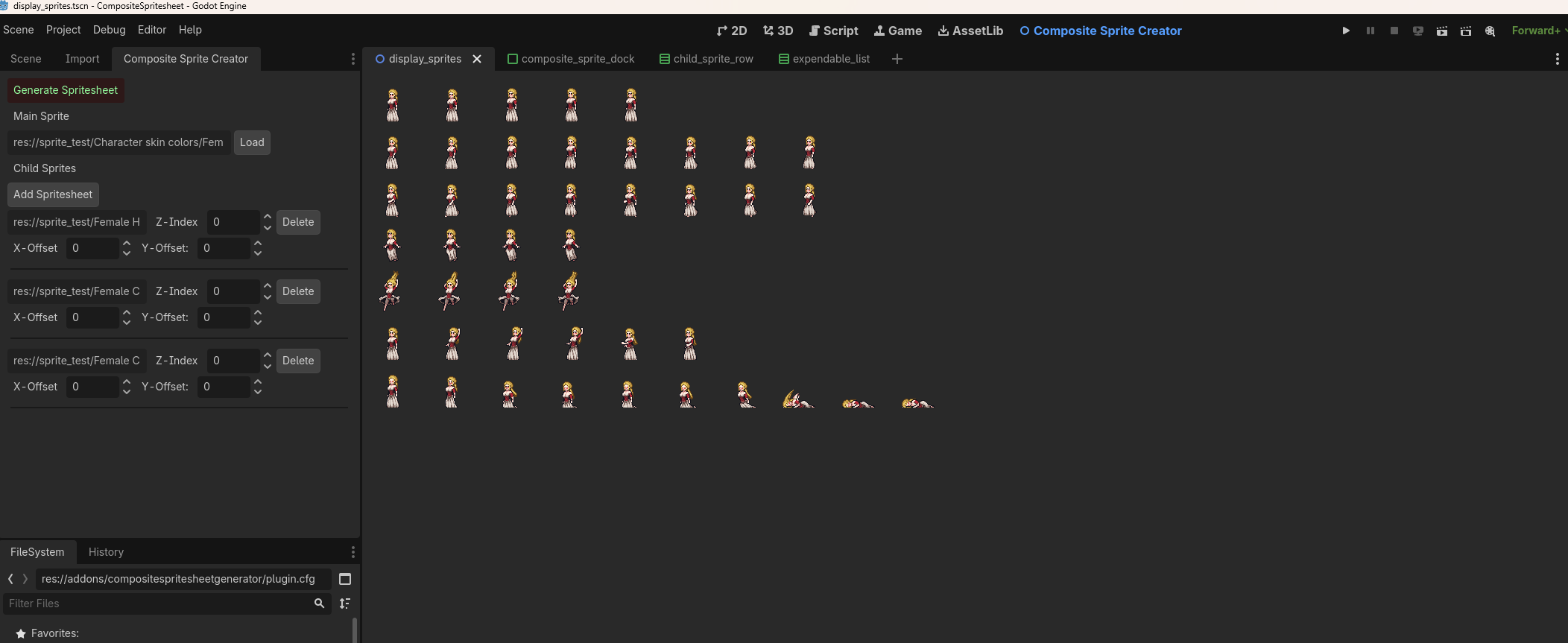
Composite Spritesheet Generator
A Godot 4 editor plugin for compositing multiple spritesheets into a single exported PNG. Load a base sprite, layer additional spritesheets on top with per-layer Z-index and position controls, and export the result with one click.
Installation
- Copy the
addons/compositespritesheetgeneratorfolder into your project'saddons/directory. - Open Project > Project Settings > Plugins.
- Find CompositeSpritesheetGenerator and set its status to Enable.
After enabling, a Composite Sprite Creator tab appears in the editor's main screen bar (alongside 2D / 3D / Script), and a Composite Sprite Creator dock panel appears on the left side of the editor.
Interface overview
The plugin has two parts:
| Part | Location | Purpose |
|---|---|---|
| Canvas | Main screen tab | Live preview of the composed sprite |
| Control dock | Left editor panel | Load sprites, adjust layers, export |
Control dock
Generate Spritesheet
The green Generate Spritesheet button at the top of the dock opens a save dialog. Choose a .png destination and the plugin renders the current composition to that file. The exported file is automatically scanned into the Godot resource filesystem.
Main Sprite
| Control | Description |
|---|---|
| Path field | Read-only. Shows the file path of the currently loaded base sprite. |
| Load button | Opens a file picker. Accepts .png, .jpg, .jpeg. |
The main sprite is the background/base layer of the composition. Its top-left corner is placed at the canvas origin and the other layers are positioned relative to it.
Child Sprites
Click Add Spritesheet to add a new layer on top of the main sprite. A file picker opens (.png, .jpg, .jpeg). Each added sprite appears as a row in the list below.
| Control | Range | Description |
|---|---|---|
| Path field | — | Read-only file path of this layer. |
| Z-Index | −100 to ∞ | Draw order. Higher values appear in front of lower values. Two sprites with the same Z-index are drawn in the order they were added. |
| X-Offset | −1000 to 1000 | Horizontal position offset in pixels relative to the main sprite origin. |
| Y-Offset | −1000 to 1000 | Vertical position offset in pixels relative to the main sprite origin. |
| Delete | — | Removes this layer from the composition. |
Step-by-step workflow
1. Open the plugin
Click the Composite Sprite Creator tab in the editor's top screen bar. The canvas opens showing an empty viewport. The control dock is visible on the left.
2. Load the main sprite
In the dock, click Load next to the Main Sprite label. Select the base spritesheet file. The sprite appears on the canvas and its path is shown in the path field.
3. Add child sprites
Click Add Spritesheet. Select a spritesheet to overlay. The new layer appears in the list and on the canvas, drawn on top of the main sprite at position (0, 0).
Repeat for each additional layer you want to add.
4. Adjust layers
For each child sprite row in the dock:
- Change Z-Index to control which layers appear in front of others.
- Change X-Offset and Y-Offset to shift the layer's position on the canvas.
The canvas updates in real time as you adjust values.
5. Export
Click Generate Spritesheet. A save dialog opens. Enter a filename and confirm. The composite is saved as a .png file and imported into your project automatically.
Supported formats
| Input | Output |
|---|---|
.png, .jpg, .jpeg |
.png only |
Notes
- The main sprite sets the reference coordinate system. All child sprite offsets are relative to its origin.
- Removing a child sprite row reindexes the remaining rows automatically.
- Z-index accepts negative values, which places a layer behind the main sprite (Z-index 0).
- The export resolution matches the size of the main sprite's texture.
Inspiration
This plugin was inspired by 2D Pixel Art Male and Female Character by gandalfhardcore on itch.io — a modular character asset pack where body, clothing, and hair are distributed as separate spritesheets designed to be layered together. The Composite Spritesheet Generator was built to make that kind of multi-layer compositing straightforward inside the Godot editor.
Changelog for version v0.9.1
2026-05-26 06:46:31
No changelog provided for this version.