Network Broadcast Discovery - Godot Demo
Overview
Network Broadcast Discovery is an educational demo project built with Godot 4.7.x. It shows how devices on a local network can announce and discover one another using UDP broadcast and multicast.
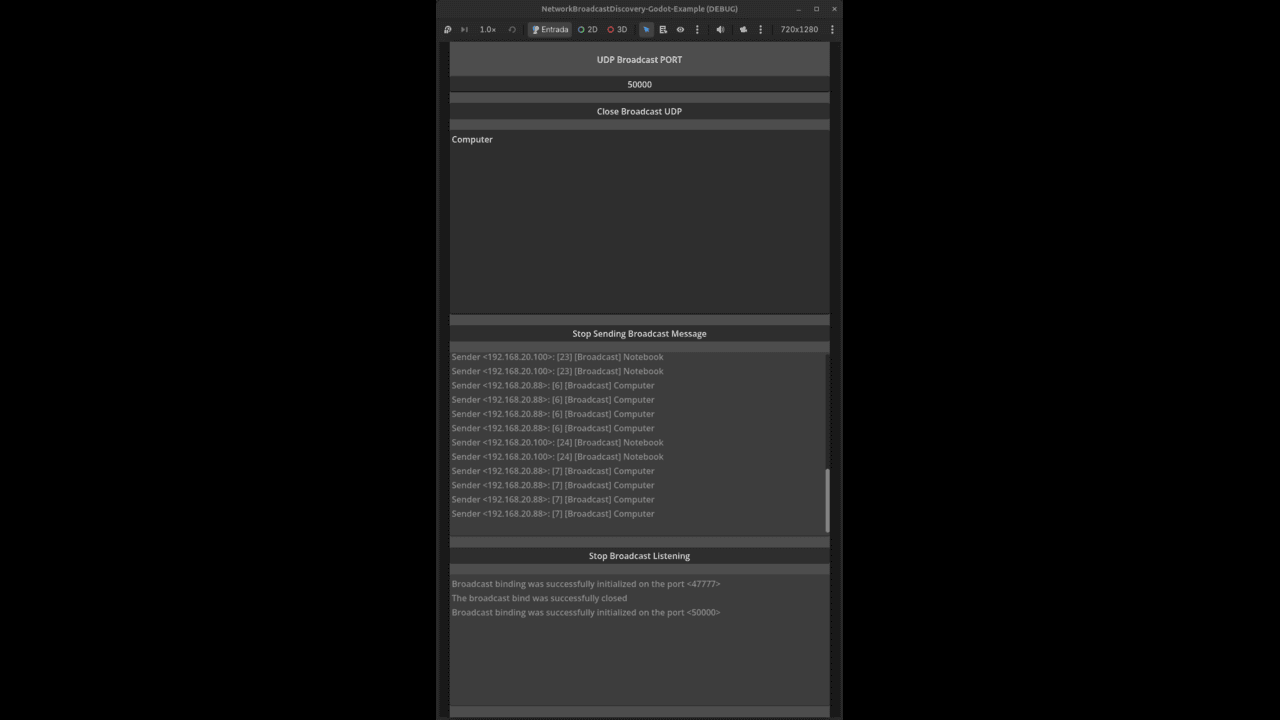
The main scene provides a small interface to choose a UDP port, send a text announcement, and inspect received messages and their sender IP addresses. This is a standalone example project, not a plugin or a complete server browser.
Features
- Configurable UDP port, defaulting to
47777. - Periodic UTF-8 announcements, sent once per second.
- Global broadcast, multicast, and per-interface broadcast destinations.
- Incoming message display with sender IP address.
- A simple log for socket initialization and shutdown.
- Godot 4.7 project with no additional plugins required.
How It Works
1. Initialize the UDP Socket
The discovery manager creates a PacketPeerUDP and binds it to the selected port. It enables broadcast and attempts to join the multicast group 239.255.77.77 on each local network interface.
2. Announce a Message
When sending is enabled, the main scene sends the entered text once per second. Each UTF-8 packet uses this format:
[id] [Broadcast] message text
The ID starts at 1 and increments for each announcement from that instance. Each packet is sent to 255.255.255.255, 239.255.77.77, and broadcast addresses derived from local IPv4 interfaces (/24).
3. Listen for Announcements
When listening is enabled, the scene checks for received packets and displays the sender IP and decoded message. Sending and listening can both be enabled in the same initialized instance.
What You Can Learn
By exploring this example, you can learn about:
- Binding a UDP peer to a port and using the same socket to send and receive datagrams.
- Using broadcast and multicast for local network discovery.
- Enumerating local interfaces and deriving candidate IPv4 broadcast destinations.
- Encoding a small announcement as UTF-8 and identifying the sender of a received packet.
- The difference between announcing a service and establishing a connection to it.
Getting Started
- Open
project.godotin Godot 4.7 and run the configured main scene. - On each of two different machines on the same LAN, enter the same available UDP port (the default is
47777) and click Initialize Broadcast UDP. - On one machine, enter a message and click Start Sending Broadcast Message.
- On the other machine, click Start Broadcast Listening to view announcements.
- Stop sending/listening and click Close Broadcast UDP when finished.
Testing requires two different machines. The UDP socket binds the selected port without enabling port reuse, so a second instance cannot bind the same port on the same machine.
Important Networking Notes
UDP does not guarantee delivery, ordering, or duplicate protection. This example periodically sends announcements, but does not implement acknowledgements, a handshake, or connections to discovered services.
Per-interface broadcast addresses are approximated by assuming a /24 subnet mask. Networks with other masks may require a subnet-aware broadcast calculation. Routers, wireless access points, operating systems, and firewalls can also block broadcast or multicast traffic, especially across subnet boundaries.
For Android exports, enable the CHANGE_WIFI_MULTICAST_STATE permission. The project calls PacketPeerUDP.set_broadcast_enabled(true) to send broadcast packets.
The listener reads one available packet per frame. A multicast join failure is logged, but does not make initialization fail if binding the UDP port succeeded.
Intended Audience
This project is for Godot developers learning UDP networking, indie developers exploring LAN discovery, and anyone looking for a small GDScript example to adapt for local network experiments.
Source Code
GitHub repository:
https://github.com/AchcarLucas/Network-Broadcast-Discovery-Godot-Example
Contributions, suggestions, and feedback are welcome.
Changelog for version Godot Network Broadcast Discovery - Demo
2026-10-17 12:39:05
No changelog provided for this version.