A real-time audio mixer for Godot that meters and edits the running game's audio buses, with a loudness meter (LUFS) and a calibrated pink-noise reference.
Requires Godot 4.7 or later.
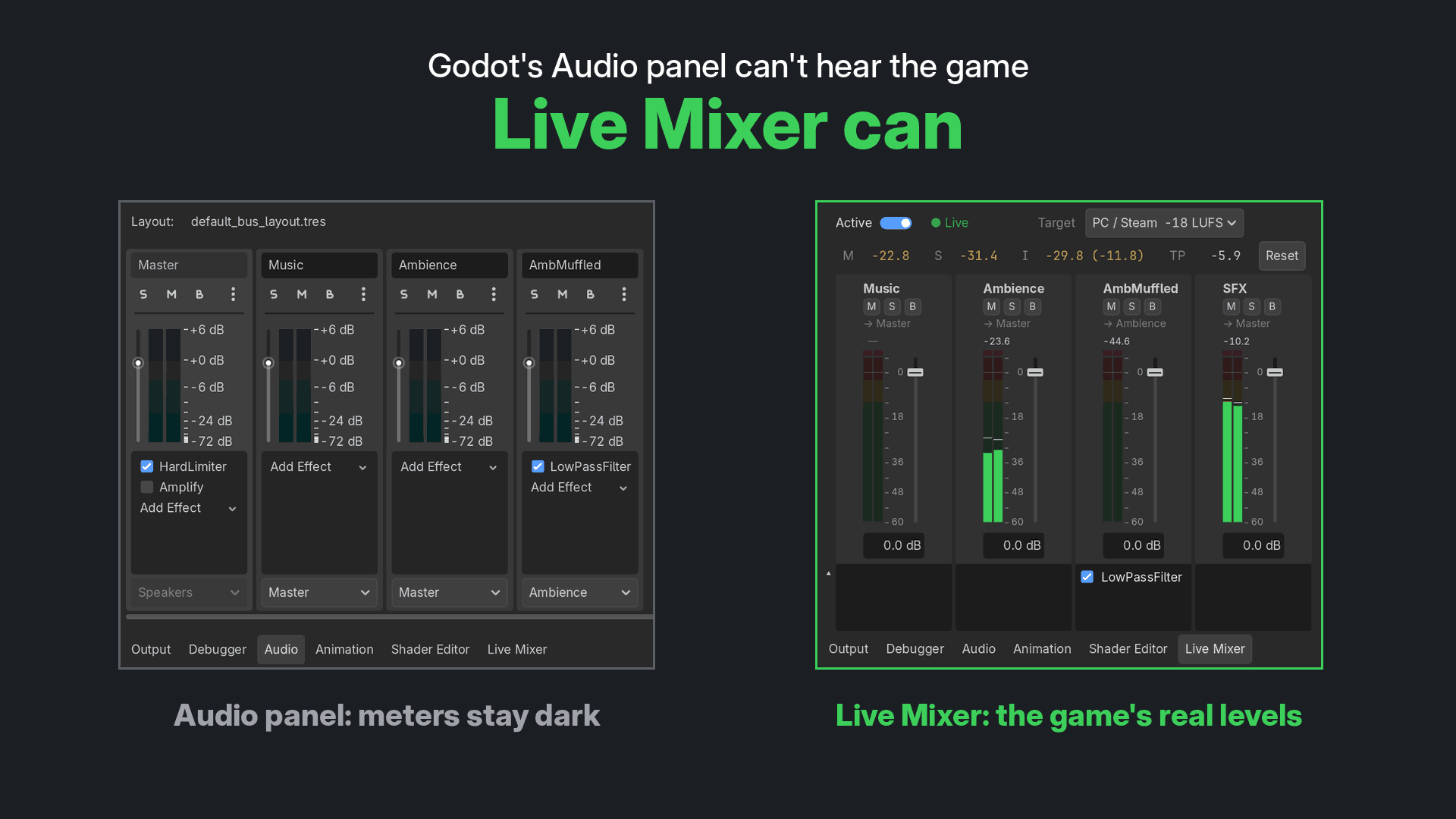
Godot's built-in Audio panel only shows the editor's own audio. The game runs in a separate process, so the panel's meters stay still while you play, and its changes don't reach the game until you restart it. Live Mixer connects to the running game through the debugger instead.
Ideally, Godot's own Audio tab would be fixed to allow live mixing. Until that day comes, I'll keep updating Live Mixer.
Features
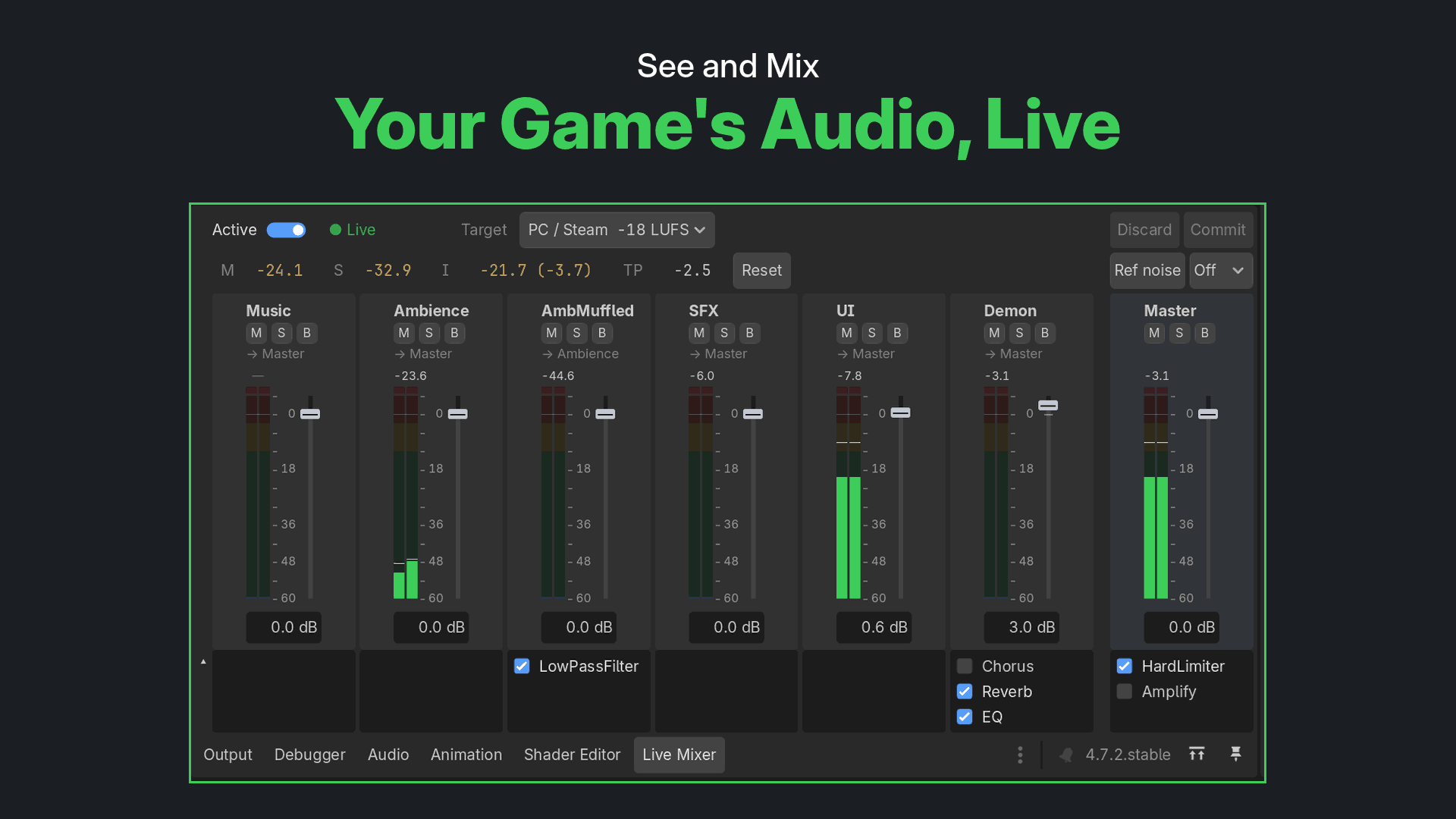
- Live meters for every bus of the running game: stereo peak, peak hold, a clip light, and the loudest peak since reset as a number above the bars (red above 0 dB). Click a meter to clear both. Faint colour zones show where yellow and red start, and a dB scale sits beside the bars.
- Live editing: faders, mute, solo, bypass and per-effect on/off take effect in the game straight away.
- Faders on the meter's scale: the fader track runs exactly alongside the meter bars, so a handle at 0 dB sits level with the 0 tick. Drag the handle, click the track to jump, scroll for ±0.5 dB (Shift: ±0.1), double-click for 0 dB. Or type a value in the dB field and press Enter.
- Desk layout: each bus on its own card. Master sits at the far right on a tinted card, pinned with Discard, Commit and the reference noise above it, so it stays in view while the other buses scroll.
- Effects accordion: one control shows or hides every bus's effects together. Its arrow sits at the dock's left edge and never scrolls away ("▾" closed, "▴" open), with a slim "Effects" line beside it when closed. Each list is as tall as the bus with the most effects needs, so nothing is hidden behind a scrollbar.
- No forced size: the buses scroll sideways when they don't fit, the dock scrolls up and down when it's short, and the loudness readouts split over two rows when it's narrow.
- Commit / Discard: changes only exist in the running game until you press Commit, which writes them into the project's bus layout. Only what you touched in the dock is committed, so volumes set by game code (a settings menu, a ducking script) never leak into the layout. Discard puts the game back how it was.
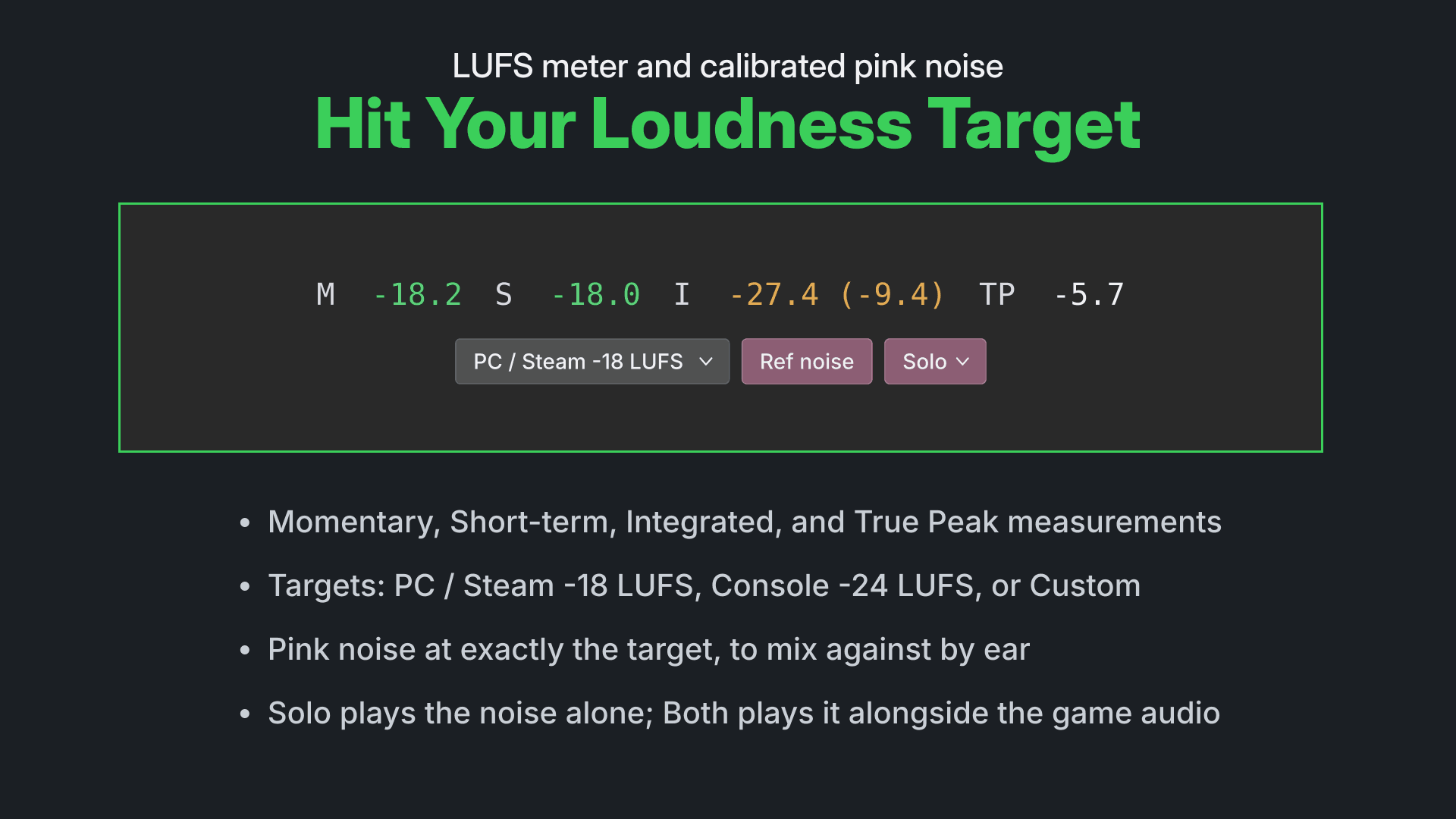
- Loudness meter on the game's output (ITU-R BS.1770 / EBU R128): momentary, short-term, integrated (with how far it is from your target) and true peak.
- Target picker: PC / Steam -18 LUFS, Console -24 LUFS, or a custom value. Saved per project.
- Reference pink noise at exactly the target loudness:
- Both: the noise plays alongside the game, with both turned down 3 dB so a game mixed on target plus the noise still totals the target.
- Solo: only the noise plays, so you can compare it with the game by ear.
- Hold to solo: hold the Ref noise button in the dock, or hold P in the game window. Let go to go back.
- Active switch: turn it off and the running game stops metering and sending audio, takes its capture off Master and stops its per-frame work, so it costs nothing (handy while profiling). Remembered per project. Disabling the plugin in Project Settings removes it completely.
What Live Mixer doesn't do
Live Mixer can't add buses or effects. It only reads and changes the buses and effects already in your project: their volume, mute, solo, bypass, and whether each effect is on. To add a bus, route a bus differently, add an effect to a bus, or change an effect's settings, use Godot's built-in Audio tab.
Live Mixer isn't audio middleware. It has no events, parameters or project format of its own, so it doesn't replace an FMOD-style workflow. It works with the buses and effects you already have.
If you add or change something in the Audio tab while the game is running, the game won't see it until you stop it and run it again. Live Mixer only shows what the running game has, so a new bus or effect appears in Live Mixer after you restart the game.
Install
- Copy the
addons/live_mixerfolder into your project'saddons/folder, keeping the two.wav.importfiles alongside the WAVs (they turn off lossy compression so the reference stays exact). - Enable Live Mixer in Project > Project Settings > Plugins. This also adds the
LiveMixerBridgeautoload, the part that runs inside the game. Disabling the plugin removes it again. - Play the game and open the Live Mixer tab in the bottom panel.
Keep the .uid files that come with the scripts. Godot uses them to find the scripts, including the autoload.
Updating: disable Live Mixer in Project Settings > Plugins, replace the addons/live_mixer folder, then enable it again. Re-enabling registers the autoload afresh. If you replaced the folder without doing this and the game reports "Failed to instantiate an autoload", disabling and re-enabling the plugin fixes it.
Using the loudness meter
- I (integrated) is the number to match to the target. It covers the whole play session since the last Reset (which also clears the clip lights), and starts fresh with every run. It pauses while the reference noise plays.
- Readouts are green within ±2 LU of the target, amber below and red above. TP turns red above -1 dBTP.
- Measurement happens after every effect on Master (so after a limiter, if you have one) and includes Master's fader: it reads what actually leaves the game.
Notes
- Only active when launched from the editor (or with
--remote-debug). In release exports, and debug exports run on their own, the autoload switches itself off and costs nothing. To keep the plugin's files out of exports altogether, addaddons/live_mixer/*to the export preset's exclude filter. - Ref noise hold key: P by default. Change
HOLD_SOLO_KEYinlive_mixer_bridge.gdif your game uses P. Avoid keys the editor uses: when the game is embedded in the editor, the editor sees the key too. - Ref noise Solo mode silences every bus that feeds Master. Sounds that play straight into Master, without going through a bus, aren't silenced.
- Reference noise files are provided at 44.1 kHz and 48 kHz, and the one matching the game's mix rate is used, because resampling would make the noise read slightly off. Other mix rates get the nearest file and a warning.
- Performance: a fraction of a millisecond per frame in the game, mostly copying audio from Master and sending it to the editor (about 400 KB/s over the local debugger connection). In the editor, the loudness maths takes about 4% of one CPU core at normal levels, rising to about 15% during very loud passages, when the true-peak check runs. It keeps measuring while the tab is hidden so the integrated reading covers the whole session.
- Multiple instances: with Run Multiple Instances, the dock follows the first game that reports in.
- Committing: buses that only exist at runtime (added by game code) can't be committed, because they're not in the saved layout. You'll get an error naming them.
Reference noise and effects on Master
The reference noise is set to the target at Master's fader, so moving the fader doesn't change it. Effects on Master, such as a limiter, compressor or gain, do change the noise's level, and the noise isn't corrected for them. Its readout is only exact with an unprocessed Master chain.
If you need extra gain, put it on a bus rather than on Master. To keep your own gain staging from affecting the reference, route your game buses through a submaster bus that feeds Master. The noise plays into Master directly, so changes on the submaster don't touch it. Effects on Master still do.
Files
| File | What it does |
|---|---|
live_mixer_plugin.gd |
Editor plugin: adds the dock, the debugger link and the autoload |
live_mixer_bridge.gd |
Autoload inside the game: sends levels and audio, applies changes, plays the noise |
live_mixer_debugger.gd |
Editor end of the debugger link |
live_mixer_panel.gd |
The dock: bus strips, Commit and Discard |
live_mixer_strip.gd |
One bus strip |
live_mixer_meter.gd |
Stereo peak meter with dB scale |
live_mixer_fader.gd |
Fader that shares the meter's scale |
live_mixer_loudness.gd |
BS.1770 loudness measurement |
live_mixer_loudness_bar.gd |
Loudness row: target, readouts, reference noise |
pink_noise_-20lufs_*.wav |
10 s seamless stereo pink noise (separate noise in each channel), exactly -20 LUFS integrated |
CHANGELOG.md |
What changed in each version |
Feedback
Found a bug or have an idea for a feature? Open an issue at https://github.com/dxsaigon/godot-live-mix/issues. For questions and general discussion, use https://github.com/dxsaigon/godot-live-mix/discussions. Bug reports are much quicker to fix with your Godot version, OS, audio device, a screenshot of the bus layout in the Audio tab, and any errors from the Output panel. The issue templates ask for these.
Author
Designed by Thomas Grové at Studio Interrupt.
License
MIT. Copyright (c) 2026 Studio Interrupt Ltd.
Changelog for version 1.1.0
2026-11-17 00:41:20
No changelog provided for this version.