Finite State Machine plugin
A GDScript implementation of the finite state machine pattern.
Adds node types for finite state machines and states.
Plugin contents
The plugin contains two script classes: StateMachine and StateMachineState.
The StateMachine node can be added as a child of your character's node and will handle the state machine's logic. Press Ctrl+A to open the "Create New Node" menu and look for "StateMachine" to add the state machine node.
The StateMachineState class is an abstract class, meaning it cannot be instantiated directly. You can extend this script to create your states.
Creating a state machine
Open the "Create New Node" menu and search for "StateMachine". Add this node in your character's scene.
A state machine by itself does nothing, you need to create a script for a state.
From the "Create script" menu, create a script that inherits from StateMachineState.
The script template downloaded with the plugin will generate some function stubs. You can now implement these functions to create a state.
The Engine's built-in virtual functions will only be called on the active state.
class_name MyState
extends StateMachineState


# Called when the state machine enters this state.
func _enter_state() -> void:
	pass


# Called every frame when this state is active.
func _process(delta: float) -> void:
	pass


# Called every physics tick when this state is active.
func _physics_process(_delta: float) -> void:
	pass


# Called when there is an input event when this state is active.
func _unhandled_input(event: InputEvent) -> void:
	pass


# Called when the state machine exits this state.
func _exit_state() -> void:
	pass
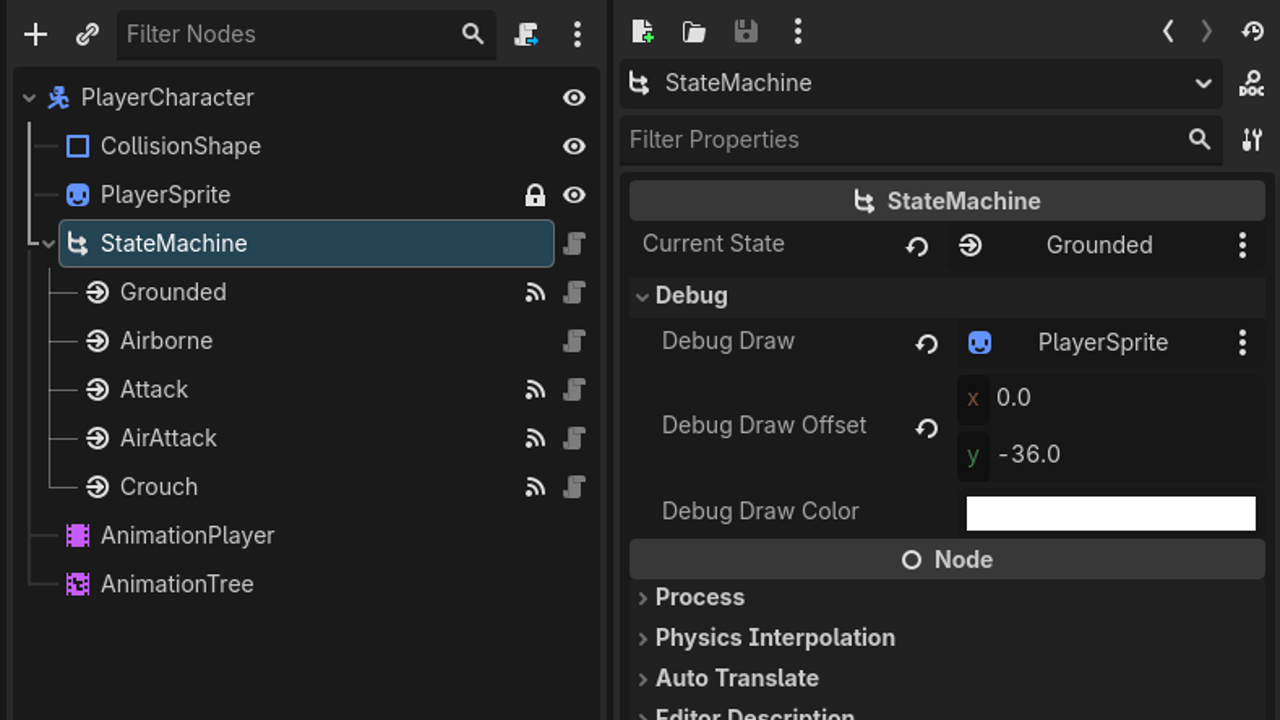
Once a state is created, you can add it as a child of the FiniteStateMachine node. Assign a state to the state machine from the inspector to set that as the initial state.
You can now change between states from your scripts by setting the current_state property.
The properties under the "Debug" subgroup are for debugging purposes. If set, the name of the current state will be drawn on top of a given sprite in debug builds.
Changelog for version 3.1.1
2026-11-09 15:54:37
No changelog provided for this version.