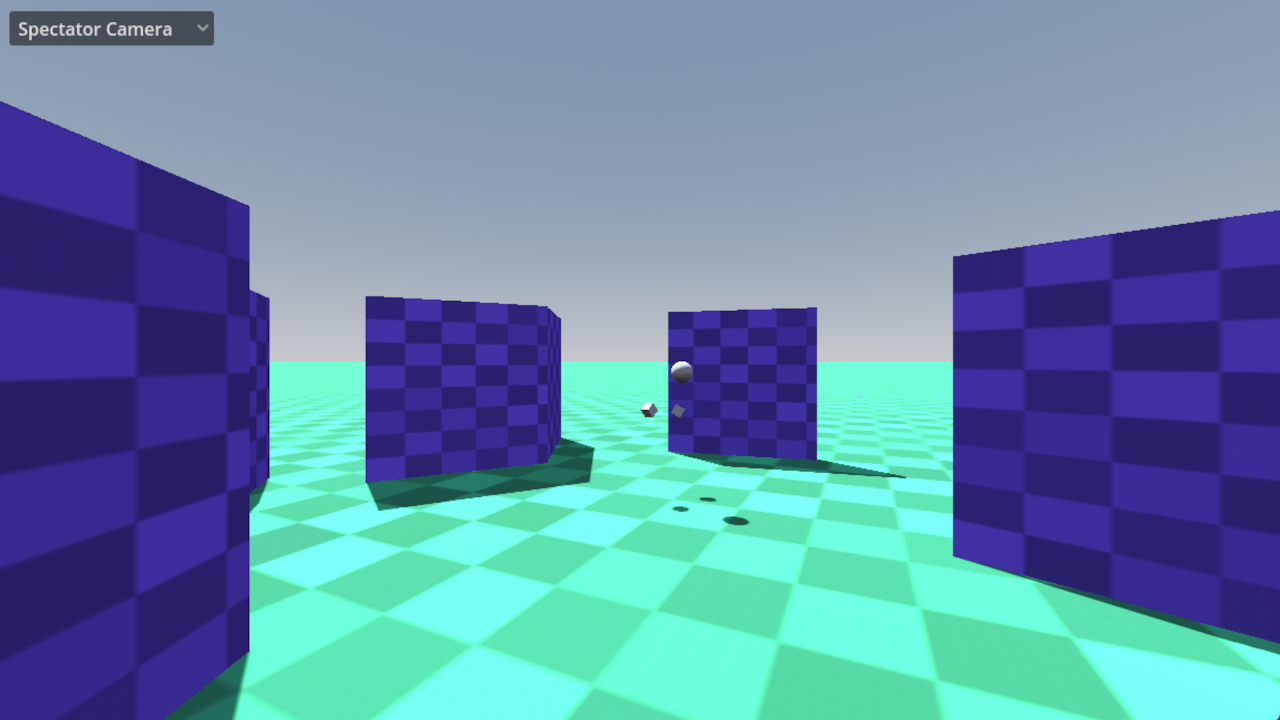
This is a demo for an OpenXR project where the player sees a different view inside of the headset compared to what a spectator sees on screen. When deployed to a standalone XR device, only the player environment is exported.
Language: GDScript
Renderer: Compatibility, Mobile
How does it work?
The VR game itself is contained within the main.tscn scene. This is similar to the other XR demos found on this repo.
This demo has a bare bones example as to not distract from the solution we're presenting here.
When run on standalone VR headsets, that scene is loaded.

When run on desktop, we load the spectator.tscn scene instead (used to be called construct.tscn). This scene has the main.tscn scene as a child of a
SubViewport which will be used to output the render result to the headset.

The spectator scene also contains a SubviewportContainer with a SubViewport that renders the output that the user
sees on the desktop screen.
By default this will show a 3rd person camera that shows our player.
We've also configured our visual layers as follows:
- Layer 1 is visible both inside the headset and by the 3rd person camera.
- Layer 2 is only visible inside the headset.
- Layer 3 is only visible in the 3rd person camera. This is used to render the "head" of the player in spectator view only.
Finally, a dropdown also allows us to switch to:
- show the 3rd person camera view,
- show a 1st person camera view but with a stabilized camera,
- showing either the left eye or right eye result the player is seeing (compatibility renderer only).
Tracked camera
There is also an option in the demo to enable camera tracking. This is currently only supported on SteamVR together with a properly configured HTC Vive Tracker.
When properly set up, this allows you to use a Vive tracker to position the 3rd person camera. Attaching the Vive tracker to a physical camera, and setting the correct offset would allow implementation of mixed reality capture by combining the 3rd person render result with a green screen captured camera.
Camera positioning
If camera tracking is not available our spectator camera will look at our player. The player can use laser pointers to point at the camera, hold the trigger, and then move the camera.
The laser pointers can be activated on either the left or right hand. The last hand on which you press a button will become active.
Action map
This project does not use the default action map but instead configures an action map that just contains the actions required for this example to work. This so we remove any clutter and just focus on the functionality being demonstrated.
The following actions are used by this example:
- aim_pose is used to aim out pointers
- interact is used to interact with what we're pointing at
Also following OpenXR guidelines only bindings for controllers with which the project has been tested are supplied. XR Runtimes should provide proper re-mapping however not all follow this guideline. You may need to add a binding for the platform you are using to the action map.
Running on PCVR
This project is specifically designed for PCVR. Ensure that an OpenXR runtime has been installed. This project has been tested with the Oculus client and SteamVR OpenXR runtimes. Note that Godot currently can't run using the WMR OpenXR runtime. Install SteamVR with WMR support.
Running on standalone VR
This project also shows how deploying to standalone skips the spectator view option. You must install the Android build templates and OpenXR vendors plugin and configure an export template for your device. Please follow the instructions for deploying on Android in the manual.
Changelog for version 4.7-6ad6167
2026-07-09 16:49:50
No changelog provided for this version.