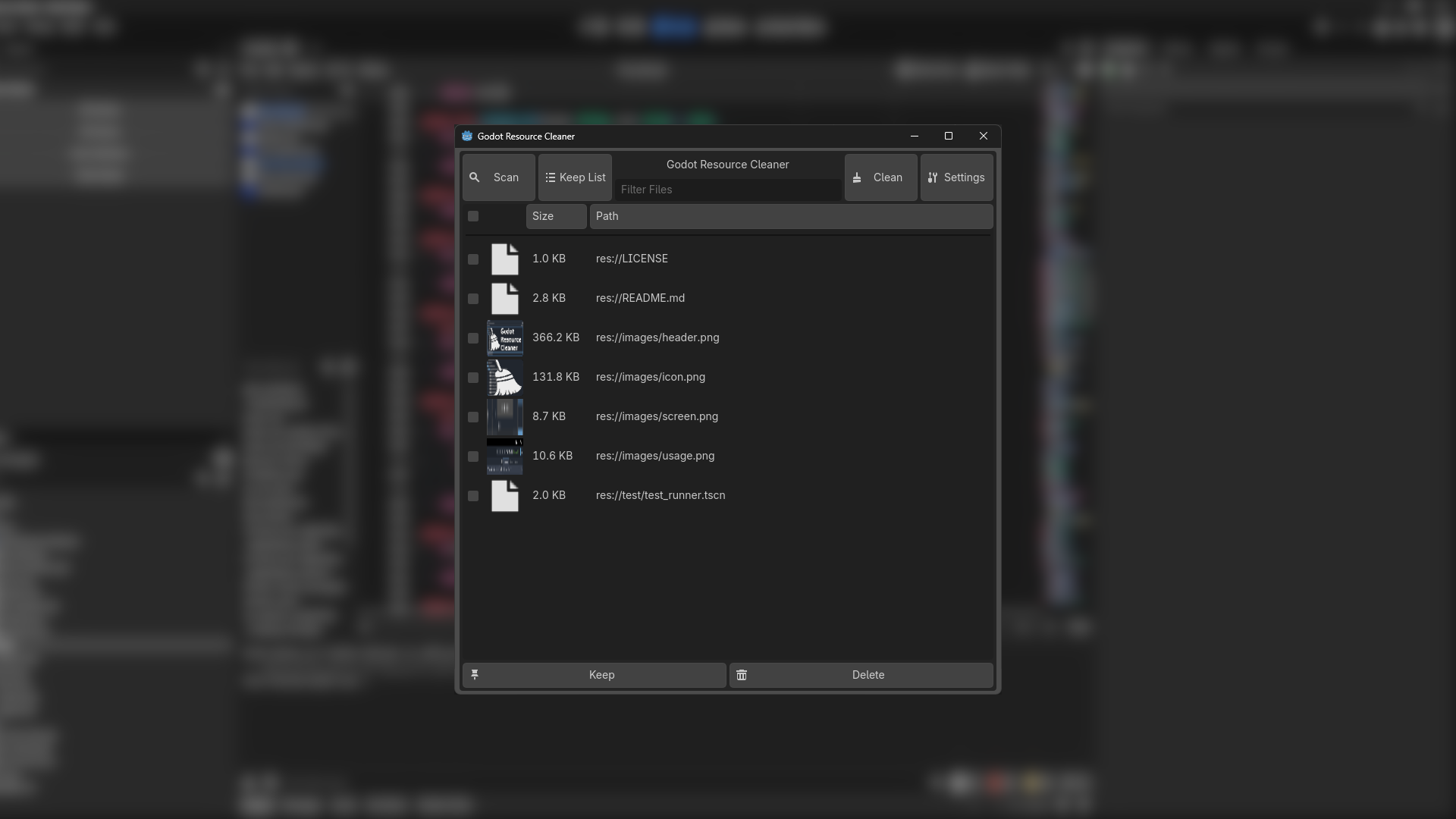
Resource Cleaner is a simple but powerful add-on that helps you keep your project and export builds neat and lightweight.
What it does:
Over time, projects accumulate unused assets and clutter. Resource Cleaner scans your project at the file system level. This allos it to detect not just unused Godot resources, but also non-imported files (like .aseprite, .psd, .blend, etc.).
Key Features:
- System-Level Scanning: Detects files directly on disk (including non-imported files).
- Find Orphaned Files: Identify unused resources, empty folders, and leftover project clutter.
- Keep List Protection: Add files to a persistent Keep List to prevent accidental deletion.
- Bulk Cleanup: Select and delete unnecessary files in bulk from within the editor.
- Custom Filters: Narrow down your scan using precise file, extension, and folder filters.
Why it’s useful:
A clean project means less storage usage, smaller exports and faster loading times. By scanning on a file system basis, Resource Cleaner ensures your entire project repository stays lean.
Interface & Key Operations
The main interface gives you access to four core tools:
- Scan: Runs a complete scan of your project directory. Once finished, it lists all detected resources and files without active dependencies. Select one or multiple items, then choose to either:
- Add to Keep List (bottom-left): Excludes selected files from future scans.
- Delete (bottom-right): Removes selected files from disk.
- Keep List: Opens the Keep List manager to view or remove protected files.
- Clean: Opens a pop-up to remove orphaned .import and .uid files, as well as empty directories.
- Settings (Advanced): Opens options to configure scanning filters, ignore patterns, and folder exclusions.
Understanding the Keep List (IMPORTANT)
Static analysis cannot detect every way a file is used in Godot. Assets might show up as "unused" if they are:
- Defined in Project Settings: Main startup scene, application icons, custom splash screens, etc.
- Loaded dynamically at runtime: Files accessed via string paths in load(), preload(), etc.
Always review scan results carefully and add your core runtime assets, main scenes, and project settings to the Keep List.
Disclaimer:
⚠️ Use with caution and make backups. This tool is provided as-is, without any warranty of any kind.
Changelog for version v0.8.1-beta
2026-09-02 15:28:09
No changelog provided for this version.
