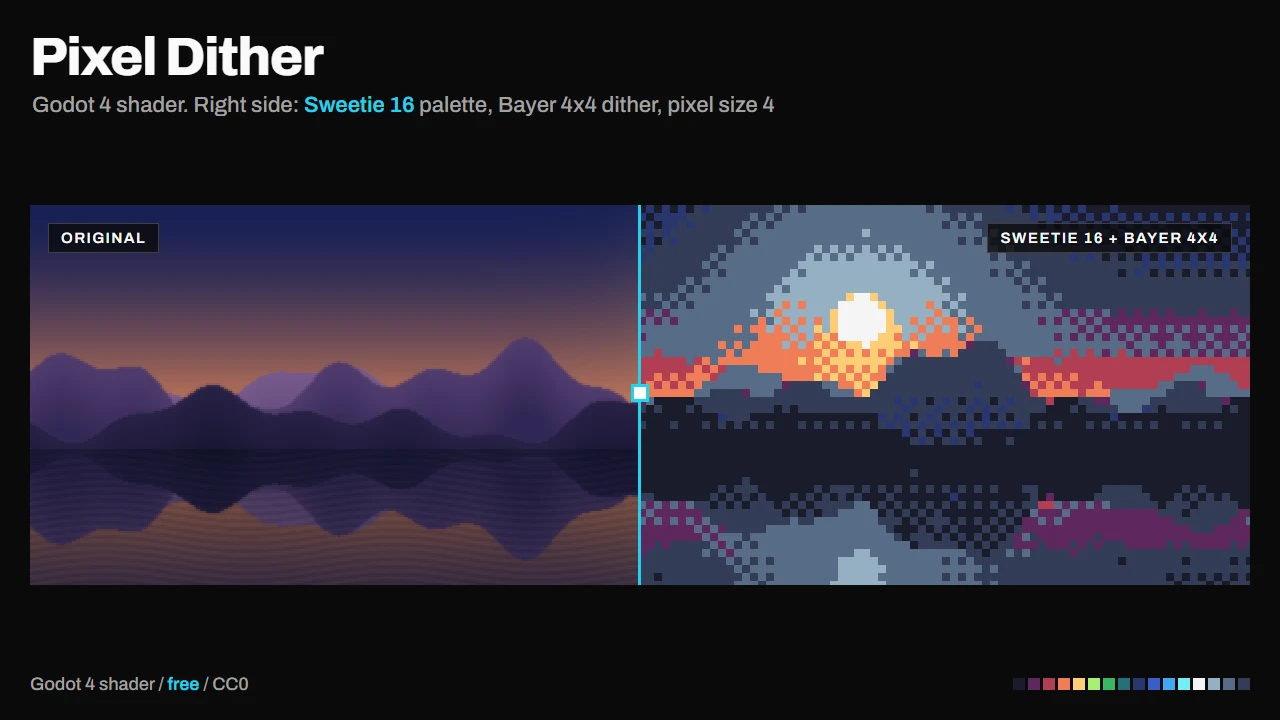
Pixelate, dither and palette-swap anything in Godot.
Pixel Dither takes a sprite, a portrait or a whole background and makes it look like it was drawn for a retro console: bigger pixels, a dithering pattern to fake the missing shades, and a palette that snaps every color to a fixed set.
Try it in your browser first. A viewer with sliders and live code editing is on the Itch.io page: https://fcidade.itch.io/pixel-dither-godot-shader-free
What you get
- One
.gdshaderfile, no dependencies. - 8 ready palettes: PICO-8, Game Boy, Sweetie 16, Commodore 64, Endesga 32, CGA, Resurrect 64 and 1-bit. Or "Posterize" to keep your own colors with fewer shades.
- Bayer 4x4 (chunky) and Bayer 8x8 (fine) ordered dithering.
- Brightness and contrast, so dark or washed-out images still look good.
- An example project that cycles through four looks, to see what each parameter does.
How to use it
- Install the asset. The shader is at
addons/pixel_dither_shader/shaders/pixel_dither.gdshader; use it from there or copy it into your project. - Create a
ShaderMaterialon yourSprite2D,TextureRector any node with a texture, and assign the shader. - Tweak the parameters in the Inspector.
Compatibility: Godot 4.x (GL Compatibility, Mobile and Forward+), CanvasItem shader. Works on desktop, mobile and web exports. The node's modulate is not applied.
License: CC0 (public domain). Use it in commercial games, change it, no credit needed (but I'd love to see what you make with it).
More assets by me: https://fcidade.itch.io
Changelog for version v1.0.0
2026-10-07 16:07:42
No changelog provided for this version.