Scene Dependency Explorer
A lightweight, read-only scene hierarchy explorer for Godot 4.5.
Show scene architecture, not implementation details.
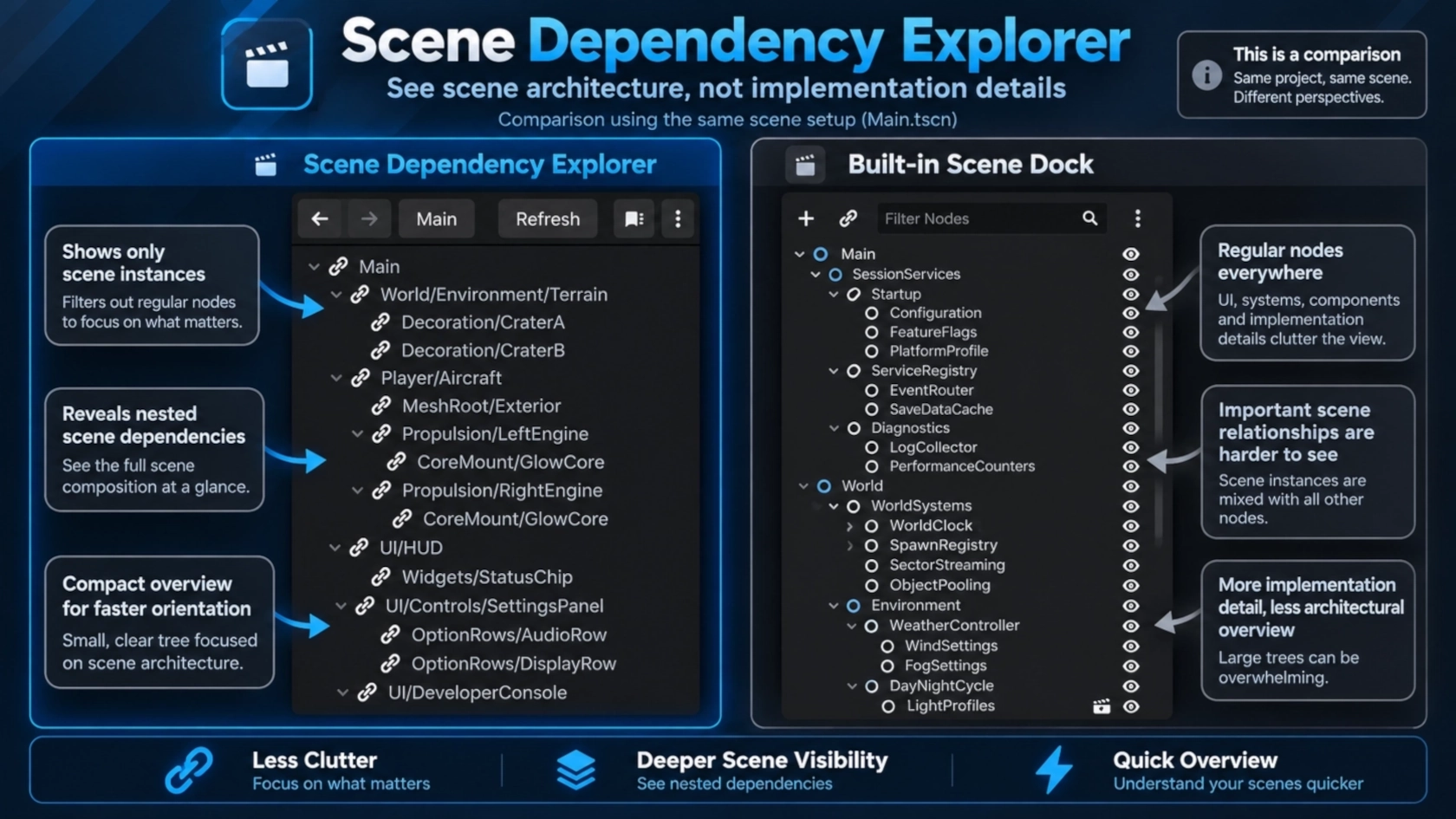
Scene Dependency Explorer is a Godot editor plugin that helps developers understand how scenes are connected without opening every scene individually. Instead of displaying the entire node tree, the explorer focuses on instanced scenes and their relationships. Regular nodes are hidden, while their paths are preserved where needed to show where a scene is instantiated. The result is a compact overview of your project's scene architecture, directly inside the Godot editor.
Why Scene Dependency Explorer?
Godot's built-in Scene dock displays the node hierarchy of the currently edited scene. However, nested scene instances normally expose only their root nodes. Enabling Editable Children reveals more details, but also adds regular nodes, controls, and other implementation details that can make larger projects difficult to navigate. Scene Dependency Explorer provides a different perspective: the structure of your scenes rather than their internal implementation.
It is particularly useful for:
- Projects built from many reusable and modular scenes.
- Developers returning to a project after some time.
- Understanding unfamiliar or AI-assisted project structures.
- Navigating between deeply nested scene files.
- Exploring scene relationships without running the game.
Features
Scene Hierarchy
- Displays the currently opened scene as the root.
- Recursively discovers statically instanced scenes.
- Hides ordinary nodes to keep the hierarchy compact.
- Preserves intermediate node paths for orientation.
- Supports multiple instances of the same scene.
- Supports nested and inherited scenes.
- Detects circular references to prevent infinite recursion.
- Provides expandable and collapsible hierarchy entries.
- Opens scene files with a double-click.
- Displays resource paths in tooltips.
Scene Navigation
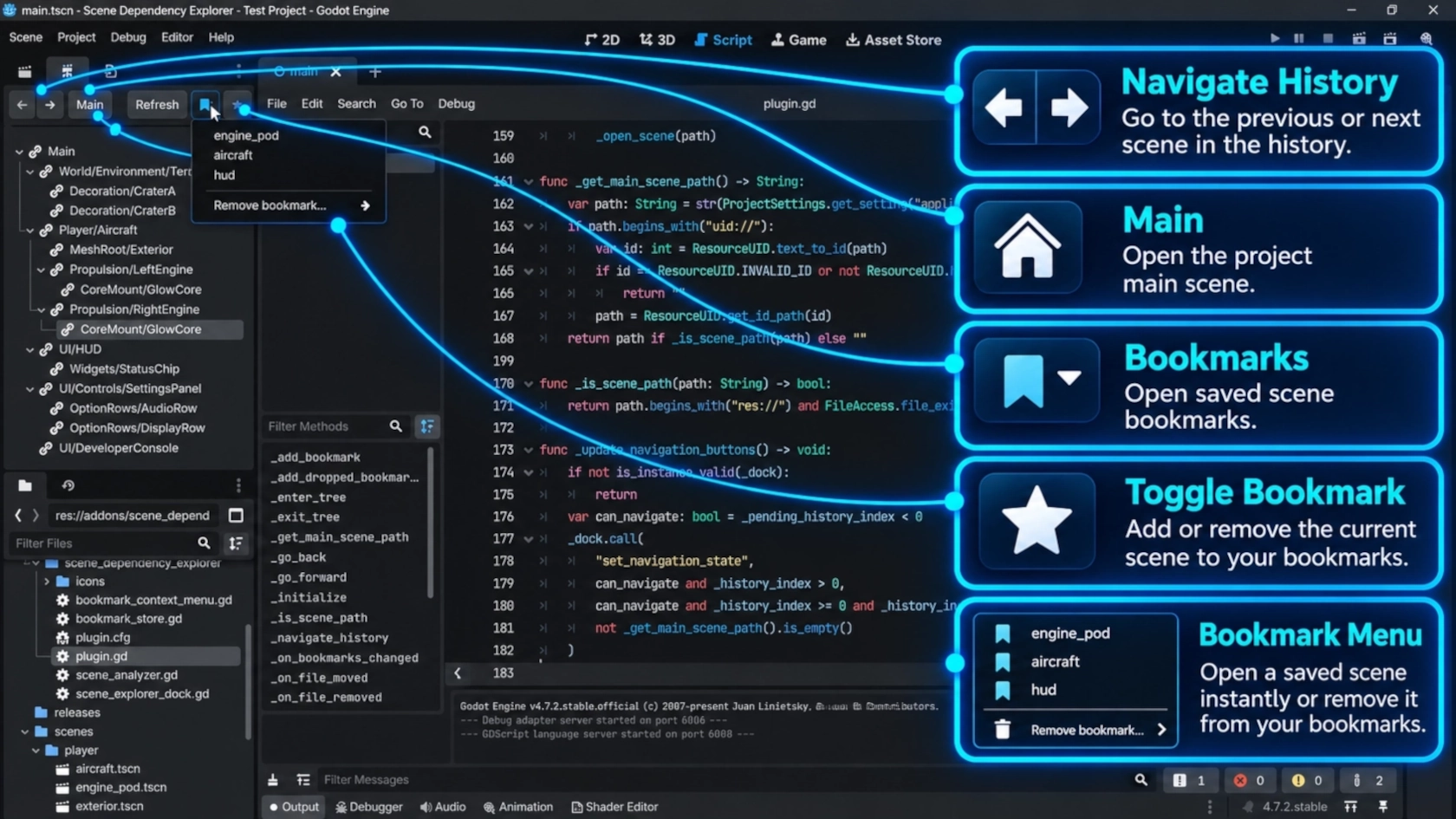
Navigate through scenes directly from the addon's toolbar like a browser does.
Scene Bookmarks
Keep frequently used scenes readily accessible with persistent bookmarks. Bookmarks are personal and project-specific.
Renamed, Moved, and Missing Scenes
When scenes are moved or renamed through Godot's FileSystem dock, the explorer updates their bookmark paths. Resource UIDs also help resolve moved resources when possible. If a bookmarked scene cannot be found, its bookmark is preserved and marked as orphaned rather than automatically deleted. Recovery of files moved outside Godot is best-effort and depends on resource UID availability.
Example
Consider a scene containing several nested scene instances:
Main
├── World
│   └── Terrain                  [Scene]
├── Player
│   └── Aircraft                 [Scene]
│       ├── MeshRoot
│       │   └── Exterior         [Scene]
│       └── Propulsion
│           └── EnginePod        [Scene]
│               └── GlowCore     [Scene]
└── UI
    ├── HUD                      [Scene]
    └── Controls
        └── SettingsPanel        [Scene]
Scene Dependency Explorer presents this as:
Main
├── World/Terrain
├── Player/Aircraft
│   ├── MeshRoot/Exterior
│   └── Propulsion/EnginePod
│       └── GlowCore
├── UI/HUD
└── UI/Controls/SettingsPanel
Intermediate nodes such as World, Player, and Controls are represented as compact paths instead of separate hierarchy entries.
Only scene instances appear as navigable items.
Installation
Requirements
- Godot 4.5
- A Godot project containing saved scene files
Manual Installation
- Copy the
addons/scene_dependency_explorer/directory into your Godot project'saddons/directory. - Open the project in Godot.
- Navigate to Project → Project Settings → Plugins.
- Enable Scene Dependency Explorer.
The explorer appears in the editor's left dock area, initially grouped with the Scene and Import docks.
Godot may restore a previously saved dock layout instead.
Usage
- Open a saved scene in the Godot editor.
- Select the Scene Dependencies dock.
- Expand scene entries to explore nested dependencies.
- Double-click an entry to open its source scene.
- Use Back, Forward, or Main to navigate.
- Click Refresh to reload the saved dependency structure.
To bookmark a scene, use the star button, drag a scene into the explorer, or use the corresponding context menu action. Click the bookmark list button to access saved bookmarks without taking space away from the hierarchy.
How It Works
Scene Dependency Explorer performs static analysis using Godot's built-in scene resource APIs.
It reads saved PackedScene resources and their SceneState information to identify scene instances and their source files.
Referenced scene files are analyzed recursively.
Repeated scene files can share analysis results within an analysis pass while remaining separate entries in the displayed hierarchy.
The plugin does not need to instantiate scenes or execute gameplay scripts.
Read-Only Design
Scene Dependency Explorer is a navigation and inspection tool only. ( The explorer uses saved scene resources. Unsaved changes may not appear until the relevant scenes are saved and the hierarchy is refreshed. )
Bookmark Storage
Bookmarks are stored through Godot's editor project metadata.
They are:
- Persistent across editor sessions.
- Scoped to the current project.
- Personal to the local editor environment.
- Stored separately from project scene files.
Changelog for version Scene Dependency Explorer
2026-10-29 20:50:00
No changelog provided for this version.