Write your Godot 4 game logic in Python, powered by pocketpy — a portable Python 3.x interpreter written in C11.
A Python script works like a GDScript one: attach it to a node, export properties to the Inspector, declare signals, and implement Godot's virtual callbacks.
See godot-pocketpy for more details.
How to use
Requirements
- Godot 4.4 or later (the
.gdextensiondeclarescompatibility_minimum = "4.4"). - A platform with prebuilt binaries: Windows x86_64, macOS, Android arm64-v8a, iOS arm64.
1. Install the addon
You will get the following structure:
res://addons/godot-pocketpy/
├── bin/                          # native libraries, one folder per platform
├── typings/                      # .pyi stubs for editor autocompletion
├── godot-pocketpy.gdextension
├── GIT_COMMIT_HASH.txt           # the commit this build was made from
└── PythonScript_icon.png
GIT_COMMIT_HASH.txt tells you exactly which commit produced the binaries — worth quoting when you report a bug.
Restart the Godot editor. GDExtensions are only loaded at startup, so a restart is required after the first install and after every upgrade.
Verify: right-click a node → Attach Script. Python should now be listed in the Language dropdown.
There is nothing to enable under Project Settings → Plugins: this is a GDExtension, not an editor plugin.
2. Lay out your project
There are two kinds of Python files, and the difference matters:
| x | Godot scripts | Plain modules |
|---|---|---|
| Where | anywhere Godot scans, e.g. res://scripts/ |
only res://site-packages/ |
| Purpose | attached to nodes | libraries you import |
| Compiled by Godot | yes | no (blocked by .gdignore) |
| Rules | filename must match the class name, and the class must derive from Extends(...) |
ordinary Python, no constraints |
import statements are resolved against res://site-packages/ only, so every shared module must live there. That folder must contain an empty .gdignore file, otherwise Godot will try to compile each module as a script and report errors.
A typical project looks like this:
res://
├── addons/
│   └── godot-pocketpy/         # the unzipped addon
├── site-packages/              # plain Python modules — "import" looks here
│   ├── .gdignore               # REQUIRED
│   ├── helpers.py              # import helpers
│   └── some_library/
│       ├── __init__.py         # import some_library
│       └── test.py             # import some_library.test
├── scripts/                    # Python scripts attached to nodes
│   └── MyClass.py
├── main.tscn
└── project.godot
3. Create your first script
Select a node → Attach Node Script, then:
- Language:
Python - Template:
Node: Default - Path: e.g.
res://scripts/MyClass.py— the file name becomes the class name
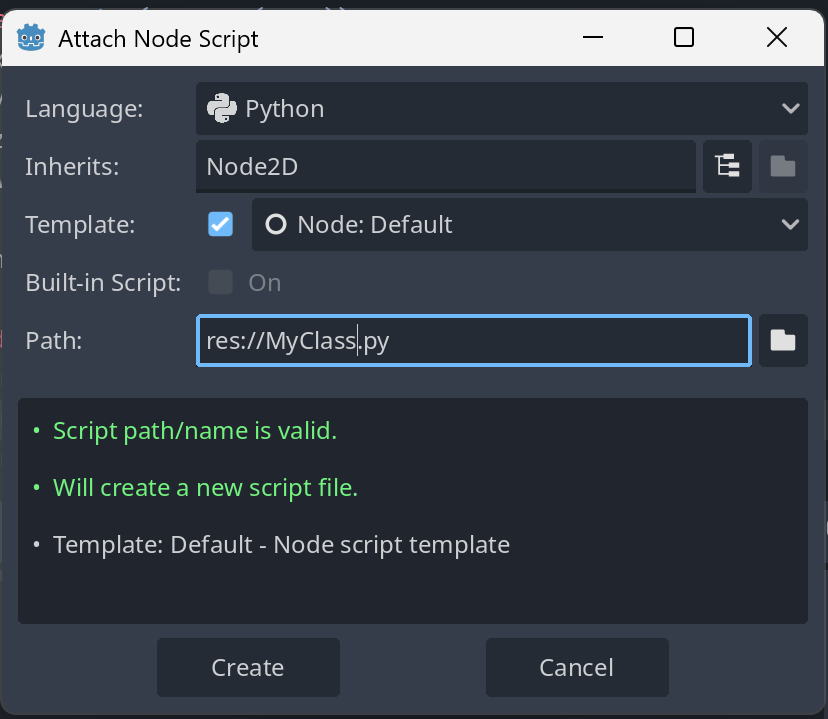
Python scripts cannot be built-in (stored inside a .tscn); they always live in their own .py file.
The default template gives you:
from godot import *
from godot.classes import Node

class MyClass(Extends(Node)):
    def _ready(self):
        pass

    def _process(self, delta: float):
        pass
The demo/ folder is a Godot project that exercises everything described below; it is the quickest reference when something does not behave as you expect.
4. Scripting essentials
Declaring a classEvery script file declares exactly one script class, and three rules apply:
from godot import *
from godot.classes import Node2D

class Player(Extends(Node2D)):   # file must be named Player.py
    ...
class <Name>(Extends(<BaseClass>))— the base class comes fromgodot.classes.<Name>must match the file name exactly (Player.py→class Player).- Class names must be unique across the whole project.
You can also inherit from another Python script by path:
class Enemy(Extends("res://scripts/Actor.py")):
    ...
self vs self.owner
self is your Python script instance — your own fields, methods, exports and signals.
self.owner is the Godot object the script is attached to — everything inherited from the base class.
class Player(Extends(Node2D)):
    def _ready(self):
        print(self.owner.get_path())            # Node API
        self.owner.position = Vector2(100, 50)  # properties are read/write
        self.owner.get_tree().paused = False
From the other direction, some_node.script gives you the Python instance attached to a node, so GDScript-side code and other Python scripts can reach your Python fields.
Define a method with the same name as any Godot virtual callback and it will be invoked:
class Player(Extends(CharacterBody2D)):
    def __init__(self):
        # runs when the instance is created, before the Inspector values
        # are applied — exported properties are NOT readable here yet
        self.hp = 100

    def _ready(self): ...
    def _process(self, delta: float): ...
    def _physics_process(self, delta: float): ...
    def _input(self, event): ...
Read exported properties in _ready(), not in __init__().
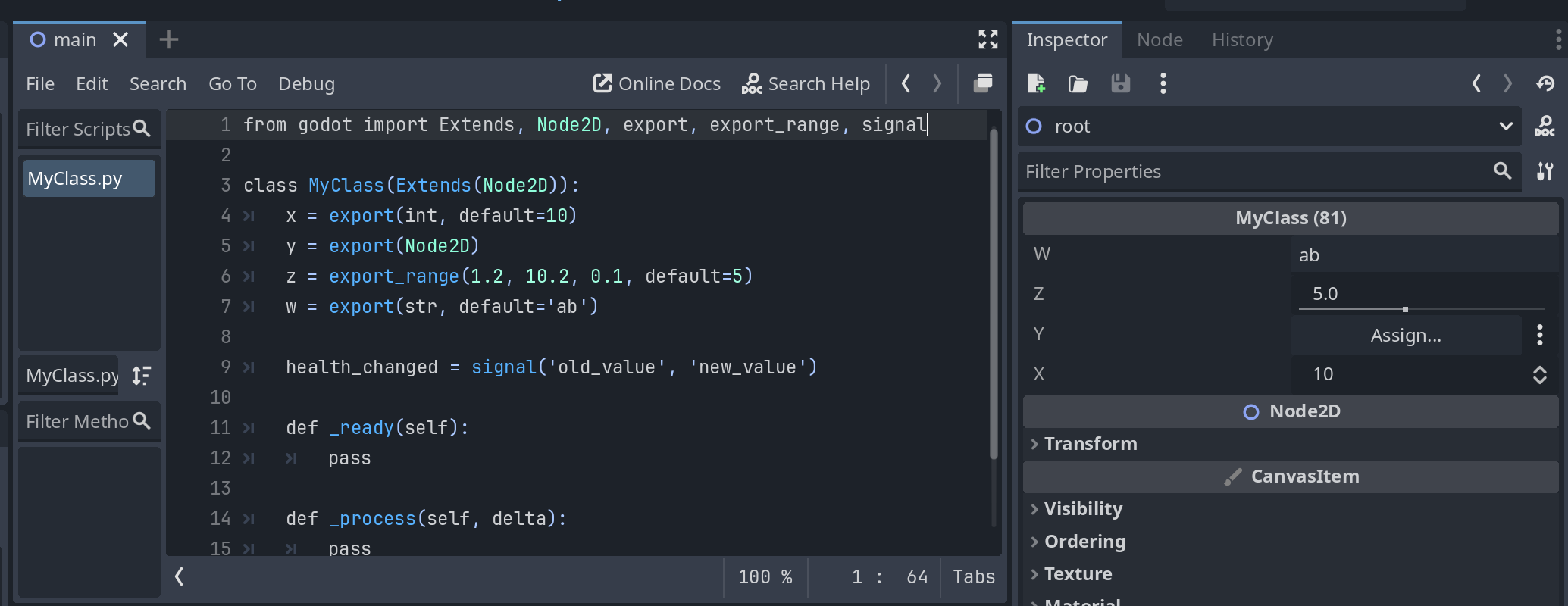
export() and export_range() publish a field to the Inspector, exactly like @export in GDScript:
class Player(Extends(Node2D)):
    speed      = export(float, default=250.0)
    name_tag   = export(str, default='hero')
    target     = export(Node)                       # any Godot class
    tint       = export(Color)                      # any built-in Variant type
    scene      = export(PackedScene)
    volume     = export_range(0.0, 1.0, 0.05, default=0.8)

    def _ready(self):
        print(self.speed, self.target)
Accepted types: the Python builtins int, float, bool, str; Godot built-in types such as Vector2, Vector3, Color, Rect2 (from godot); and any engine class such as Node, Texture2D, PackedScene (from godot.classes).
class Player(Extends(Node2D)):
    health_changed = signal('old_value', 'new_value')

    def take_damage(self, amount: int):
        old = self.hp
        self.hp -= amount
        self.health_changed.emit(old, self.hp)
Declared signals show up in the editor's Node → Signals panel, so you can connect them to GDScript methods (or any other node) from the UI just like native signals.
To react to an existing Godot signal, connect it to one of your methods. A Python bound method is not a Godot Callable, so wrap it with Callable(<object>, '<method name>'):
def _ready(self):
    button = self.owner.get_node('Button')
    button.pressed.connect(Callable(self.owner, 'on_pressed'))

def on_pressed(self):
    print('clicked')
You can also make the connection from the editor's Node → Signals panel: Godot connects by method name, and your Python methods are visible to the engine.
CoroutinesThere is no await; use a generator plus start_coroutine():
class Player(Extends(Node2D)):
    def _ready(self):
        self.start_coroutine(self.blink(3))

    def wait_one_second(self):
        yield self.owner.get_tree().create_timer(1.0).timeout   # yield a Signal

    def blink(self, times: int):
        for _ in range(times):
            yield from self.wait_one_second()                   # yield to another coroutine
        print('done')
yield <signal>suspends until that signal fires. Onlygodot.Signalvalues may be yielded.yield from <generator>delegates to another coroutine.start_coroutine()returns an id;stop_coroutine(id)andstop_all_coroutines()cancel them.
import helpers                    # res://site-packages/helpers.py
from some_library import test     # res://site-packages/some_library/test.py
pocketpy ships a small standard library (json, gc, inspect, easing, vmath, array2d, lz4, msgpack, …); the stubs under addons/godot-pocketpy/typings/ list everything that is available. CPython packages from PyPI are not supported.
Script classes are registered in the godot.scripts module under their class name:
from godot.scripts import Bullet

def fire(self):
    b = Bullet()                       # creates the node with the script attached
    self.owner.add_child(b)
Since a class only becomes available once its script has been loaded, prefer importing inside the function that uses it rather than at the top of the file.
To keep your IDE aware of these classes, run Project → Tools → "Python: Rebuild Scripts Index File" in the Godot editor. It regenerates addons/godot-pocketpy/typings/godot/scripts.pyi from the scripts currently in your project.
scene = load('res://scenes/Enemy.tscn')
enemy = scene.instantiate()

print(OS.get_name(), Engine.get_frames_per_second())
if Input.is_key_pressed(KEY_SPACE):
    ...
from godot import * brings in the engine singletons (Input, OS, Engine, Time, ProjectSettings, …), the built-in Variant types, and the global constants (KEY_*, TYPE_*, PROPERTY_HINT_*, …).
5. Autocompletion and type checking
The addon ships .pyi stubs for the whole Godot API. To let Pylance / Pyright use them, put a pyrightconfig.json at your project root:
{
    "pythonVersion": "3.12",
    "stubPath": "addons/godot-pocketpy/typings",
    "reportMissingModuleSource": "none",
    "reportOverlappingOverload": "none",
    "extraPaths": [
        "site-packages"
    ]
}
stubPathenables completion forgodot,godot.classesand the pocketpy modules.extraPathsmakes your ownsite-packagesmodules resolve the same way they do at runtime.
6. Exporting your game
Exporting works as usual — the artifact already contains release libraries for all supported platforms.
One thing to check: because site-packages carries a .gdignore, its .py files are not Godot resources. If your exported build raises import errors that never happen in the editor, add a filter under Project → Export → Resources → "Filters to export non-resource files/folders", for example:
site-packages/*
7. Troubleshooting
| Symptom / console message | Cause and fix |
|---|---|
Python is missing from the Attach Script language list |
The extension was not loaded. Confirm res://addons/godot-pocketpy/godot-pocketpy.gdextension exists with a bin/ folder next to it, that you are on Godot 4.4+, and restart the editor. |
Class 'X' in res://... must derive from Extends(...) |
The class does not use Extends(...) as its base. |
Failed to find class 'X' in res://... |
The class name does not match the file name. |
Duplicate class name: X has been defined in both ... and ... |
Two .py files share the same file name. Rename one. |
Failed to find base class for res://... |
Extends(...) was not evaluated — check that the argument is a class from godot.classes or a valid res:// script path. |
cannot open file 'res://site-packages/foo.py' when importing 'foo' module |
The module is missing from res://site-packages/, or you tried to import a script that lives elsewhere. |
| Errors about your library modules on editor startup | res://site-packages/.gdignore is missing, so Godot is compiling them as scripts. |
Exported properties are None in __init__ |
Expected — the Inspector values are applied after construction. Read them in _ready(). |
coroutine yielded value must be 'godot.Signal' |
A coroutine yielded something else. Yield a signal, or use yield from for another coroutine. |
Changelog for version v1.0.1
No changelog provided for this version.