Trigger Manager
Trigger Manager is a Godot plugin that allows you to create and manage
timed triggers directly from the Inspector.\
Each trigger internally uses SceneTreeTimer to fire events at the
configured time and emits a signal with the trigger's name.
Ideal for sequences, cutscenes, gameplay logic, automation systems, and any situation where timed events are needed in a clean and centralized way.
Features
- Configure multiple triggers directly in the Inspector
- Each trigger fires once or repeats (loop mode)
- Emits a
trigger_fired(trigger_name: String)signal - Support for custom processing modes
- Add and remove triggers dynamically via code
- Provides configuration warnings for missing or duplicate names
- Easy to integrate with any gameplay system
Getting Started
1. Enable the plugin
Place the plugin folder inside:
res://addons/trigger_manager/
Then enable it in:
Project > Project Settings > Plugins
Signals
signal trigger_fired(trigger_name: String)
Fired whenever a trigger completes its timer.
Example Usage
Listening to Trigger Events
extends Node

@onready var trigger_manager: TriggerManager = $TriggerManager

func _ready() -> void:
    trigger_manager.trigger_fired.connect(_on_trigger_fired)

func _on_trigger_fired(name: String) -> void:
    print("Trigger fired:", name)
Adding Triggers via Code
trigger_manager.add_trigger("enemy_spawn", 3.0, false)
trigger_manager.add_trigger("loop_event", 1.5, true)
If a trigger with the same name already exists, a warning is shown and it will not be added.
Removing Triggers via Code
trigger_manager.remove_trigger("enemy_spawn")
trigger_manager.remove_trigger("loop_event")
If a trigger does not exist, a warning is shown.
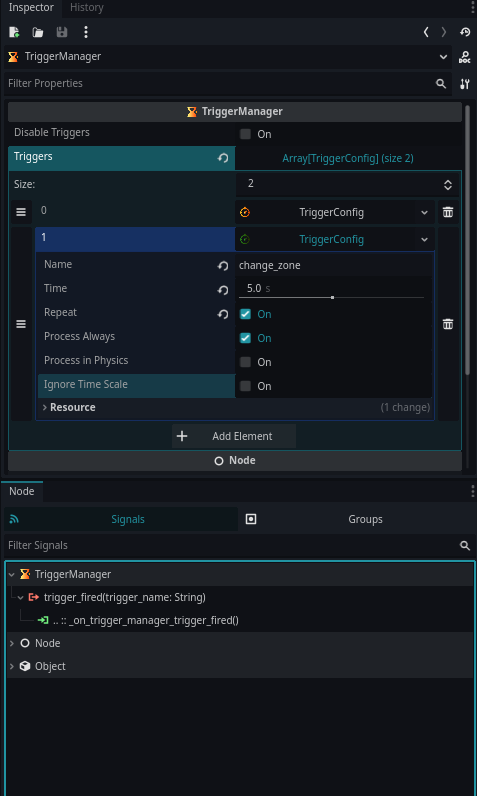
Inspector Setup
In the Inspector, you can configure:
- Trigger name
- Timeout duration
- Repeat mode
- Processing mode (idle, physics, always)
- Ignore time scale
Each TriggerConfig resource is initialized automatically on startup.
Configuration Warnings
Trigger Manager will warn you if:
- A trigger has no name
- Two triggers share the same name
- A trigger is empty/unconfigured
These warnings appear directly in the Inspector.
Public API Summary
Add Trigger
func add_trigger(trigger_name: String, time: float, repeat: bool) -> void
Remove Trigger
func remove_trigger(trigger_name: String) -> void
Access Triggers
var list: Array[TriggerConfig] = trigger_manager.triggers
Disable All Triggers
trigger_manager.disable_triggers = true
Screenshots
Screenshot InputManager
❤️ Support
If this project helps you, consider supporting:
https://github.com/sponsors/Saulo-de-Souza
https://www.paypal.com/donate/?hosted_button_id=G24W4KL9ALH64
Changelog for version 1.0.4
2025-12-29 05:06:00
No changelog provided for this version.