Loadout
The global plugin manager for Godot: one registry, every project in sync. Godot has no global editor plugins, so Loadout lives in each project and brings the others along. It installs the plugins a project is missing, keeps their versions in a lock file and tells you when updates are out.
Features
- One registry for all projects: plugins from the Godot Asset Store (with search), GitHub Releases or a local folder, shared by every project on your computer.
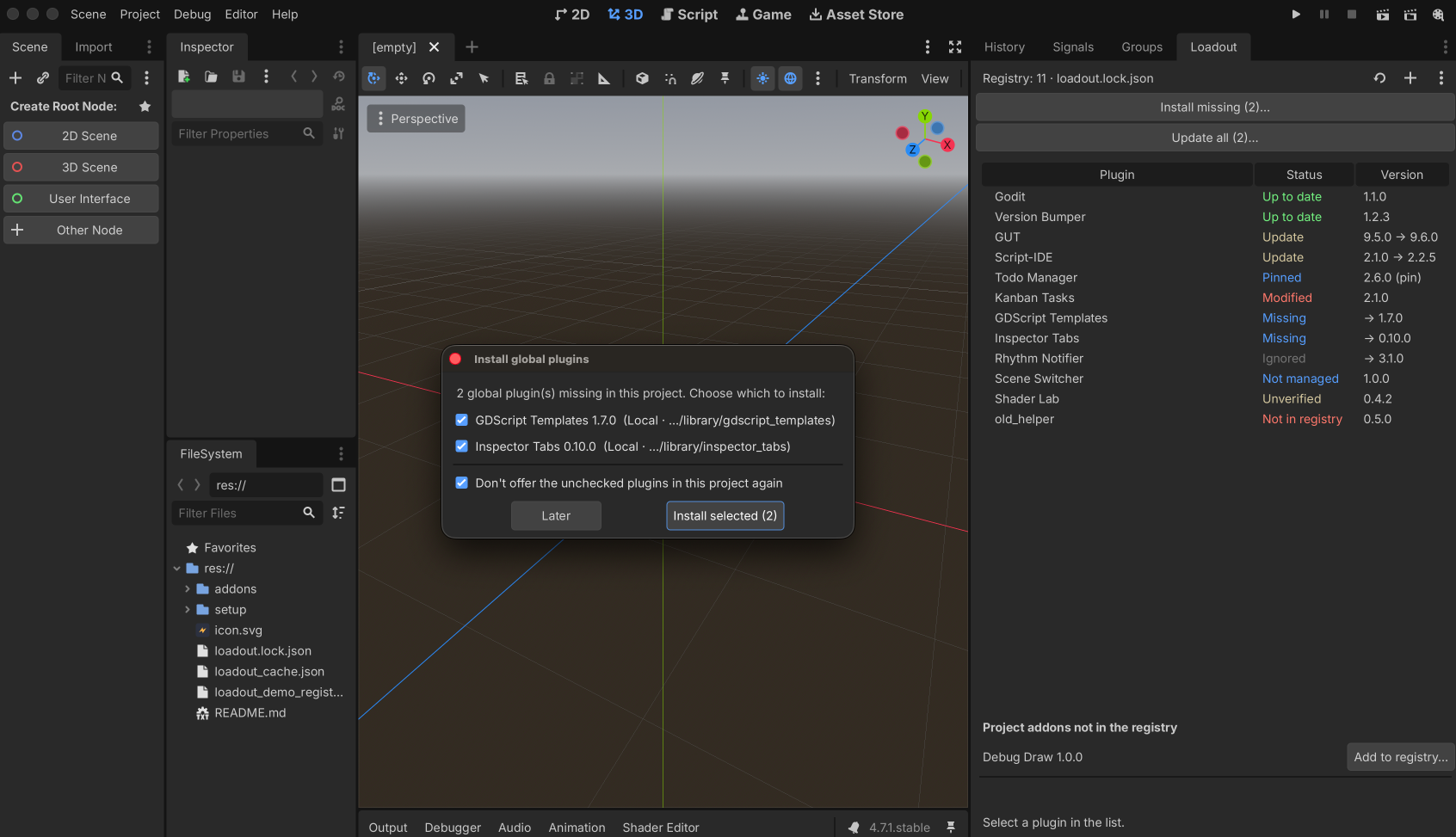
- New project in one click: on start Loadout lists the missing plugins and you pick which ones the project gets.
- Reproducible versions:
loadout.lock.jsonrecords the version, pin and folder hash of each plugin. Commit it and a fresh clone gets exactly the same versions. - Safe updates: checked once a day, always confirmed, backed up and rolled back when the new version does not start. No editor restart needed.
- Pin or pick any version: keep a plugin at one version in one project, or install an older release.
- Hands off your changes: a plugin you edited by hand or pinned is never overwritten without asking.
- Takes over what you already have: add plugins that are already in the project to the registry without reinstalling them.
- Updates itself, has no dependencies and runs only in the editor.
Install
- Copy
addons/loadout/into your project'saddons/folder (or install it from the Asset Store). - Enable Loadout in Project → Project Settings → Plugins.
You need Godot 4.7+. For many projects, one command does both steps. It is safe to run again, and
a different Loadout version is replaced only with --force (close the project's editor first):
tools/install_loadout.sh ~/path/to/your/project
It finds Godot in $GODOT, in PATH or in /Applications/Godot.app. On Windows run the same
through Godot: godot --headless --path <this repository> --script res://tools/install_loadout.gd -- <your project>.
Usage
Everything is in the Loadout dock on the right side of the editor.
- Add a plugin: + searches the Asset Store, takes a GitHub repository (
owner/name) or a local folder withplugin.cfg. Allowed versions:*(newest),^1.2.0(minor and patch updates) or~1.2.0(patch updates only). Plugins that appear inaddons/by other means are offered for the registry too. - New project: the missing plugins are listed with a checkbox each, unchecked ones can be ignored in this project. Install missing… opens the same list later.
- Update: a plugin with a newer version shows Update and its release notes. Update all… does every one in a single confirmation. ⟳ checks for updates now.
- Pin keeps a plugin at its version in this project only. Install version… lists every release, and installing an older one pins it.
- Modified means the folder differs from the lock: Accept changes keeps your edits, Overwrite replaces them (with a backup).
- Remove from project… deletes the folder (with a backup) and ignores the plugin here. Remove from registry… stops offering it in all projects. ⋮ exports and imports the registry.
How updates work
The plugin is disabled and its folder backed up to user://loadout_backup/, the files are replaced
(existing .uid files are kept), the editor rescans and checks that the new version compiles, then
the plugin is enabled and checked again. Any failure brings the backup back. Loadout updates itself
the same way and restarts the editor. Offline, it uses the data it saved last time and warns in the
dock.
Files and settings
loadout.lock.jsonin the project root records versions, pins and ignored plugins. Commit it.loadout_registry.jsonandloadout_cache.json(safe to delete) live in the editor config folder:~/Library/Application Support/Godot/(macOS),%APPDATA%\Godot\(Windows) or~/.config/godot/(Linux). Neither goes into git.- A damaged JSON file is never overwritten: Loadout copies it to
*.bakand reports it in the dock. - Loadout installs only from sources in your registry, always over HTTPS. Paid Asset Store assets are not supported.
- GitHub token (optional): without one GitHub allows 60 API requests per hour, which is plenty
because each repository is asked once a day. Set a fine-grained token with read access to public
repositories in Editor → Editor Settings → Loadout → Github Token for 5000 per hour. It is
sent only to
api.github.comand never ends up in the project or the log.
License
MIT, see LICENSE.
Changelog for version v0.1.0
2026-10-01 21:23:25
No changelog provided for this version.