

 Godot Share Plugin
Share Plugin allows sharing of text and images on Android and iOS platforms.
Features:
- Native share dialogs on Android and iOS
- Share content with other installed apps
- Share-target mode: receive content shared by other apps
- Supported share types (outgoing and incoming):
- Text
- Images
- Video
- Audio
- Arbitrary files (with MIME type support)
Table of Contents
- Demo
- Installation
- Usage
- Share-Target Mode
- Signals
- Methods
- Classes
- Platform-Specific Notes
- Links
- All Plugins
- Credits
- Contributing
Demo
Try the demo app located in the demo directory.
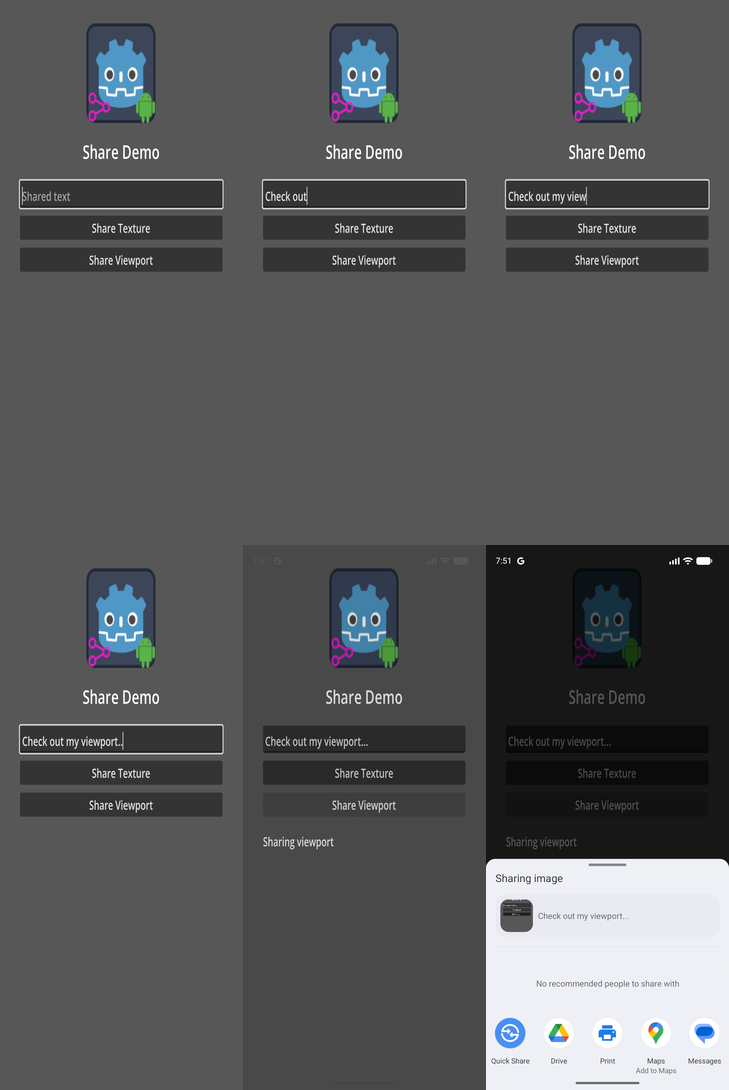
Installation
Important: Uninstall any previous versions of the plugin before installing a new one. If you are targeting both Android and iOS, make sure the addon interface version matches for both platforms.
Installation Options
There are 3 ways to install the Share plugin into your project:
- Through the GMP Menu (recommended)
- Through the Godot Editor's AssetLib
- Manually by downloading archives from Github
- install GMP Menu if not installed
- enable
GMP Menuvia thePluginstab ofGodot Editor'sProject->Project Settings...menu if not enabled - select
Share PluginfromGodot Editor'sGMPmenu - select desired plugin version and platform
- click
Downloadbutton - once the download has completed, click
Installbutton - enable
Sharevia thePluginstab ofProject->Project Settings...menu, in the Godot Editor
- Open the Godot AssetLib and search for
Share - Click Download → Install
- Install to the project root with Ignore asset root enabled
- Enable the plugin via Project → Project Settings → Plugins
- For iOS, also enable the plugin in the export settings
- If installing both Android and iOS versions, you may safely ignore file conflict warnings for shared GDScript interface files
- Download the latest release from GitHub
- Extract the archive into your project root
- Enable the plugin via Project → Project Settings → Plugins
- For iOS, also enable the plugin in the export settings
Usage
Add a Share node to your scene and follow the following steps:
- use one of the following methods of the
Sharenode to share text or images:share_text(title, subject, content)share_image(full_path_for_saved_image_file, title, subject, content)- Note that the image you want to share must be saved under the
user://virtual directory in order to be accessible. TheOS.get_user_data_dir()method can be used to get the absolute path for theuser://directory. See the implementation ofshare_viewport()method for sample code.
- Note that the image you want to share must be saved under the
share_viewport(viewport, title, subject, content)
Share-Target Mode
Share-target mode lets other apps share content to your Godot game, so your app appears as a destination in the system share sheet or "Open With" picker alongside WhatsApp, Mail, etc.
Enabling Share-Target Mode
Call set_share_target(true) at startup (persist this preference in your save system so it survives restarts):
func _ready() -> void:
    $Share.set_share_target(load_setting("share_target_enabled", false))

func _on_share_target_toggled(enabled: bool) -> void:
    save_setting("share_target_enabled", enabled)
    $Share.set_share_target(enabled)
Handling Received Data
Connect to the share_received signal — the Share node handles cold-start timing automatically, so no extra _ready() boilerplate is needed:
func _ready() -> void:
    $Share.share_received.connect(_on_share_received)
    $Share.set_share_target(true)

func _on_share_received(data: ReceivedSharedData) -> void:
    if data.has_text():
        print("Received text: ", data.get_text())
    if data.has_files():
        for path in data.get_file_paths():
            print("Received file: ", path)
            # path is a plain filesystem path — use FileAccess, Image.load_from_file(), etc.
Platform Differences
| Android | iOS | |
|---|---|---|
| Share sheet integration | App appears directly in Android's share sheet alongside WhatsApp, Gmail, etc. | App appears in the "Open With" row of the iOS share sheet (secondary position) |
| Toggle at runtime | set_share_target(true/false) enables/disables the app in the share sheet immediately |
Document types are always registered; the toggle controls whether received files are processed |
| Export configuration | Automatic — no extra export settings needed | Enable share_target/enable_share_target in the iOS export preset to inject the required CFBundleDocumentTypes into Info.plist |
| Full share-sheet integration | ✅ Supported out of the box | ⚠️ Requires a separate Share Extension target (outside this plugin's scope) |
| Received files location | getCacheDir()/share_received/ |
<Caches>/share_received/ |
iOS Setup
- In Godot Editor, open Project → Export and select your iOS export preset.
- In the Options tab, locate Share Target and enable Enable Share Target.
- Export your project — the plugin will automatically add the
CFBundleDocumentTypesentries toInfo.plist.
Note: With these plist entries, your app appears in the "Open With" picker for text, images, video, audio, and generic files. For full share-sheet integration (primary row alongside system apps), you would need to implement a separate iOS Share Extension.
Android Setup
No extra export configuration is needed. When set_share_target(true) is called, the plugin enables the ShareTargetActivity component (which is always included in the APK but disabled by default), making the app appear in Android's share sheet immediately.
Signals
Outgoing share signals:
share_completed(activity_type: String): Emitted when...- iOS: the shared item is successfully sent
- Android: the user selects a share target from the chooser
share_canceled: Emitted when...- iOS: the user dismisses the share dialog without sending
- Android: the user returns to the app without selecting a target within a time threshold (default: 5000 ms)
share_failed(error_message: String): Emitted when an error occurs that prevents sharing.
Note: On Android, the share_completed signal only indicates that a share target was selected. It does not guarantee that the user actually completed the share action.
Incoming share signal (share-target mode):
share_received(received_data: ReceivedSharedData): Emitted when another app shares content to this app.- Android: fired when the user selects this app from Android's share sheet.
- iOS: fired when the user selects "Open With → [Your App]" in the iOS share sheet.
- Cold-start timing (app launched by the share action) is handled automatically — no extra
_ready()code needed.
Methods
share_text(a_title: String, a_subject: String, a_content: String)- Shares plain text.share_image(a_path: String, a_title: String, a_subject: String, a_content: String)- Shares text along with an image located at the given file path.share_texture(a_texture: Texture2D, a_title: String, a_subject: String, a_content: String)- Shares text with an image generated from aTexture2D.share_viewport(a_viewport: Viewport, a_title: String, a_subject: String, a_content: String, a_flip_y: bool)- Shares text with an image captured from aViewport.share_file(a_path: String, a_mime_type: String, a_title: String, a_subject: String, a_content: String)- Shares text along with a file at the specified path and MIME type.
Share-target methods:
set_share_target(a_enabled: bool)- Enables or disables the app as a share-target. On Android this immediately toggles the app's visibility in the share sheet. On iOS it controls whether received files are processed (document types are always registered).is_share_target() -> bool- Returnstruewhen share-target mode is currently active.get_received_data() -> ReceivedSharedData- Consumes and returns the pending received-share payload, ornullwhen nothing is pending. Called automatically by theSharenode; you do not normally need to call this directly.
Classes
SharedData
- Encapsulates data to be shared.
- Properties:
title: Title that may be shown in the share dialog.subject: Subject of the shared content (commonly used by email clients).content: Main text content to be shared.file_path: Path to the file being shared.mime_type: MIME type of the shared file.custom_threshold: Time in milliseconds after which the plugin considers the share flow completed (Android only).
ReceivedSharedData
- Wraps the data received when another app shares to this app (share-target mode).
- Methods:
get_mime_type() -> String: MIME type reported by the sender (e.g."image/jpeg").get_text() -> String: Plain-text payload (EXTRA_TEXTon Android).get_subject() -> String: Subject line, if any.get_file_paths() -> PackedStringArray: Absolute paths of received files copied to the app's cache directory. UseFileAccess,Image.load_from_file(), etc. to read them.is_multiple() -> bool:truewhen multiple files were shared in one action.has_text() -> bool: Convenience —truewhenget_text()is non-empty.has_files() -> bool: Convenience —truewhenget_file_paths()is non-empty.get_raw_data() -> Dictionary: Returns the underlying Dictionary for advanced use.
Platform-Specific Notes
Android
- Package name: In your project's Android export settings, remove/replace the
$gennametoken from thepackage/unique_name. - Build: Create custom Android gradle build.
- Registration: App must be registered with Google Play.
- Share-target mode: Call
set_share_target(true)to make the app appear in Android's share sheet. TheShareTargetActivitycomponent is always bundled but disabled by default; the call enables it at runtime without reinstalling. - Received files: Copied to
getCacheDir()/share_received/. Android clears this automatically when storage is low. - Troubleshooting:
- Logs:
adb logcat | grep 'godot'(Linux),adb.exe logcat | select-string "godot"(Windows) - Also check out: https://docs.godotengine.org/en/stable/tutorials/platform/android/android_plugin.html#troubleshooting
- Logs:
iOS
- Export settings: The plugin must be enabled in the iOS export settings. For share-target mode, also enable share_target/enable_share_target in the export preset's Options tab.
- Share-target mode: The app appears in the "Open With" row of the iOS share sheet for registered file types (text, images, video, audio, generic files). This is the maximum achievable within a single plugin bundle; full primary-row presence requires a separate Share Extension target.
- Received files: Copied to
<Caches>/share_received/. iOS clears this automatically when storage is low. - Troubleshooting:
- View Xcode logs while running the app for troubleshooting.
- See Godot iOS Export Troubleshooting.
Links
All Plugins
| ✦ | Plugin | Android | iOS | Stars |
|---|---|---|---|---|
 |
Admob | ✅ | ✅ |  |
 |
Connection State | ✅ | ✅ |  |
 |
Deeplink | ✅ | ✅ |  |
 |
Firebase | ✅ | ✅ |  |
 |
In-App Review | ✅ | ✅ |  |
 |
Native Camera | ✅ | ✅ |  |
 |
Notification Scheduler | ✅ | ✅ |  |
 |
OAuth 2.0 | ✅ | ✅ |  |
 |
QR | ✅ | ✅ |  |
|
Share | ✅ | ✅ |  |
 |
Vision | ✅ | ✅ |  |
Original repository: Godot Share Plugin
Changelog for version v6.0-Multi
No changelog provided for this version.
