 Godot OAuth 2.0 Plugin
A Godot plugin that provides a unified GDScript interface for OAuth 2.0 authentication flows on Android and iOS.
It supports popular OAuth providers via presets (Google, Apple, GitHub, Discord, Auth0) as well as fully custom OAuth2 providers, with built-in PKCE, deep link handling, and secure token storage through native platform integrations.
Key Features:
- Unified OAuth 2.0 API for Android and iOS
- Built-in provider presets (Google, Apple, GitHub, Discord, Auth0)
- Custom OAuth2 provider support
- PKCE (Proof Key for Code Exchange) support
- In-App Browser authentication (Chrome Custom Tab on Android, ASWebAuthenticationSession on iOS)
- Deep link–based redirect handling
- Secure token storage via native platform plugins
- Session-based token management
- Editor-friendly configuration via exported properties
Demo
Try the demo app located in the demo directory.
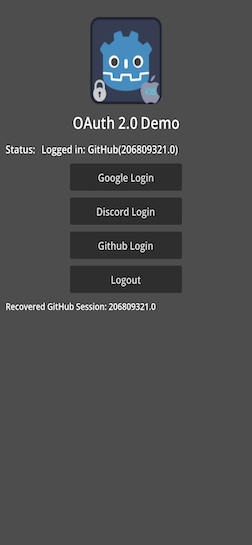
Installation
Before installing: uninstall any previous version of this plugin. If installing both Android and iOS versions in the same project, ensure both use the same addon interface version.
Via AssetLib (recommended)
- Search for
OAuthin the Godot Editor's AssetLib and click Download. (AssetLib Links: Android, iOS) - In the install dialog, keep the default install folder (project root) and Ignore asset root checked, then click Install.
- Enable the plugin under Project → Project Settings → Plugins.
If the installer warns about conflicting files when adding a second platform, you can safely ignore it — both platforms share the same addon code.
Manually
- Download the release archive from GitHub and unzip it into your project's root directory.
- Enable the plugin under Project → Project Settings → Plugins.
Dependencies
Depends on the Deeplink Plugin, which is required to receive OAuth redirect callbacks via custom URI schemes.
Quick Start
- Add an
OAuth2node to your main scene or to an autoload/global scene. - Set the Browser Mode in the inspector:
EXTERNAL(default, system browser) orIN_APP(Chrome Custom Tab on Android / ASWebAuthenticationSession on iOS). - Add a
Deeplinknode to your scene and configure your redirect URI.Note: A
Deeplinknode is required in all cases except iOS withIN_APPmode, where the OS intercepts the redirect internally. - Assign the
Deeplinknode path in theOAuth2node inspector. - Configure provider settings (preset or custom).
- Connect to
OAuth2signals. - Call
authorize()to start authentication. Callcancel_auth()to cancel an in-progress in-app session (safe no-op inEXTERNALmode). - Use the
OAuth2node’s public methods to initiate authorization and manage sessions. - Listen to signals to handle success, errors, and cancellations.
Example:
@onready var oauth2 := $OAuth2

func _ready():
    oauth2.auth_started.connect(_on_auth_started)
    oauth2.auth_success.connect(_on_auth_success)
    oauth2.auth_error.connect(_on_auth_error)
    oauth2.auth_cancelled.connect(_on_auth_cancelled)

func login():
    oauth2.authorize()

func cancel_login():
    oauth2.cancel_auth()  # safe to call in EXTERNAL mode (no-op)

func _on_auth_started():
    print("Authentication started")

func _on_auth_success(token_data: Dictionary):
    print("Authentication success:", token_data)

func _on_auth_error(msg: String):
    print("Authentication error:", msg)

func _on_auth_cancelled():
    print("Authentication cancelled")
In-App Browser Authentication
The plugin supports two browser modes, selectable via the browser_mode exported property on the OAuth2 node.
| Mode | Value | Description |
|---|---|---|
| System Browser | BrowserMode.EXTERNAL |
Opens the provider page in the default system browser. Requires a Deeplink node on both platforms. |
| In-App Browser | BrowserMode.IN_APP |
Opens a sandboxed browser inside the app. See platform details below. |
Android — Chrome Custom Tab
In IN_APP mode on Android, the plugin opens a Chrome Custom Tab (androidx.browser), presented as a full-screen overlay inside the app. The redirect URI travels through the Android intent system exactly as in EXTERNAL mode, so a Deeplink node is still required.
iOS — ASWebAuthenticationSession
In IN_APP mode on iOS, the plugin uses ASWebAuthenticationSession (AuthenticationServices, iOS 12+). The OS intercepts the redirect URI internally via a completion block, so no Deeplink node is needed on iOS in this mode.
An additional property controls session privacy on iOS:
| Property | Type | Default | Description |
|---|---|---|---|
ios_ephemeral_browser_session |
bool |
false |
When true, opens the session in private-browsing mode — no cookies or credentials are shared with Safari. Set to false to enable SSO (users skip re-entering their password when already signed in to the provider in Safari). Has no effect on Android or in EXTERNAL mode. |
Deeplink node requirements at a glance
| Platform | EXTERNAL mode |
IN_APP mode |
|---|---|---|
| Android | Required | Required |
| iOS | Required | Not required |
Cancelling an in-app session
Call cancel_auth() to dismiss an in-progress in-app browser session. This is safe to call in EXTERNAL mode as well — it is a no-op when no in-app session is active.
func _on_cancel_button_pressed():
    oauth2.cancel_auth()
Signals emitted in IN_APP mode
In addition to auth_success and auth_error, the auth_cancelled signal is emitted when the user closes the in-app browser without completing authentication. This maps to the user tapping Cancel in the Chrome Custom Tab or dismissing the ASWebAuthenticationSession sheet.
Documentation
Explore the plugin documentation for a deep dive into features:
All Plugins
| ✦ | Plugin | Android | iOS | Stars |
|---|---|---|---|---|
 |
Admob | ✅ | ✅ |  |
 |
Connection State | ✅ | ✅ |  |
 |
Deeplink | ✅ | ✅ |  |
 |
Firebase | ✅ | ✅ |  |
 |
In-App Review | ✅ | ✅ |  |
 |
Native Camera | ✅ | ✅ |  |
 |
Notification Scheduler | ✅ | ✅ |  |
|
OAuth 2.0 | ✅ | ✅ |  |
 |
QR | ✅ | ✅ |  |
 |
Share | ✅ | ✅ |  |
 |
Vision | ✅ | ✅ |  |
 |
Plugin Template | ✅ | ✅ |  |
Credits
Developed by Cengiz
Based on Godot Mobile Plugin Template v7
Original repository: Godot OAuth 2.0 Plugin
Contributing
Contributions are welcome. Please see the contributing guide in the repository for details.
💖 Support the Project
If this plugin has helped you, consider supporting its development! Every bit of support helps keep the plugin updated and bug-free.
| ✦ | Ways to Help | How to do it |
|---|---|---|
| ✨⭐ | Spread the Word | Star this repo to help others find it. |
| 💡✨ | Give Feedback | Open an issue or suggest a feature. |
| 🧩 | Contribute | Submit a PR to help improve the codebase. |
| ❤️ | Buy a Coffee | Support the maintainers on GitHub Sponsors or other platforms. |
⭐ Star History
Changelog for version v2.0-Multi
No changelog provided for this version.
