

 Godot Connection State Plugin
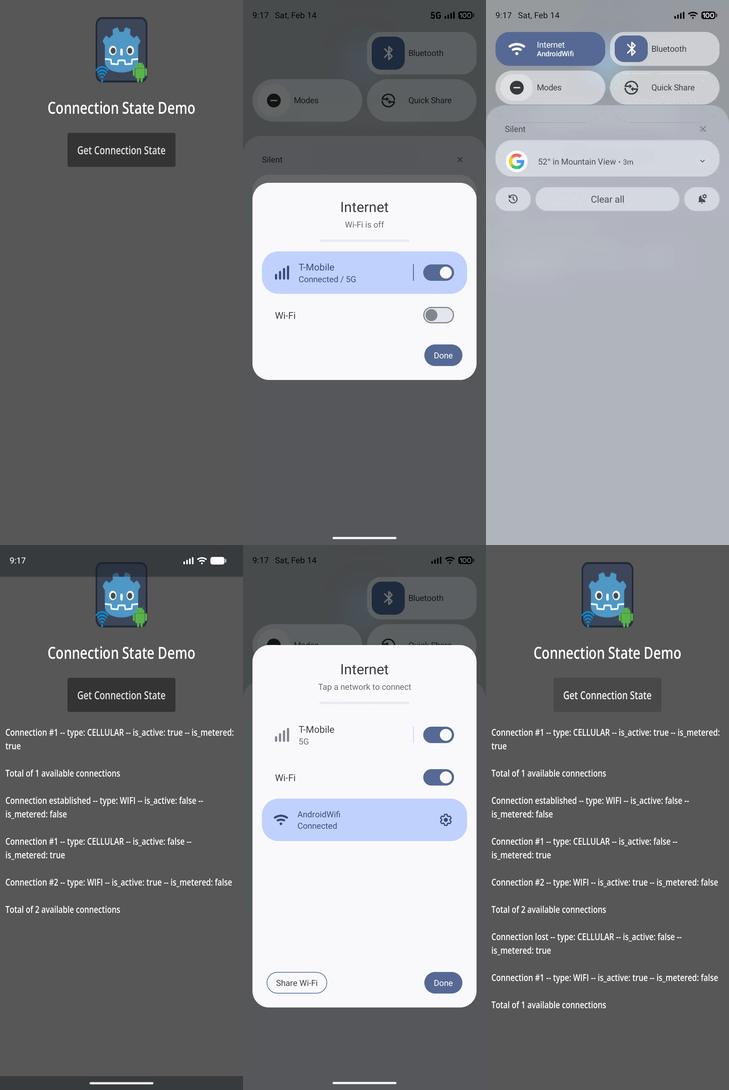
A Godot plugin that provides a unified GDScript interface for getting information on mobile device connections on Android and iOS.
Key Features:
- Get information about all available connections on a mobile device
- Know when a new connection is established (signal)
- Know when a connection is lost (signal)
Demo
Try the demo app located in the demo directory.
Installation
_Before installing this plugin, make sure to uninstall any previous versions of the same plugin._
_If installing both Android and iOS versions of the plugin in the same project, then make sure that both versions use the same addon interface version._
There are 3 ways to install the ConnectionState plugin into your project:
- Through the GMP Menu (recommended)
- Through the Godot Editor's AssetLib
- Manually by downloading archives from Github
Installing via GMP Menu (recommended)
Steps:
- install GMP Menu if not installed
- enable
GMP Menuvia thePluginstab ofGodot Editor'sProject->Project Settings...menu if not enabled - select
Connection State PluginfromGodot Editor'sGMPmenu - select desired plugin version and platform
- click
Downloadbutton - once the download has completed, click
Installbutton - enable
ConnectionStatevia thePluginstab ofProject->Project Settings...menu, in the Godot Editor
Installing via AssetLib
Steps:
- search for and select the
ConnectionStateplugin in Godot Editor - click
Downloadbutton - on the installation dialog...
- keep
Change Install Foldersetting pointing to your project's root directory - keep
Ignore asset rootcheckbox checked - click
Installbutton
- keep
- enable the plugin via the
Pluginstab ofProject->Project Settings...menu, in the Godot Editor
Installing both Android and iOS versions of the plugin in the same project
When installing via AssetLib, the installer may display a warning that states "_[x number of]_ files conflict with your project and won't be installed." You can ignore this warning since both versions use the same addon code.
Installing manually
Steps:
- download release archive from Github
- unzip the release archive
- copy to your Godot project's root directory
- enable the plugin via the
Pluginstab ofProject->Project Settings...menu, in the Godot Editor
Usage
Add ConnectionState node to your main scene or an autoload global scene.
- use the
ConnectionStatenode'sget_connection_state()method to get information on all available connections - connect
ConnectionStatenode signalsconnection_established(a_connection_info: ConnectionInfo)connection_lost(a_connection_info: ConnectionInfo)
Example usage:
@onready var connection_state := $ConnectionState

func _ready():
    connection_state.connection_established.connect(_on_connection_established)
    connection_state.connection_lost.connect(_on_connection_lost)

    var connections: Array[ConnectionInfo] = connection_state.get_connection_state()
    for info in connections:
        print("Connection type: %s -- is_active: %s -- is_metered: %s" % [
                ConnectionInfo.ConnectionType.keys()[info.get_connection_type()],
                str(info.is_active()),
                str(info.is_metered())])

func _on_connection_established(info: ConnectionInfo):
    print("Connection established:", info.connection_type)

func _on_connection_lost(info: ConnectionInfo):
    print("Connection lost:", info.connection_type)
Signals
- register listeners to the following signals of the
ConnectionStatenode:connection_established(a_connection_info: ConnectionInfo)connection_lost(a_connection_info: ConnectionInfo)
Methods
get_connection_state() -> Array[ConnectionInfo]- returns an array ofConnectionInfoobjects
Classes
This section documents the GDScript interface classes implemented and exposed by the plugin.
ConnectionInfo
- Encapsulates network connection data that is provided by the mobile OS.
- Properties:
connection_type: type of network connection: WIFI, Cellular, Ethernet, Bluetooth, VPN, Loopback, or Unknownis_active: whether the connection is actively being usedis_metered: whether the connection has a data limit that tracks usage
Platform-Specific Notes
Android
- Download Android export template and enable gradle build from export settings
- Troubleshooting:
- Logs:
adb logcat | grep 'godot'(Linux),adb.exe logcat | select-string "godot"(Windows) - You may find the following resources helpful:
- https://docs.godotengine.org/en/stable/tutorials/export/exporting_for_android.html
- https://developer.android.com/tools/adb
- https://developer.android.com/studio/debug
- https://developer.android.com/courses
iOS
- Follow instructions on Exporting for iOS
- View XCode logs while running the game for troubleshooting.
- See Godot iOS Export Troubleshooting.
Links
All Plugins
| ✦ | Plugin | Android | iOS | Stars |
|---|---|---|---|---|
 |
Admob | ✅ | ✅ |  |
|
Connection State | ✅ | ✅ |  |
 |
Deeplink | ✅ | ✅ |  |
 |
Firebase | ✅ | ✅ |  |
 |
In-App Review | ✅ | ✅ |  |
 |
Native Camera | ✅ | ✅ |  |
 |
Notification Scheduler | ✅ | ✅ |  |
 |
OAuth 2.0 | ✅ | ✅ |  |
 |
QR | ✅ | ✅ |  |
 |
Share | ✅ | ✅ |  |
 |
Vision | ✅ | ✅ |  |
 |
Plugin Template | ✅ | ✅ |  |
Credits
Developed by Cengiz
Based on Godot Mobile Plugin Template v7
Original repository: Godot Connection State Plugin
Contributing
See our guide if you would like to contribute to this project.
💖 Support the Project
If this plugin has helped you, consider supporting its development! Every bit of support helps keep the plugin updated and bug-free.
| ✦ | Ways to Help | How to do it |
|---|---|---|
| ✨⭐ | Spread the Word | Star this repo to help others find it. |
| 💡✨ | Give Feedback | Open an issue or suggest a feature. |
| 🧩 | Contribute | Submit a PR to help improve the codebase. |
| ❤️ | Buy a Coffee | Support the maintainers on GitHub Sponsors or other platforms. |
⭐ Star History
Changelog for version v1.2-Multi
No changelog provided for this version.