Description
Changelog
Reviews (0)
Virtual Joystick Plus for Godot
VirtualJoystickPlus is a fully featured and highly configurable on-screen joystick plugin for Godot Engine 4.5+.
Designed specifically for mobile and touch-based games, it provides precise analog input, multiple interaction modes, flexible visibility control, and extensive visual customization.
Features
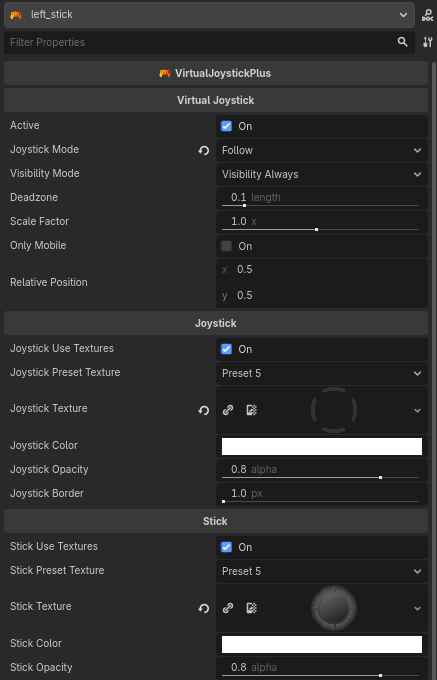
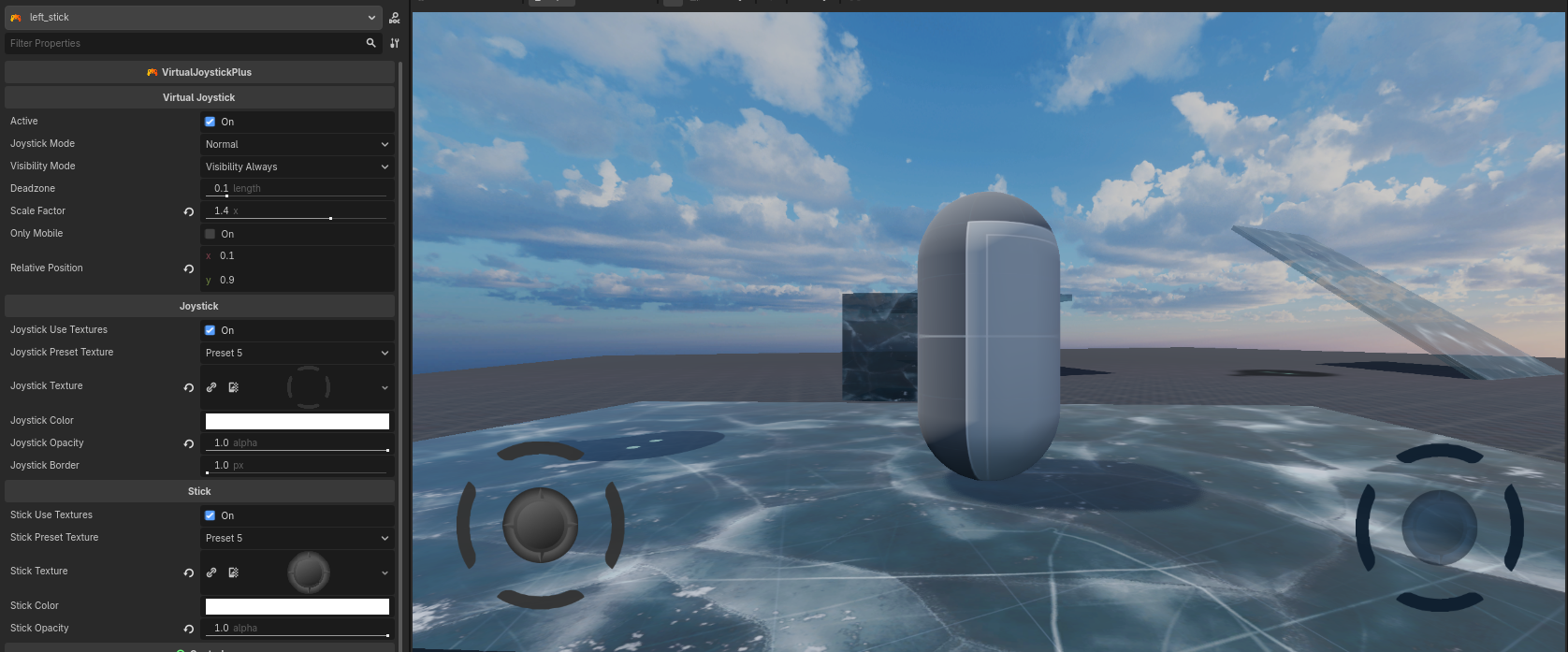
- Multiple joystick interaction modes: NORMAL, DYNAMIC, and FOLLOW.
- Configurable visibility behavior (always visible or only while touching).
- Normalized analog output (direction, distance, and angles).
- Linear deadzone handling with enter/leave signals.
- Normalized positioning using relative coordinates (0.0 → 1.0).
- Fully customizable visuals using shapes or textures.
- Mobile-aware visibility option.
Installation
- Copy the plugin folder into your Godot project:
addons/virtual_joystick_plus/
- Enable the plugin in the editor:
Project → Project Settings → Plugins → VirtualJoystickPlus → Enable
How to Use
- Add a VirtualJoystickPlus node to your scene (inside a
Control). - Configure the joystick mode, visibility mode, and appearance in the Inspector.
- Connect the
analogic_changedsignal or poll values directly.
Example (Signal-based)
func _on_virtual_joystick_plus_analogic_changed(
    value: Vector2,
    distance: float,
    angle: float,
    angle_clockwise: float,
    angle_not_clockwise: float
) -> void:
    velocity = value * max_speed * distance
Example (Polling)
@onready var joystick: VirtualJoystickPlus = $VirtualJoystickPlus

func _physics_process(delta: float) -> void:
    var dir := joystick.get_value()
    if dir.length() > 0.0:
        player.velocity = dir * SPEED
    else:
        player.velocity = Vector2.ZERO
⚙️ Exported Properties
General
| Property | Type | Description |
|---|---|---|
active |
bool |
Enables or disables joystick input. |
joystick_mode |
JoystickMode |
Defines how the joystick behaves (NORMAL, DYNAMIC, FOLLOW). |
visibility_mode |
VisibilityMode |
Controls when the joystick is visible. |
deadzone |
float |
Linear deadzone threshold (0.0 – 0.9). |
scale_factor |
float |
Global scale multiplier for joystick size. |
only_mobile |
bool |
Shows the joystick only on mobile platforms. |
relative_position |
Vector2 |
Normalized base position (0–1) relative to the Control size. |
Joystick (Base)
| Property | Type | Description |
|---|---|---|
joystick_use_textures |
bool |
Enables texture rendering for the joystick base. |
joystick_preset_texture |
Preset |
Selects a predefined joystick texture. |
joystick_texture |
Texture2D |
Custom joystick base texture. |
joystick_color |
Color |
Base color of the joystick. |
joystick_opacity |
float |
Opacity of the joystick base (0–1). |
joystick_border |
float |
Width of the joystick border. |
Stick (Thumb)
| Property | Type | Description |
|---|---|---|
stick_use_textures |
bool |
Enables texture rendering for the stick. |
stick_preset_texture |
Preset |
Selects a predefined stick texture. |
stick_texture |
Texture2D |
Custom stick texture. |
stick_color |
Color |
Stick (thumb) color. |
stick_opacity |
float |
Stick opacity (0–1). |
Joystick Modes
- NORMAL
Fixed position joystick. Only reacts to touches that start inside the base area. - DYNAMIC
The joystick appears at the touch position and remains fixed until release. - FOLLOW
Similar to DYNAMIC, but the base follows the finger when the stick reaches its maximum radius.
Visibility Modes
- VISIBILITY_ALWAYS
The joystick is always visible. - VISIBILITY_WHEN_TOUCHED
The joystick appears only while the screen is being touched.
Signals
| Signal | Description |
|---|---|
analogic_changed(value, distance, angle, angle_clockwise, angle_not_clockwise) |
Emitted whenever the joystick value changes. |
deadzone_enter() |
Emitted when the stick enters the deadzone. |
deadzone_leave() |
Emitted when the stick leaves the deadzone. |
Methods
| Method | Returns | Description |
|---|---|---|
get_value() |
Vector2 |
Returns the normalized direction vector. |
get_distance() |
float |
Returns the normalized distance (0–1). |
get_angle_degrees_clockwise() |
float |
Returns the clockwise angle in degrees. |
get_angle_degrees_not_clockwise() |
float |
Returns the counter-clockwise angle in degrees. |
get_angle_degrees(continuous, clockwise) |
float |
Returns a specific angle configuration. |
Screenshots
❤️ Support
If this project helps you, consider supporting:
https://github.com/sponsors/Saulo-de-Souza
https://www.paypal.com/donate/?hosted_button_id=G24W4KL9ALH64
Changelog for version 2.0.0
2026-02-01 19:22:00
No changelog provided for this version.