🛠️ Sprite StaticBody Builder for Godot 4
Automated 2D Physics Generation & Real-Time Dynamic Shadow Toolset





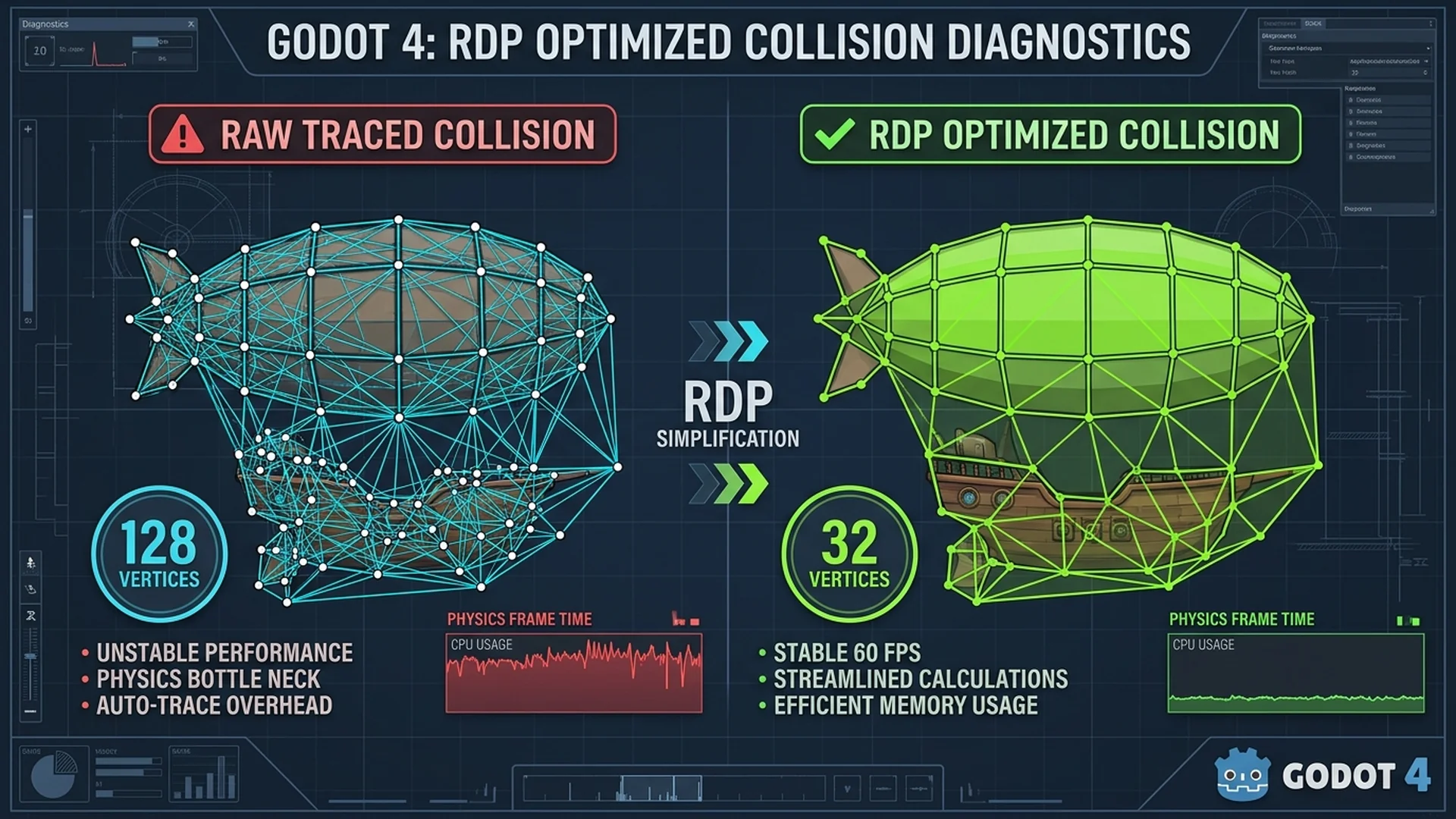
A high-performance, developer-friendly Godot 4 editor plugin that bridges the gap between 2D concept art and physics-ready game assets. It automatically vectorizes arbitrary sprite textures into optimized StaticBody2D nodes with pixel-perfect polygon collision, intelligent polygon decimation, convex decomposition, live viewport previews, and rotation-invariant real-time dynamic shadows.
🌟 Executive Summary & Problem Solved
Creating collision geometry for irregular 2D sprites in game engines is traditionally tedious, manual, and error-prone:
- Manual Polygon Tracing: Hand-placing dozens of collision vertices wastes artist and developer time.
- Concave Physics Issues: 2D physics engines struggle with complex concave polygons without decomposition.
- Rigid Shadow Artifacts: Standard 2D drop-shadows are locked to the object's local transform; rotating the object causes the shadow to swing unnaturally across the screen, violating consistent world lighting.
Sprite StaticBody Builder solves all three problems in one unified dock interface with a single click.
🚀 Key Highlights & Capabilities
- 🎯 One-Click Vectorization: Converts any
Sprite2Dor FileSystem texture into a physics-readyStaticBody2Dinstantly. - 📐 Ramer-Douglas-Peucker (RDP) Simplification: Reduces thousands of pixel boundary points into lightweight, performant polygons (32 to 128 points) tailored for mobile and desktop budgets.
- 🧩 Convex Decomposition Engine: Automatically decomposes complex concave shapes into convex partitions using ear-clipping to prevent physics clipping and tunneling.
- 💡 Real-Time Dynamic Shadows (
RealtimeShadow2D): A specialized tool script that counter-rotates shadow displacement in world space. Shadows stay anchored to the global light source in real-time as objects or levels rotate. - 👁️ Live Viewport Canvas Overlay: Renders collision wireframes, vertex indicators, and projected shadow contours directly inside the Godot 2D editor before committing.
- ⏪ Full Engine Undo/Redo: Seamlessly integrated into Godot's
EditorUndoRedoManager(Ctrl+Z/Ctrl+Y).
🎛️ Dock Window Reference Guide
The plugin adds a clean, native tab to your Godot editor dock titled "StaticBody". Below is an in-depth breakdown of every section and control.
┌─────────────────────────────────────────────────────────┐
│ [Icon] Target: Detected Sprite: Obstacle_Rock           │
│        res://art/rock.png (128x128)                     │
├─────────────────────────────────────────────────────────┤
│ ▼ ALPHA & TRACE                                         │
│   Alpha Threshold:     [====|====] 0.50                 │
│   Simplification:      [ Medium (Balanced - 64 pts) ▼ ] │
│   Max Points:          [ 64 ]                           │
│   Collision Mode:      [ Single Polygon             ▼ ] │
│   Build Mode:          [ Solids (Filled Area)       ▼ ] │
├─────────────────────────────────────────────────────────┤
│ ▼ GAMEPLAY ARCHETYPES & PRESETS                         │
│   Preset:              [ 🧱 Static Wall / Platform  ▼ ] │
├─────────────────────────────────────────────────────────┤
│ ▼ REAL SHADOW SPRITE                                    │
│   [x] Generate Real Shadow Sprite                       │
│   Anchor / Base:       [ Center (Top-Down)          ▼ ] │
│   Offset (X, Y):       X: [ 6.0 ]   Y: [ 8.0 ]          │
│   Light Angle / Dist:  Angle: [ 53.1° ]  Dist: [ 10.0px]│
│   Color / Alpha:       [ ■ rgba(0, 0, 0, 0.45) ]        │
│   Shadow Scale:        [ 1.00 ]                         │
│   [x] Realtime Rotation Sync                            │
├─────────────────────────────────────────────────────────┤
│ ▼ WORKFLOW OPTIONS                                      │
│   [x] Create StaticBody2D   [x] Keep Main Sprite        │
│   [x] Auto-Generate Collision                           │
├─────────────────────────────────────────────────────────┤
│ [ 🔨 Create StaticBody ]       [ 🔄 Regenerate ]        │
│ [ 👁️ Live Preview ]           [ 🗑️ Remove Collision ]   │
│ Status: Generated 1 polygon, 42 vertices total.         │
└─────────────────────────────────────────────────────────┘
1. Target Detection Header
Automatically monitors editor selection without manual dragging:
Sprite2Din Scene: Detects the sprite and inspects its texture, centered mode, offsets, and regions.StaticBody2Din Scene: Detects existing bodies and reads previously generated collisions and shadow configurations.- Texture in FileSystem: Allows building physics bodies straight from the asset drawer into the center of the active viewport.
2. Alpha & Trace Settings
| Setting | Type | Purpose & How It Works |
|---|---|---|
| Alpha Threshold | Slider + SpinBox (0.0 - 1.0) |
Determines the opacity cutoff for solid pixels. Soft semi-transparent borders or anti-aliasing halos are ignored below this value (default: 0.5). |
| Simplification Preset | Dropdown | Controls the vertex reduction aggressiveness via the Ramer-Douglas-Peucker (RDP) algorithm: • Low (Detailed - 128 pts): Preserves fine details and jagged outlines. • Medium (Balanced - 64 pts): Sweet spot for 2D physics performance and accuracy. • High (Low-Poly - 32 pts): Minimalist geometry optimized for mobile and large swarms of objects. • Custom...: Unlocks direct epsilon distance control. |
| Custom Epsilon | SpinBox (0.1 - 20.0) |
Visible only when preset is set to Custom. Epsilon distance in pixels. Higher values yield fewer vertices by eliminating smaller contours. |
| Max Points | SpinBox (4 - 512) |
Defines a hard upper limit on the vertex count per polygon, guaranteeing strict memory and physics budgets. |
| Collision Mode | Dropdown | • Single Polygon: Creates one unified boundary polygon. • Convex Decomposition: Automatically splits concave shapes into convex partitions using ear-clipping to prevent physics clipping and tunneling. |
| Build Mode | Dropdown | Corresponds to Godot's CollisionPolygon2D.build_mode: • Solids (Filled Area): The entire interior is solid ( BUILD_SOLIDS).• Segments (Edges Only): Hollow boundary outline ( BUILD_SEGMENTS). Ideal for boundary barriers or hollow chambers. |
3. Gameplay Archetypes & Presets
Provides standardized physics and interactive mechanics across multiple game genres:
- 🧱 Static Wall / Platform: Standard
StaticBody2Dcollision for level geometry, platforms, and boundaries. - 🌀 Rotating Obstacle / Spinner: Creates an
AnimatableBody2D(withsync_to_physics = trueandRotatingObstaclein_physics_process) ensuring accurate Godot 4 momentum transfer and zero tunneling. Unlocks an interactive Rotation Speed (°/s) spinbox. - ⚠️ Hazard / Trap: Creates an
Area2Dtrigger withHazardAreaattached and registered into the"hazards"group withplayer_hitsignal and damage callbacks. - 🏁 Goal / Checkpoint: Creates an
Area2Dtrigger withGoalAreaattached and registered into the"goals"group withgoal_reachedsignal for level-exit triggers. - 🦘 Bumper / Spring Pad: Creates an
Area2DwithBumperPadattached. Launches player slimes in local/normal direction with interactive Bounce Force (px/s) spinbox and spring squish tween. - 🛡️ One-Way Jelly Membrane: Creates a
StaticBody2DwithOneWayMembraneand automatically configuresone_way_collision = trueon all collision polygons, allowing slimes to pass in one direction while blocking return. - 🌀 Teleport Portal: Creates an
Area2DwithTeleportPortalattached. Supports node linking to destination portals with momentum preservation and cooldown protection. - ⭐ Collectible Star / Gem: Creates an
Area2DwithCollectibleStarattached. Provides configurable Star Index (1, 2, 3), smooth sine-wave hover bobbing, and pickup celebration pop animations. - 🔑 Key Pickup: Creates an
Area2DwithKeyItemattached with customizable Key ID tag, registering to player inventory or metadata on contact. - 🚪 Locked Door: Creates a
StaticBody2DwithLockedDoorattached. Automatically detects player contact with the matching Key ID, disables collision, and slides/fades open. - 💥 Crumbling Platform: Creates an
AnimatableBody2DwithCrumblingPlatformattached. Features customizable Collapse Delay (e.g.0.6s) and Respawn Time (e.g.2.5s), shake-warning animation upon player landing, collision collapse, and smooth regeneration. - 💨 Wind Vent: Creates an
Area2DwithWindVentattached. Applies continuous directional acceleration (Wind Force default450 px/s) along the vent's pointing angle to push floating or jumping slimes. - 🔘 Pressure Plate Switch: Creates an
Area2DwithPressurePlateattached. Provides physical depression sink tween and trigger dispatching (activated/deactivatedsignals and target method calls) when stepped on. - 🧊 Ice Slippery Floor: Creates a
StaticBody2Dwith zero-frictionPhysicsMaterial(friction = 0.0) andIcePlatformattached, making slimes slide uncontrollably unless they hit a wall.
4. Real Shadow Sprite & Dynamic Lighting
A standout technical feature of this tool is its rotation-invariant dynamic shadow system.
| Setting | Description |
|---|---|
| Generate Real Shadow Sprite | Generates an intelligent, dedicated shadow node beneath the main visual sprite. |
| Shadow Origin / Anchor | Sets the geometric anchor point: • Center (Top-Down): Originates from the sprite center (standard for top-down games). • Bottom / Ground (Floor): Anchors to the base/feet of the sprite (standard for platformers and isometric games where shadows cast along the floor). • Custom Anchor: Custom pivot point via dedicated (X, Y) offset spinboxes in the dock. |
| Custom Anchor (X, Y) | Direct pixel translation offset for the custom anchor reference pivot. |
| Offset (X, Y) | Direct pixel translation along Cartesian coordinates. |
| Light Angle / Distance | Polar lighting controls: • Light Angle (°): Circular dial/slider ( 0° = Right, 90° = Down, 135° = Down-Right, 180° = Left).• Shadow Distance (px): Distance cast away from the anchor point. (Offset X/Y and Angle/Distance are bidirectionally synchronized in real-time). |
| Shadow Color / Alpha | ColorPicker with alpha channel support (default: rgba(0, 0, 0, 0.45)). |
| Shadow Scale | Uniform scaling multiplier (e.g. 0.9 for perspective height, 1.0 for 1:1 footprint). |
| Realtime Rotation Sync | Attaches RealtimeShadow2D. When the parent body or stage rotates, the shadow offset dynamically counter-rotates in real-time, preserving world light direction while matching silhouette orientation. |
[!TIP] Direct Viewport Repositioning: Developers can click the generated
Sprite2DShadownode directly in the Godot 2D Viewport and move it with the Move Tool (W). The tool automatically recalculates and saves the new world offset without snapping back.
5. Workflow Options
- Create StaticBody2D: Wraps generated nodes under a new physics body (
StaticBody2D,AnimatableBody2D, orArea2Ddepending on preset). If unchecked, attaches collision nodes and shadows directly to the target sprite/parent. - Keep Main Sprite: Retains and parents the primary visual
Sprite2Dunder the body. If unchecked, removes the visual sprite, leaving an invisible physics/trigger shape. - Auto-Generate Collision: Automatically computes contours upon pressing Create. If unchecked, only creates the physics body and shadow without collision geometry.
6. Action Buttons & Feedback
- 🔨 Create StaticBody: Executes the creation pipeline with full
EditorUndoRedoManagerregistration (add_do_referencememory safety ensuring clean Undo and Redo). - 🔄 Regenerate Collision: Updates collision polygons and shadow parameters on an existing body without disturbing its transform, scripts, or scene hierarchy.
- 👁️ Live Preview (Toggle): Draws semi-transparent green polygons, yellow vertex indicators, and projected shadow contours directly on the editor viewport canvas (supports both scene nodes and standalone FileSystem textures).
- 🗑️ Remove Collision: Cleanly strips all
CollisionPolygon2Dchildren from the target body with full undo capability. - Status Bar & Warnings: Real-time diagnostic readouts showing generated polygon count and vertex count, with instant warning alerts if an image has 0 opaque pixels or if vertex budgets exceed recommended thresholds (>256 vertices).
🔬 Technical Architecture & Math
[ Sprite2D Texture ]
        │
        ▼
[ BitMap Extraction ] ──── (Alpha Threshold Evaluation)
        │
        ▼
[ Contour Tracing ] ────── (Marching Squares / Opaque Boundary)
        │
        ▼
[ RDP Simplification ] ─── (Epsilon Tolerance & Max Points Budget)
        │
        ▼
[ Ear-Clipping / Convex ]─ (Single Poly OR Convex Decomposition)
        │
        ├─────────────────────────────┬─────────────────────────────┐
        ▼                             ▼                             ▼
[ CollisionPolygon2D Nodes ]   [ Sprite2D (Main) ]   [ RealtimeShadow2D Node ]
Counter-Rotation Math (RealtimeShadow2D)
In top-down or side-scrolling games, a global light source (e.g. sun from the top-left) remains fixed relative to the screen. When an object rotates by angle $\theta$, rigid children rotate with it:
$$\vec{v}_{\text{rigid}} = \mathbf{R}(\theta) \cdot \vec{v}_{\text{offset}}$$
To keep the shadow's world displacement constant, RealtimeShadow2D calculates the parent's global transformation matrix $\mathbf{T}_{\text{parent}}$ and applies affine inversion in _process and _physics_process:
$$\vec{p}_{\text{local}} = \mathbf{T}_{\text{parent}}^{-1} \cdot (\vec{p}_{\text{world_origin}} + \vec{v}_{\text{shadow_offset}})$$
Result:
- $\text{Global Rotation}$: Matches the parent, rotating the shadow silhouette with the object.
- $\text{Global Displacement}$: Strictly preserved at $\vec{v}_{\text{shadow_offset}}$, ensuring lighting stays completely natural.
📦 File Structure
addons/sprite_staticbody_builder/
├── plugin.cfg                  # Plugin metadata and entry script declaration
├── sprite_staticbody_plugin.gd # EditorPlugin lifecycle, Undo/Redo & Viewport overlays
├── sprite_staticbody_dock.gd   # Dock UI logic, signal dispatching & target sync
├── sprite_staticbody_dock.tscn # Clean Godot 4 Control scene for the dock UI
├── collision_generator.gd      # Bitmap tracing & ear-clipping decomposition
├── polygon_simplifier.gd       # Ramer-Douglas-Peucker (RDP) algorithm
├── collision_preview.gd        # Viewport canvas overlay renderer
└── resources/
    ├── realtime_shadow.gd      # RealtimeShadow2D tool script
    ├── rotating_obstacle.gd    # Continuous rotation archetype script (AnimatableBody2D)
    ├── hazard_area.gd          # Hazard trigger script (Area2D)
    ├── goal_area.gd            # Level exit trigger script (Area2D)
    ├── bumper_pad.gd           # Launch/bounce spring pad script (Area2D)
    ├── one_way_membrane.gd     # One-way directional barrier script (StaticBody2D)
    ├── teleport_portal.gd      # Momentum-preserving wormhole portal (Area2D)
    ├── collectible_star.gd     # 3-star rating collectible script (Area2D)
    ├── key_item.gd             # Key item pickup script (Area2D)
    ├── locked_door.gd          # Proximity key-unlockable door (StaticBody2D)
    ├── crumbling_platform.gd   # Step-activated collapse & respawn platform (AnimatableBody2D)
    ├── wind_vent.gd            # Directional acceleration wind updraft/vent (Area2D)
    ├── pressure_plate.gd       # Step depression switch & trigger dispatcher (Area2D)
    └── ice_platform.gd         # Zero-friction slippery floor (StaticBody2D)
🛠️ Installation & Setup
- Copy the
addons/sprite_staticbody_builderfolder into your Godot 4 project'sres://addons/directory. - In the Godot editor, navigate to Project → Project Settings → Plugins.
- Locate Sprite StaticBody Builder and check the Enable box.
- The dock will appear in your editor panels ready for use.
📄 License & Attribution
- Author: Rohan Choudhary
- License: MIT License
This project is open-source software licensed under the MIT License (see LICENSE). Feel free to use, modify, and integrate it into commercial and personal games.
Changelog for version v1.0.1
2026-09-21 19:42:42
No changelog provided for this version.
Reviews
 Recommended
by Prateek Roonwal - 24 September 2026
Recommended
by Prateek Roonwal - 24 September 2026
very useful asset, helped me in solving my problems related to static bodies
Recommended
by Ritik Mehta - 04 October 2026
The tool basically solved my staticbody building problems and also the shadow generator is really amazing.
Login to write a review.