Project Time Tracker
Track your time in the Godot editor.
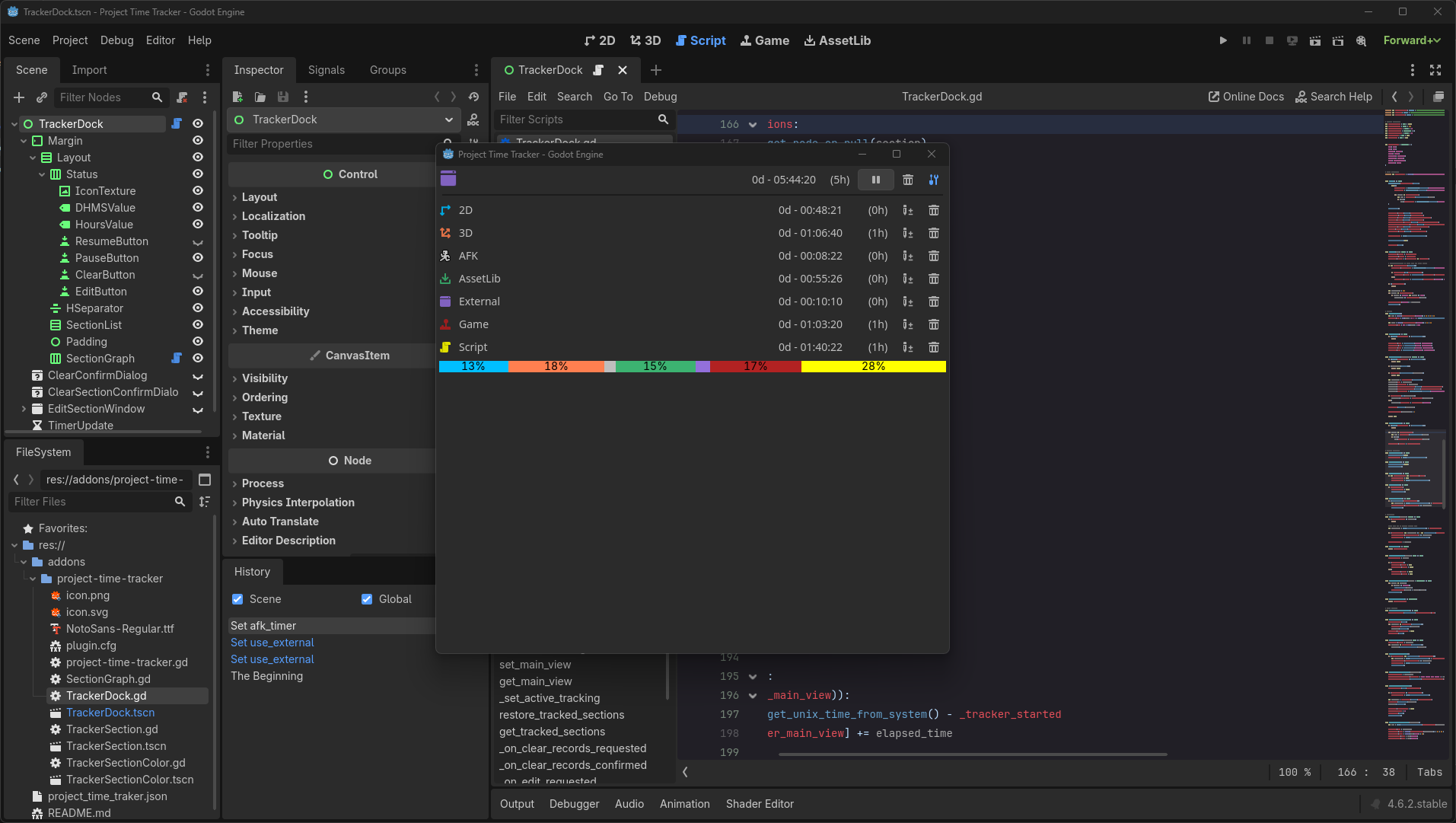
Track which main screen view you are using the most.
Features
- Track the time you have spent since the start of your project
- Track the time you have spent in each workspace (2D, 3D, Script, etc.)
- A bar chart shows the time spent in each workspace relative to the total time
- Starts tracking when project is loaded
- Stops tracking after a customizable period of inactivity and resumes automatically (AFK management)
- Counts time as "External" when godot is not focused (for users that use external code editor)
- Sections and bar chart can be hide separately
- Timers are saved each time a scene or script is saved
Customize
You can customize how the plugin works in the project settings:
- Name and location of the file where times are saved
- Visibility and color of sections and bar graphs
- Whether or not to use AFK and External
- Time before switching to AFK
Feedback
To report a bug or suggest an improvement, feel free to create an issue on the project's GitHub page.
Changelog for version v3.0.1
2026-09-27 18:38:15
No changelog provided for this version.
Reviews
 Recommended
by hugo_mdnn - 24 June 2026
Recommended
by hugo_mdnn - 24 June 2026
really cool :D
Recommended
by seeker - 22 August 2026
its just fun to know exactly what i worked on. just wished it could automatically merge multiple trackers bc i work with multiple godot users on 1 project
Recommended
by 水 果 - 29 June 2026
It works! I wish I could customize it a bit, for example if I go make myself some tea or have to reply to a call I'd like it to stop counting time after 15 seconds of inactivity. Instead it keeps counting time as long as Godot is in focus, and from what I see this can't be tweaked. Otherwsie it's great.
Recommended
by sabermax27 - 22 August 2026
Recommended
by Cédric Roussel - 11 August 2026
Recommended
by Claudius The vernid - 07 August 2026
Recommended
by Avery - 03 August 2026
Recommended
by FabianS - 23 July 2026
Recommended
by Grant - 22 July 2026
Recommended
by XORandom - 13 July 2026
Recommended
by Max Bartle - 30 June 2026
Login to write a review.